

LIS2DW12 Sensor
Component/Hub
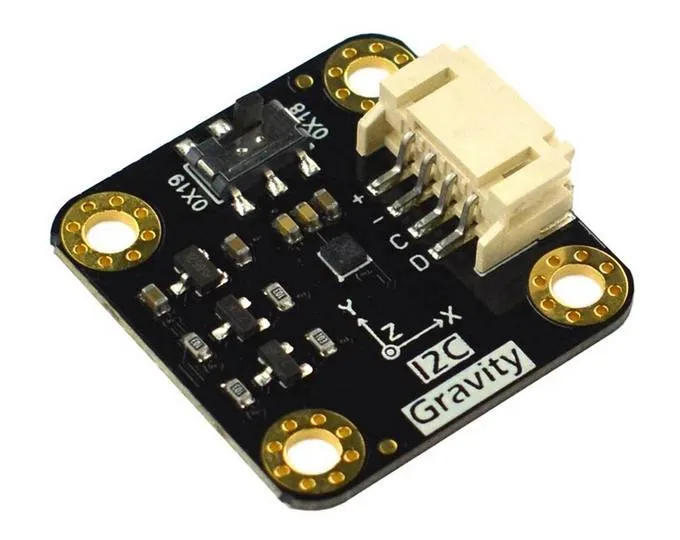
Section titled “Component/Hub”The lis2dw12 sensor platform allows you to use your ST LIS2DW12 tri-axial, low-g
accelerometer (datasheet)
with ESPHome. The sensor supports both I²C and SPI buses.
LIS2DW12 is a 14-bit accelerometer with multiple power modes, tap/double-tap detection, free-fall detection, wake-up/activity detection, and 6D orientation recognition.
This component provides acceleration data in m/s², orientation information, and event detection. XYZ axes can be calibrated and transformed to match the physical orientation of the sensor.
# Example I2C configurationlis2dw12_i2c:# Example SPI configurationlis2dw12_spi: cs_pin: GPIOXXConfiguration Variables
Section titled “Configuration Variables”The configuration is made up of several parts: The central component (I2C or SPI variant), acceleration sensors, text sensor with orientation information, and binary sensors for taps, freefall, and movement detection.
Base Configuration (shared by both lis2dw12_i2c and lis2dw12_spi):
-
id (Optional, ID): Manually specify the ID of the hub. Needed when more than one sensor is configured, so the platforms below can refer to it with
lis2dw12_id. -
update_interval (Optional, Time): The interval for updating acceleration sensors. Defaults to
10s. -
range (Optional, string): The range of the sensor measurements. One of
2G,4G,8G,16G. Defaults to2Gwhich means it picks up accelerations between-2gand2g. -
power_mode (Optional, string): Operating power mode. One of
high_performance,low_power_1,low_power_2,low_power_3,low_power_4. Modelow_power_1uses 12-bit resolution, all others use 14-bit. Defaults tohigh_performance. -
output_data_rate (Optional, string): Output data rate. One of
1.6Hz,12.5Hz,25Hz,50Hz,100Hz,200Hz,400Hz,800Hz,1600Hz. Defaults to100Hz.1.6Hzis only available in the low-power modes, and400Hzand above only inhigh_performance. -
filter_bandwidth (Optional, string): Digital filter bandwidth. One of
odr_div_2,odr_div_4,odr_div_10,odr_div_20. Defaults toodr_div_2. -
low_noise (Optional, boolean): Enable low-noise mode. Defaults to
false. -
calibration (Optional):
- offset_x (Optional, float): X-axis zero position calibration, in m/s². From -4.5 to 4.5. Defaults to
0. - offset_y (Optional, float): Y-axis zero position calibration, in m/s². From -4.5 to 4.5. Defaults to
0. - offset_z (Optional, float): Z-axis zero position calibration, in m/s². From -4.5 to 4.5. Defaults to
0.
- offset_x (Optional, float): X-axis zero position calibration, in m/s². From -4.5 to 4.5. Defaults to
-
transform (Optional): Remaps the axes of the acceleration sensors to match how the board is mounted. The orientation text sensor always reports the chip’s own axes.
- mirror_x (Optional, boolean): Mirror X-axis. Defaults to
false. - mirror_y (Optional, boolean): Mirror Y-axis. Defaults to
false. - mirror_z (Optional, boolean): Mirror Z-axis. Defaults to
false. - swap_xy (Optional, boolean): Swap X and Y axis. Defaults to
false.
- mirror_x (Optional, boolean): Mirror X-axis. Defaults to
-
on_tap (Optional, Automation): Actions to run when a single tap is detected.
-
on_double_tap (Optional, Automation): Actions to run when a double tap is detected.
-
on_freefall (Optional, Automation): Actions to run when free-fall is detected.
-
on_active (Optional, Automation): Actions to run when movement is detected.
-
on_orientation (Optional, Automation): Actions to run when the orientation changes.
I2C-specific:
- All options from I²C Device. Default address is
0x19.
SPI-specific:
- cs_pin (Required, Pin): The chip select pin.
- All other options from SPI Device.
Binary Sensor
Section titled “Binary Sensor”Four binary sensors available for use. Internal 500 ms debounce is applied for all sensors. Every sensor needs at least an id or a name. All other options from Binary Sensor. Shorthand notation also can be used.
binary_sensor: - platform: lis2dw12 tap: Single tap # shorthand notation for the sensor double_tap: Double tap # -- "" -- freefall: Freefall # -- "" -- active: # regular notation for the sensor to be able name: Active # to use filters and other options filters: - delayed_off: 5000ms # example of prolongation of movement detection signalConfiguration Variables
Section titled “Configuration Variables”- lis2dw12_id (Optional, ID): The ID of the
lis2dw12_i2corlis2dw12_spihub. Needed when more than one sensor is configured. - tap (Optional): Single tap detection.
- double_tap (Optional): Double tap detection.
- freefall (Optional): Free-fall detection.
- active (Optional): Movement detection.
Sensor
Section titled “Sensor”Acceleration data is available through sensors configuration.
You can use shorthand notation like acceleration_x: "Acceleration X" or use regular notation. For
regular notation at least an id or a name is required. All options from Sensor.
sensor: - platform: lis2dw12 acceleration_x: Accel X acceleration_y: Accel Y acceleration_z: Accel ZConfiguration Variables
Section titled “Configuration Variables”- lis2dw12_id (Optional, ID): The ID of the
lis2dw12_i2corlis2dw12_spihub. Needed when more than one sensor is configured. - acceleration_x (Optional): X-axis acceleration, m/s².
- acceleration_y (Optional): Y-axis acceleration, m/s².
- acceleration_z (Optional): Z-axis acceleration, m/s².
Text Sensor
Section titled “Text Sensor”Text sensor provides 6D orientation information. You can use shorthand notation like
orientation: "Orientation" or use regular notation.
text_sensor: - platform: lis2dw12 orientation: OrientationConfiguration Variables
Section titled “Configuration Variables”- lis2dw12_id (Optional, ID): The ID of the
lis2dw12_i2corlis2dw12_spihub. Needed when more than one sensor is configured. - orientation (Optional): 6D orientation. One of
X Up,X Down,Y Up,Y Down,Z Up,Z Down, orUnknownwhile the chip has not settled on an axis.
Automations
Section titled “Automations”on_tap Trigger
Section titled “on_tap Trigger”This automation will be triggered when single tap is detected.
lis2dw12_i2c: # or lis2dw12_spi # ... on_tap: - then: - logger.log: "Tapped"on_double_tap Trigger
Section titled “on_double_tap Trigger”This automation will be triggered when double tap is detected.
lis2dw12_i2c: # or lis2dw12_spi # ... on_double_tap: - then: - logger.log: "Double tapped"on_freefall Trigger
Section titled “on_freefall Trigger”This automation will be triggered when free-fall is detected.
lis2dw12_i2c: # or lis2dw12_spi # ... on_freefall: - then: - logger.log: "Freefall detected"on_active Trigger
Section titled “on_active Trigger”This automation will be triggered when device detects changes in motion.
lis2dw12_i2c: # or lis2dw12_spi # ... on_active: - then: - logger.log: "Activity detected"on_orientation Trigger
Section titled “on_orientation Trigger”This automation will be triggered when the device orientation changes with respect to the gravity vector.
lis2dw12_i2c: # or lis2dw12_spi # ... on_orientation: - then: - logger.log: "Orientation change detected"