

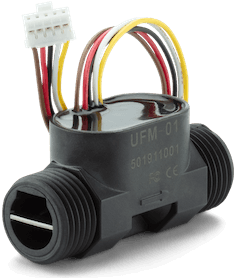
UFM-01 Flow Meter
The ufm01 component allows you to integrate the UFM-01 flow meter
(datasheet,
manufacturer page)
into your ESPHome device. This component reads accumulated flow (volume), current flow rate, and water temperature
from the UFM-01 device via UART. It also provides diagnostic binary sensors, optional meter ID and software version
text sensors, and an action to clear the accumulated flow stored on the meter.
The UFM-01 flow meter communicates using a specific UART protocol at 2400 baud with even parity and 1 stop bit. One-Wire is not supported; use the manufacturer Arduino library if you need that bus.
Configuration
Section titled “Configuration”The ufm01 component requires a UART bus to be configured. Ensure your UART bus is set up with baud_rate: 2400,
parity: EVEN, and stop_bits: 1.
# Example UART configurationuart: - id: uart_bus tx_pin: GPIOXX rx_pin: GPIOXX baud_rate: 2400 parity: EVEN stop_bits: 1Component/Hub
Section titled “Component/Hub”To use the UFM-01 component, add the following to your configuration:
# Basic UFM-01 configurationufm01: - id: ufm01_component uart_id: uart_bus # The ID of your UART busConfiguration variables
Section titled “Configuration variables”- id (Optional, ID): The ID to use for the UFM-01 component.
- uart_id (Optional, ID): The ID of the UART bus to use.
Sensor
Section titled “Sensor”The ufm01 sensor platform allows you to read accumulated flow, current flow rate, and water temperature from the
UFM-01 device.
# Sensor configurationsensor: - platform: ufm01 ufm01_id: ufm01_component # The ID of your UFM-01 component accumulated_flow: name: "UFM01 Accumulated Flow" flow: name: "UFM01 Flow Rate" temperature: name: "UFM01 Water Temperature"Configuration variables
Section titled “Configuration variables”-
platform:
ufm01 -
ufm01_id (Optional, ID): The ID of the
ufm01component this sensor belongs to. -
accumulated_flow (Optional): The accumulated flow (volume) sensor.
- All options from Sensor.
-
flow (Optional): The current flow rate sensor.
- All options from Sensor.
-
temperature (Optional): The water temperature sensor.
- All options from Sensor.
When empty_tube is active, or when the meter stops sending valid readings long enough for the component to treat
the stream as stale, flow and temperature are published as unknown (NaN). accumulated_flow continues to
update while frames are still valid.
Binary Sensor
Section titled “Binary Sensor”The UFM-01 component also exposes several diagnostic binary sensors to report the device’s status.
# Binary sensor configurationbinary_sensor: - platform: ufm01 ufm01_id: ufm01_component # The ID of your UFM-01 component ufc_chip_error: name: "UFM01 UFC Chip Error" flow_direction_wrong: name: "UFM01 Flow Direction Wrong" empty_tube: name: "UFM01 Empty Tube" flow_rate_out_of_range: name: "UFM01 Flow Rate Out of Range"Configuration variables
Section titled “Configuration variables”-
platform:
ufm01 -
ufm01_id (Optional, ID): The ID of the
ufm01component this binary sensor belongs to. -
ufc_chip_error (Optional): Reports if there is an error with the UFC chip (ultrasonic flow converter; datasheet ST2 bit 5).
- All options from Binary Sensor.
-
flow_direction_wrong (Optional): Reports if the flow direction is incorrect.
- All options from Binary Sensor.
-
empty_tube (Optional): Reports if the tube is empty.
- All options from Binary Sensor.
-
flow_rate_out_of_range (Optional): Reports if the flow rate is out of the measurable range.
- All options from Binary Sensor.
Text Sensor
Section titled “Text Sensor”The ufm01 text sensors report the meter identity and firmware version.
text_sensor: - platform: ufm01 ufm01_id: ufm01_component meter_id: name: "UFM01 Meter ID" software_version: name: "UFM01 Software Version"Configuration variables
Section titled “Configuration variables”-
platform:
ufm01 -
ufm01_id (Optional, ID): The ID of the
ufm01component this text sensor belongs to. -
meter_id (Optional): The 10-digit meter ID from the device.
- All options from Text Sensor.
-
software_version (Optional): The software version reported by the meter.
- All options from Text Sensor.
Actions
Section titled “Actions”ufm01.clear_accumulated_flow Action
Section titled “ufm01.clear_accumulated_flow Action”Clears the accumulated flow stored on the UFM-01. The command is sent once the UART is idle and the automation continues right away; the meter’s acknowledgement, or a timeout, is logged. A request made while one is still pending joins it instead of sending a second command.
on_...:  - ufm01.clear_accumulated_flow: ufm01_component
  # Equivalent long form  - ufm01.clear_accumulated_flow:      id: ufm01_component
Configuration variables
Section titled “Configuration variables”- id (Required, ID): The ID of the UFM-01 component.
Full Example Configuration
Section titled “Full Example Configuration”uart: - id: uart_bus tx_pin: GPIOXX rx_pin: GPIOXX baud_rate: 2400 parity: EVEN stop_bits: 1
ufm01: - id: ufm01_component uart_id: uart_bus
sensor: - platform: ufm01 ufm01_id: ufm01_component accumulated_flow: name: "UFM01 Accumulated Flow" flow: name: "UFM01 Flow Rate" temperature: name: "UFM01 Water Temperature"
binary_sensor: - platform: ufm01 ufm01_id: ufm01_component ufc_chip_error: name: "UFM01 UFC Chip Error" flow_direction_wrong: name: "UFM01 Flow Direction Wrong" empty_tube: name: "UFM01 Empty Tube" flow_rate_out_of_range: name: "UFM01 Flow Rate Out of Range"
text_sensor: - platform: ufm01 ufm01_id: ufm01_component meter_id: name: "UFM01 Meter ID" software_version: name: "UFM01 Software Version"
button: - platform: template name: "Clear UFM01 accumulated flow" on_press: - ufm01.clear_accumulated_flow: ufm01_component