

Duco Ventilation
The Duco component controls a Duco ventilation system directly over a UART connection, without the Duco Connectivity Board. It uses the same protocol as the Connectivity Board.

NOTE
The component was developed on a DucoBox Energy Comfort D325. Users report it working on other DucoBox Energy and Focus models and on the DucoBox Silent 2.0, but it may not work on every Duco ventilation system.
Connecting to the Ventilation System
Section titled “Connecting to the Ventilation System”A DucoBox Energy Comfort D325 has a 12 pin connector on its main board with this pinout:
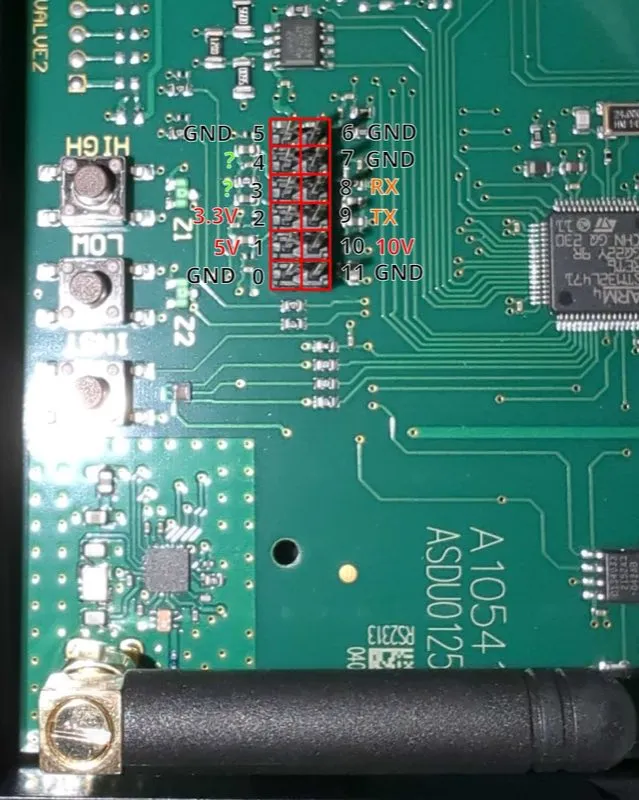
Connect pin 8 (RX of the box) to the TX pin of your ESPHome device, and pin 9 (TX of the box) to its RX pin. The ground of the box must also be connected to the ground of the ESPHome device. The connector also provides 3.3 V and 5 V, which can power the ESPHome device.
WARNING
Do not plug in USB while the ESPHome device is powered from the box: on many boards this connects the USB supply to the supply of the box. Disconnect the 3.3 V or 5 V wire before flashing over USB, and keep the ground connected.
The UART Component must be configured with a baud rate of 57600, 8 data bits, no parity and 1 stop bit.
duco:Getting Started
Section titled “Getting Started”The box talks to nodes such as remote controls and CO2 or humidity sensors, each at its own address. To find the addresses, enable discovery:
duco: discovery: {}Discovery asks each address in turn, starting 16 seconds after boot, which takes about two minutes. The nodes it found are listed with the configuration in the logs, so open the logs again once discovery has finished:
[C][duco]: Discovered nodes:[C][duco]: Node 1: type 17 (BOX)[C][duco]: Node 2: type 8 (UCBAT)[C][duco]: Node 3: type 12 (UCCO2)[C][duco]: Node 4: type 12 (UCCO2)[C][duco]: Node 52: type 18 (SWITCH)[C][duco]: Node 67: type 9 (UC)The known node types are:
| Type | Name | Node |
|---|---|---|
| 8 | UCBAT | Battery powered remote |
| 9 | UC | Wired wall switch |
| 10 | UCRH | Humidity sensor |
| 12 | UCCO2 | CO2 sensor |
| 13 | VLV | Valve |
| 17 | BOX | The ventilation box itself |
| 18 | SWITCH | Sensor for the current mode |
With the addresses you can add sensors, for example the CO2 level and temperature of the CO2 sensors above:
sensor: - platform: duco co2: - address: 3 name: "CO2 Bedroom" - address: 4 name: "CO2 Living Room" temperature: - address: 3 name: "Temperature Bedroom"Duco Component
Section titled “Duco Component”All options are optional, so duco: on its own is a complete configuration. This example also enables discovery and
sets the clock of the box from a Time Component with the ID my_time:
duco: discovery: {} time: time_id: my_timeConfiguration Variables
Section titled “Configuration Variables”- id (Optional, ID): Manually specify the ID of the Duco component.
- uart_id (Optional, ID): Manually specify the ID of the UART Component if you want to use multiple UART buses.
- discovery (Optional): Discover the nodes connected to the box once after boot and list them with the
configuration in the logs. Takes no options; use
discovery: {}. - time (Optional): Set the clock of the box from a Time Component.
- disable_crc (Optional, boolean): Accept messages that fail the checksum check. Only for troubleshooting.
Defaults to
false.
WARNING
The remaining filter time is computed from the clock of the box. Setting the clock to a time in the past lowers the remaining filter time accordingly.
Select
Section titled “Select”The select shows and changes the ventilation mode.
select: - platform: duco name: "Ventilation Mode"| Value | Mode |
|---|---|
| AUTO | Automatic flow rate |
| MAN1 | Manual level 1 for 15 minutes |
| MAN2 | Manual level 2 for 15 minutes |
| MAN3 | Manual level 3 for 15 minutes |
| EMPT | House empty, low flow rate |
| CNT1 | Manual level 1 until changed |
| CNT2 | Manual level 2 until changed |
| CNT3 | Manual level 3 until changed |
| MAN1x2 | Manual level 1 for 30 minutes |
| MAN2x2 | Manual level 2 for 30 minutes |
| MAN3x2 | Manual level 3 for 30 minutes |
| MAN1x3 | Manual level 1 for 45 minutes |
| MAN2x3 | Manual level 2 for 45 minutes |
| MAN3x3 | Manual level 3 for 45 minutes |
Configuration Variables
Section titled “Configuration Variables”- duco_id (Optional, ID): The Duco component to use. Only needed with more than one.
- update_interval (Optional, Time): How often the mode is read.
Defaults to
3s. - All other options from Select.
Number
Section titled “Number”The number shows and changes the comfort temperature of the box, from 10.0 °C to 25.5 °C in steps of 0.1 °C.
number: - platform: duco name: "Comfort Temperature"Configuration Variables
Section titled “Configuration Variables”- duco_id (Optional, ID): The Duco component to use. Only needed with more than one.
- update_interval (Optional, Time): How often the temperature is read.
Defaults to
60s. - All other options from Number.
Text Sensor
Section titled “Text Sensor”The text sensor reports the serial number of the box.
text_sensor: - platform: duco name: "Serial Number"Configuration Variables
Section titled “Configuration Variables”- duco_id (Optional, ID): The Duco component to use. Only needed with more than one.
- update_interval (Optional, Time): How often the serial number is read.
Defaults to
300s. - All other options from Text Sensor.
Sensor
Section titled “Sensor”The sensors read the nodes connected to the box and the state of the box itself. CO2 and humidity nodes also measure temperature.
sensor: - platform: duco co2: - address: 3 name: "CO2 Bedroom" temperature: - address: 3 name: "Temperature Bedroom" humidity: - address: 2 name: "Humidity Bathroom" filter_remaining: name: "Filter Time Remaining" flow_level: name: "Flow Level" time_remaining: name: "Mode Time Remaining" bypass: name: "Bypass" temperature_oda: name: "Temperature Outdoor Air" temperature_sup: name: "Temperature Supply Air" temperature_eta: name: "Temperature Extract Air" temperature_eha: name: "Temperature Exhaust Air"Configuration Variables
Section titled “Configuration Variables”-
duco_id (Optional, ID): The Duco component to use. Only needed with more than one.
-
co2 (Optional): A list of CO2 sensors, in ppm.
-
temperature (Optional): A list of node temperature sensors, in °C.
-
humidity (Optional): A list of humidity sensors, in %.
Each entry of these lists takes:
-
filter_remaining (Optional): Days until the filter should be replaced.
update_intervaldefaults to1200s. -
flow_level (Optional): The current flow level, in %.
-
time_remaining (Optional): Seconds left in the current timed mode.
-
bypass (Optional): The position of the bypass, in %.
-
temperature_oda (Optional): Temperature of the outdoor air coming into the box, in °C.
-
temperature_sup (Optional): Temperature of the supply air going to the rooms, in °C.
-
temperature_eta (Optional): Temperature of the extract air coming from the rooms, in °C.
-
temperature_eha (Optional): Temperature of the exhaust air going outside, in °C.
Each of these takes: