

IR Remote Climate
This climate component allows you to control compatible AC units by sending an infrared (IR) control signal, just as the unit’s handheld remote controller would.
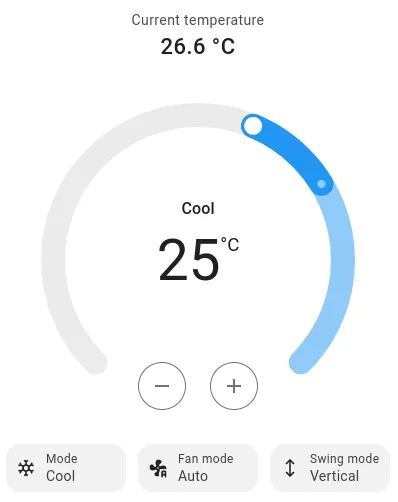
There is a growing list of compatible units. If your unit is not listed below you should submit a feature request (see FAQ).
| Supported units | Platform name | Supports receiver |
|---|---|---|
| Airton | airton | yes |
| Ballu | ballu | yes |
| Coolix | coolix | yes |
| Daikin | daikin | yes |
| Daikin ARC | daikin_arc | yes |
| Daikin BRC | daikin_brc | yes |
| Delonghi | delonghi | yes |
| Emmeti | emmeti | yes |
| Friedrich | friedrich | yes |
| Fujitsu General | fujitsu_general | yes |
| GREE | gree | yes |
| Haier Tundra | haier_tundra | yes |
| Hitachi | hitachi_ac344, hitachi_ac424 | yes |
| Islandaire | islandaire | yes |
| LG | climate_ir_lg | yes |
| Midea | midea_ir | yes |
| Mistral | mistral_ir | yes |
| Mitsubishi | mitsubishi | yes |
| Noblex | noblex | yes |
| Panasonic | panasonic_ir | yes |
| Pioneer mini-split (Parker Davis) | pd_pioneer_ir | yes |
| Remko, Fischer ClimaButler, TROTEC, Novamatic, Rexair, FREECOM | remko_ar715 | |
| Samsung | samsung | yes |
| Siemens IRA211 | siemens_ira211 | yes |
| Electrolux, TCL, Fuego | tcl112 | yes |
| Toshiba | toshiba | yes |
| Hisense, BGH, Tadiran (Argentina) | whirlpool (HISENSE_ARG) | yes |
| Hitachi (HCRA31NEWH remote) | whirlpool (HITACHI_HCRA31NEWH) | yes |
| Whirlpool | whirlpool | yes |
| Yashima | yashima | |
| Whynter | whynter | yes |
| ZH/LT-01 | zhlt01 | yes |
| Arduino-HeatpumpIR library | heatpumpir | mitsubishi_heavy_zmp |
This component requires that you have configured a Remote Transmitter.
Due to the unidirectional nature of IR remote controllers, this component cannot determine the actual state of the device and will assume the state of the device is the latest state requested. The assumed state can be restored at boot.
However, when receiver is supported, you can optionally add a Remote Receiver component so the climate state will be tracked when it is operated with the original remote controller unit.
# Example configuration entryremote_transmitter:  pin: GPIOXX  carrier_duty_percent: 50%
climate:  - platform: REPLACEME    name: "Living Room AC"
Configuration Variables
Section titled “Configuration Variables”-
sensor (Optional, ID): The sensor that is used to measure the ambient temperature. This is only for reporting the current temperature in the frontend.
-
humidity_sensor (Optional, ID): The sensor that is used to measure the ambient humidity. This is only for reporting the current humidity in the frontend.
-
supports_cool (Optional, boolean): Enables setting cooling mode for this climate device. Defaults to
true. -
supports_heat (Optional, boolean): Enables setting heating mode for this climate device. Defaults to
true. -
supports_heat_cool (Optional, boolean): Enables setting heat/cool mode for this climate device. Most remotes label this mode “auto”, since the unit switches between heating and cooling on its own. When not set, it is enabled automatically only if both
supports_coolandsupports_heatare enabled. Set it totrueto advertise the mode regardless (e.g. cool-only units that still expose an auto mode), or tofalseto hide it even on units that support both heating and cooling but have no usable auto mode. -
receiver_id (Optional, ID): The id of the remote_receiver if this platform supports receiver. see: Using a Receiver.
-
All other options from Climate.
NOTE
Older versions offered the heat/cool mode on every device. If supports_cool or supports_heat is set to false
and you still use this mode (for example in automations or voice commands), add supports_heat_cool: true to keep it.
Advanced Options
Section titled “Advanced Options”- transmitter_id (Optional, ID): Manually specify the ID of the remote transmitter.
airton
Section titled “airton”Airton RD1A1 remote protocol, used by Airton branded units and Ferroli’s Aster range.
- vertical_direction (Optional, string): The vertical direction of the air outlet until a saved setting is
restored or the select below changes it. One of
off,swing,up,middle-up,middle,middle-downanddown. Defaults tooff.
The remote sends every setting in each frame, so the display light, sleep mode and vertical direction are stored in
flash and restored at boot. Nothing is transmitted at boot; the stored settings go out with the next command. With a
receiver_id, frames from the handheld remote update the climate state and these settings as well.
The airton switch platform exposes the display light and sleep mode. Both switches are configuration entities and
keep their state through the climate’s own storage, so they do not need a restore_mode.
- airton_id (Optional, ID): The ID of the
airtonclimate. Only needed with more than one. - display (Optional, Switch): The display light of the indoor unit.
- sleep_mode (Optional, Switch): Sleep mode. The unit ignores it in fan-only mode and in the automatic heat/cool mode.
The airton select platform exposes the vertical air outlet direction.
- airton_id (Optional, ID): The ID of the
airtonclimate. Only needed with more than one. - vertical_direction (Optional, Select): The vertical direction, with the
options of the climate’s
vertical_direction.swingand the climate’s vertical swing mode are the same setting, so changing one updates the other.
# Example configuration entryclimate:  - platform: airton    id: living_room_ac    name: Living Room AC
switch:  - platform: airton    display:      name: Display Light    sleep_mode:      name: Sleep Mode
select:  - platform: airton    vertical_direction:      name: Vertical Direction
The display light and sleep mode can also be set from automations with climate.airton.display_on,
climate.airton.display_off, climate.airton.sleep_on and climate.airton.sleep_off. Each action takes the ID of
the airton climate.
on_...: - climate.airton.display_off: living_room_ac - climate.airton.sleep_on: id: living_room_acclimate_ir_lg
Section titled “climate_ir_lg”- header_high (Optional, Time): time for the high part of the header for the LG protocol. Defaults to
8000us - header_low (Optional, Time): time for the low part of the header for the LG protocol. Defaults to
4000us - bit_high (Optional, Time): time for the high part of any bit in the LG protocol. Defaults to
600us - bit_one_low (Optional, Time): time for the low part of a ‘1’ bit in the LG protocol. Defaults to
1600us - bit_zero_low (Optional, Time): time for the low part of a ‘0’ bit in the LG protocol. Defaults to
550us - advanced_commands_support (Optional, boolean): enables an advanced control mode for newer units, allowing temperature regulation in
Heat/Coolmode and vertical airflow adjustment. Only up and down swing are supported. The 6 fixed position settings are treated as off. Swing mode is remembered after powering off as well. Defaults tofalse.
# Example configuration entryclimate: - platform: climate_ir_lg name: "AC" sensor: room_temperature header_high: 3265us # AC Units from LG in Brazil, for example use these timings header_low: 9856us advanced_commands_support: falsedaikin
Section titled “daikin”The daikin climate controls units that use the Daikin ARC43xxx remotes. The target temperature can be set in
0.5 °C steps. The following presets are supported and map to the unit’s own functions:
| Preset | Unit function |
|---|---|
boost | Powerful |
sleep | Quiet |
eco | Econo |
comfort | Comfort airflow |
activity | Intelligent eye (presence sensor) |
The unit ends Powerful after 20 minutes, so the boost preset returns to none by itself.
# Example configuration entryclimate: - platform: daikin name: "Living Room AC" sensor: room_temperaturedaikin_brc
Section titled “daikin_brc”The Daikin BRC remotes are used by the ceiling cassette model of Daikin heatpumps.
- use_fahrenheit (Optional, boolean): U.S. models of the Daikin BRC remote send the temperature in Fahrenheit, if your remote shows Fahrenheit and can not be changed to Celsius then set this to true. Defaults to
false. - sub_unit (Optional, int): Which indoor unit this climate addresses on a system with several units on one
remote,
0to5. A frame from the remote is only decoded when it is addressed to this unit. Defaults to0.
# Example configuration entryclimate: - platform: daikin_brc name: "AC" sensor: room_temperature use_fahrenheit: true# Two indoor units driven from one transmitterclimate: - platform: daikin_brc name: "Living Room" sub_unit: 0 - platform: daikin_brc name: "Kitchen" sub_unit: 1delonghi
Section titled “delonghi”The delonghi climate currently supports the protocol used by some Delonghi portable units, known working with Delonghi PAC WE 120HP.
daikin_arc
Section titled “daikin_arc”The Daikin ARC remotes (daikin_arc climate, daikin_arc417, daikin_arc480 protocols of Arduino-HeatpumpIR) are used by the Japanese model of Daikin.
friedrich
Section titled “friedrich”The friedrich climate currently supports the MW12Y3H protocol.
The unit only accepts Fahrenheit temperatures in steps of 2 degrees, so the climate entity reports temperatures
in degrees Fahrenheit, in the range 60 to 88. Heating can be set down to 60, other modes down to 64. Write visual
temperatures and the fixed temperatures of climate.control in Fahrenheit too; a value written with another unit,
such as 20°C, is converted.
- model (Optional, string): The unit model. Only
MW12Y3Hexists so far; the option is reserved for other models. Defaults toMW12Y3H.
The sensor option is not supported, because a temperature sensor reports Celsius while this climate works in
Fahrenheit. humidity_sensor works as usual.
NOTE
Home Assistant reads the temperature unit from the device starting with release 2026.10. In earlier releases the temperatures are treated as Celsius and converted, so they are shown incorrectly (for example 72 °F as 162 °F).
# Example configuration entryclimate: - platform: friedrich name: "AC"fujitsu_general
Section titled “fujitsu_general”The Fujitsu General remote has buttons that send a command on their own and change no
climate state: stepping the vertical or horizontal vane one position, and toggling economy
mode. The fujitsu_general button platform sends these commands through the climate’s
transmitter.
# Example configuration entryclimate:  - platform: fujitsu_general    id: living_room_ac    name: "Living Room AC"
button: - platform: fujitsu_general fujitsu_general_id: living_room_ac step_vertical: name: "Step Vertical Vane" step_horizontal: name: "Step Horizontal Vane" economy: name: "Toggle Economy Mode"- fujitsu_general_id (Required, ID): The
fujitsu_generalclimate whose transmitter sends the command. - step_vertical (Optional): A button that steps the vertical vane. All options from Button.
- step_horizontal (Optional): A button that steps the horizontal vane. All options from Button.
- economy (Optional): A button that toggles economy mode. All options from Button.
-
model (Required, string): GREE has a few different protocols depending on model. One of these will likely work for you:
genericyanyaayacyac1fb9yb1fayx1ffyagyaw1f: theyagbyte layout with the frame timing and follow-up message of YAW1F remotes. Try it when a unit with a YAW1F remote ignoresyag.
-
use_fahrenheit (Optional, boolean): Show the setpoint in Fahrenheit on the air conditioner’s own display, for every whole degree from 61 °F to 86 °F. This does not change the unit Home Assistant shows. Sent for every model, but only tested with
yx1ff. Defaults tofalse.
# Example configuration entry for climate onlyclimate: - platform: gree name: "AC" id: my_gree_ac sensor: room_temperature model: yanModels yx1ff and yac1fb9 also offer the sleep preset.
All GREE models can receive commands from the original remote and update the climate state. The receiver validates the GREE transport and checksum, then decodes power, operating mode, target temperature from 16 to 30 °C, fan speed, and the swing axes supported by the selected model. Timer and other auxiliary fields do not change the climate state.
The generic, yan, yaa, yac, yac1fb9, yag, and yaw1f models use the common GREE state fields while
allowing OEM-specific values in timer, display-temperature, I-Feel, WiFi, vane-position, and otherwise unused fields.
This is useful for GREE-compatible units sold under other brands such as Tadiran or Tosot.
The yb1fa and yx1ff models have stricter model-specific validation because their captured frame formats and
feature interactions are known. Both expose only vertical swing control. The yb1fa model maps the three numbered
fan speeds to low, medium, and high. The yx1ff model maps them to quiet, low, and medium, uses the Turbo bit for high,
and also decodes the sleep preset.
A GREE command has an inter-block space of approximately 20 ms. Set remote_receiver.idle to a value longer than
that space so the receiver does not split one command into two captures. Use 25ms to 30ms; the default 10ms is
too short for this protocol. See Remote Receiver and
Remote Transmitter for the other settings.
remote_receiver:  id: ir_receiver  pin: GPIOXX  idle: 30ms
remote_transmitter:  id: ir_transmitter  pin: GPIOXX  carrier_duty_percent: 50%
climate:  - platform: gree    name: "AC"    model: yx1ff    transmitter_id: ir_transmitter    receiver_id: ir_receiver
The receiver updates only the state encoded by the remote. If sensor is configured, its current temperature reading
is kept unchanged.
The following additional features can be controlled with switches. Availability depends on the selected GREE model:
| Model | light | turbo | health | xfan |
|---|---|---|---|---|
yan, yaa, yac, yac1fb9 | yes | yes | yes | yes |
yb1fa | yes | yes | no | yes |
yx1ff | yes | no | no | no |
The generic, yag, and yaw1f models have no feature switches; configuring one is a validation error.
For models with supported GREE feature switches, received feature bits update the configured switches and are preserved
when a later climate or feature change transmits a complete GREE state frame. On yan, yaa, yac, and yac1fb9,
switch states are restored at startup.
On yb1fa and yx1ff, feature switches do not restore a saved state or transmit IR during startup. They initially
publish the protocol default state and are synchronized by the first valid frame received from the physical remote.
On yb1fa, Turbo is represented as an effective high fan speed. Enabling the Turbo switch also updates the climate fan
state to high. Selecting any fan mode through the climate entity disables Turbo; disabling only the Turbo switch leaves
the regular high fan speed selected. The yx1ff Turbo bit is part of high fan-speed encoding and is therefore not
available as an independent switch.
- gree_id (Required, ID): The ID of the
greeclimate to which the switches belong. - light (Optional, Switch): Turns the indoor-unit display/LED on or off.
- turbo (Optional, Switch): Enables maximum fan speed for faster results.
- health (Optional, Switch): Enables the air ionization feature.
- xfan (Optional, Switch): Keeps the indoor fan running briefly after the climate device is turned off to dry the evaporator.
# Example configuration entry for switches of the climateswitch: - platform: gree gree_id: my_gree_ac light: name: "AC Lights" turbo: name: "AC Turbo" health: name: "AC Health" xfan: name: "AC X-Fan"haier_tundra
Section titled “haier_tundra”Haier 112-bit protocol, currently only tested with AS35TB4HRA but may also work with other units.
- unit (Optional, string): The AC unit ID, either
aorb. Each transmitter can drive one unit of each ID. Defaults toa.
# Example configuration entryclimate: - platform: haier_tundra name: "AC" id: my_haier_acTwo buttons and three switches are also exposed:
- haier_tundra_id (Required, ID): The Haier Tundra Climate entity.
- light (Optional, Button): Toggles the display LEDs.
- self_clean (Optional, Button): Starts the self clean process. Can be started when the unit is off.
- health_mode (Optional, Switch): Turns on/off Health mode.
- quiet_mode (Optional, Switch): Turns on/off Quiet mode.
- turbo_mode (Optional, Switch): Turns on/off Turbo mode.
# Example configuration entrybutton:  - platform: haier_tundra    haier_tundra_id: my_haier_ac    light:      name: "Toggle Light"    self_clean:      name: "Start Self Clean"
switch:  - platform: haier_tundra    haier_tundra_id: my_haier_ac    health_mode:      name: "Health Mode"    quiet_mode:      name: "Quiet Mode"    turbo_mode:      name: "Turbo Mode"
NOTE
Quiet and Turbo mode cannot both be on at once, and either can only be turned on in Cool or Heat mode.
hitachi_ac344
Section titled “hitachi_ac344”Fan modes auto, quiet, low, medium and high, and swing modes off, vertical, horizontal and both.
The unit does not read the vertical swing setting from the frame; it toggles vertical swing when the frame carries the swing button, so ESPHome tracks the state it last sent or received and sends the button only on a change. When the unit misses a command the two drift apart. To bring them back in step, press the vertical swing button on the original remote once at the unit. With a receiver configured, point the remote at the receiver but away from the unit instead, and press the button until the two agree again.
# Example configuration entryclimate: - platform: hitachi_ac344 name: "AC" receiver_id: rcvr # the remote_receiver from Using a ReceiverThe hitachi_ac344 switch platform exposes the unit’s mildew proof function, which keeps the fan running for a
while after power off to dry the unit:
- hitachi_ac344_id (Optional, ID): The
hitachi_ac344climate the switch belongs to. Only needed with more than one. - mildew_proof (Required, Switch): The mildew proof switch.
restore_modedefaults toRESTORE_DEFAULT_OFF. The restored setting is not sent at boot; it goes out with the next command, so a reboot does not turn mildew proof off.
# Example configuration entry for the switchswitch: - platform: hitachi_ac344 mildew_proof: name: "AC Mildew Proof"islandaire
Section titled “islandaire”The islandaire climate supports Islandaire PTAC units, known working with the Islandaire EZ12A1GSP1S10AL.
It supports cool, heat and fan only modes and the auto, low and high fan speeds.
The unit takes whole degrees Fahrenheit, so the climate entity reports temperatures in degrees Fahrenheit, in the
range 61 to 88. Write visual temperatures and the fixed temperatures of climate.control in Fahrenheit too; a value
written with another unit, such as 20°C, is converted.
The sensor option is not supported, because a temperature sensor reports Celsius while this climate works in
Fahrenheit. humidity_sensor works as usual.
NOTE
Home Assistant reads the temperature unit from the device starting with release 2026.10. In earlier releases the temperatures are treated as Celsius and converted, so they are shown incorrectly (for example 72 °F as 162 °F).
# Example configuration entryclimate: - platform: islandaire name: "AC"midea_ir
Section titled “midea_ir”These air conditioners support two protocols: Midea and Coolix. Therefore, when using an IR receiver, it considers both protocols and publishes the received states.
- use_fahrenheit (Optional, boolean): Allows you to transfer the temperature to the air conditioner in degrees Fahrenheit. The air conditioner display also shows the temperature in Fahrenheit. Defaults to
false.
# Example configuration entryclimate: - platform: midea_ir name: "AC" sensor: room_temperature use_fahrenheit: trueNOTE
- See Transmit Midea to send custom commands, including Follow Me mode.
- See Toshiba below if you are looking for compatibility with Midea model MAP14HS1TBL or similar.
mistral_ir
Section titled “mistral_ir”The mistral_ir platform supports Mistral brand split air conditioners, model MHFE1126A, which use the MR112C
remote controller.
The platform supports turning the unit on and off, the cool, dry, fan only, heat and auto modes, a target temperature from 16 to 30 °C in steps of 1 °C, and the low, medium, high and auto fan speeds. Swing control is not supported.
# Example configuration entryclimate: - platform: mistral_ir name: "Living Room AC"mitsubishi
Section titled “mitsubishi”NOTE
- When using this component with Mitsubishi units that only support cooling mode, the Off command may not work. Set supports_heat to
falseto resolve that issue.
-
set_fan_mode (Optional, string): Select the fan modes desired or that are supported on your remote. Defaults to
3levels3levels: Low [fan speed 1], Medium [2], High [3]4levels: Low [1], Middle [2], Medium [3], High [4]quiet_4levels: Low [1], Middle [2], Medium [3], High [4], Quiet [5]
-
supports_dry (Optional, boolean): Enables setting dry mode for this unit. Defaults to
false. -
supports_fan_only (Optional, boolean): Enables setting fan only mode for this unit. Confirm that mode is supported on your remote. Defaults to
false. -
fahrenheit_compatibility (Optional, boolean): Send the temperature codes a Mitsubishi remote set to Fahrenheit uses. These codes add a half degree bit, so every whole degree from 61°F to 88°F reaches the unit unchanged instead of rounding to the nearest Celsius step; targets outside that range are clamped to it. Enable this when you set the target temperature in Fahrenheit, for example when Home Assistant uses imperial units. Defaults to
false. -
horizontal_default (Optional, string): What to default to when the AC unit’s horizontal direction is not set to swing. One of
left,middle-left,middle,middle-right,right,auto. Defaults tomiddle. -
vertical_default (Optional, string): What to default to when the AC unit’s vertical direction is not set to swing. One of
down,middle-down,middle,middle-up,up,auto. Defaults tomiddle. -
vertical_vanes (Optional, int): Set to
2on units with separately controlled left and right vertical vanes, such as the FH, FS and FX series, so both vanes receive the swing and default position commands. Both vanes always get the same setting. Defaults to1.
NOTE
- This climate IR component is also known to work with some Stiebel Eltron Units. It has been tested with Stiebel Eltron IR-Remote
KM07Fand unitACW 25 i
# Example configuration entryclimate: - platform: mitsubishi name: "Heatpump" set_fan_mode: "quiet_4levels" supports_dry: "true" supports_fan_only: "true" horizontal_default: "left" vertical_default: "down"panasonic_ir
Section titled “panasonic_ir”The panasonic_ir platform controls Panasonic air conditioners that use the 216 bit Panasonic IR protocol,
called PANASONIC_AC by IRremoteESP8266. The remote sends the whole
state with every key press. The bytes the unit expects differ a little between model families, so set model to the
one that matches your unit or remote.
Supported modes are Off, Heat/Cool (the unit’s auto mode), Cool, Heat, Dry and Fan Only. The target temperature is
16 to 30 °C in steps of 1 °C. Fan modes are Auto, Low, Medium and High, plus the custom fan modes Minimum and
Maximum. Swing modes are Off and Vertical. Vertical sets the vane to automatic. Off sends a fixed vane position, see
the vane select below. Timers, the clock, the quiet and powerful buttons, nanoe and horizontal swing are not
supported.
-
model (Optional, string): The model family of the unit. Defaults to
JKE. The families and the units and remotes they cover are the ones listed by IRremoteESP8266:DKE: DKE, DKW and PKR series; remotes A75C2616-1, A75C3704 and PN1122VJKE: JKE series; remote A75C3747LKE: LKE seriesNKE: NKE seriesCKP: CKP series, such as the CS-ME10CKPG, CS-ME12CKPG and CS-ME14CKPG; remote A75C2311. These units have no separate on and off commands, see the note belowRKR: RKR series, such as the CS-Z9RKR and CS-Z24RKR; remote A75C4762PKE: The remote of the CS-NE9PKE and CU-NE9PKE heat pump. Its frames are the same as theJKEones, apart from one extra bit in the byte that holds the power and mode. This is the only model tested on a real unit.
NOTE
The CKP units have no separate commands for turning on and off. The power key of the remote toggles the unit, so
the climate keeps track of the power state and only sends a toggle when the state changes. If the unit is switched
with its remote and no receiver is configured, ESPHome loses track and the power state ends up inverted. After a
restart, the unit is taken to be on or off as the restored state says.
The away preset is the frost protection mode of the remote, which is labelled 8/10°C on some remotes. It keeps the
room above freezing by heating at a low temperature with the fan at maximum. On the remote, this mode only offers
8 °C and 10 °C as the temperature. Selecting the preset always sends 10 °C in heat mode with the fan at maximum and
the vane on auto, and the climate shows that state. It does not change the target temperature. Changing the mode,
target temperature, fan mode, swing mode or vane position ends the preset. If the remote switches to
frost protection at 8 °C, that is understood when received and the preset stays on, but ESPHome can only send 10 °C.
The frames are as captured from a CS-NE9PKE remote, and other models may not have this function.
When receiver_id is set the climate follows the original remote, see Using a Receiver. A frame has
two sections with a 10 ms gap between them. Depending on the idle time of the receiver, a frame arrives whole or as
two captures, and both work. The short frames that the quiet, powerful and nanoe buttons send are ignored.
IMPORTANT
On an ESP32 the receiver stops capturing when its RMT memory is full, and a frame that is cut short is ignored. A Panasonic frame is 220 symbols (66 for the first section, 154 for the second), but the default is 192. On the Remote Receiver, set either:
rmt_symbolsandreceive_symbolsto at least220, which is256on the ESP32, oridle: 5ms, which splits the frame at the 10 ms gap so that only the 154 symbol second section is needed.
idle: 5ms applies to the whole receiver and cuts any signal with a pause over 5 ms, such as the 9 ms header mark of
NEC. Use the first option if the receiver must decode other protocols.
This was verified on an ESP32 only. The ESP32-C3, C5, C6 and H2 have 96 symbols of RMT memory (see
ESP32 RMT Configuration Variables), which is too
few for either option. The ESP32-S3 and ESP32-P4 have 192, which is enough for the second section but not for a whole
frame, unless use_dma is enabled. Then rmt_symbols is the size of a DMA buffer and can be set higher. The
ESP32-S2 has 256 symbols shared by every receiver and transmitter, so a whole frame takes all of them, while
idle: 5ms needs only the default 192.
# Example configuration entryclimate: - platform: panasonic_ir name: "Panasonic AC"# Example configuration entry for a CS-NE9PKE, following its remoteclimate: - platform: panasonic_ir id: panasonic_ac name: "Panasonic AC" model: PKE receiver_id: rcvr
select: - platform: panasonic_ir panasonic_ir_id: panasonic_ac vane_position: name: "Panasonic AC vane position"The panasonic_ir select platform adds a Select for the vertical vane:
- panasonic_ir_id (Optional, ID): The
panasonic_irclimate to control. Only needed with more than one. - vane_position (Required): The options are
Auto, then1(highest) to5(lowest). Setting a position also sets the swing mode to Off, andAutosets it to Vertical. When the remote sets the vane, the select follows it. Without this select, swing Off sends the lowest position in Heat mode and the highest in the other modes. The chosen position is not kept after a restart. Horizontal vanes are not controlled. All options from Select are available.
pd_pioneer_ir
Section titled “pd_pioneer_ir”This platform controls Pioneer mini-split air conditioners that use the PD Pioneer infrared protocol. These units are manufactured by Parker Davis (the “PD” in the protocol name). It has been tested with the ESPIR1 IR adapter module. Other Pioneer mini-split models that use the same protocol may also work.
Supported modes are Off, Cool, Heat, Dry, and Fan Only. Fan speeds Auto, Low, Medium, and High are supported. Swing modes Off, Vertical, Horizontal, and Both are supported. The ECO preset is supported.
- use_fahrenheit (Optional, boolean): When enabled, the target temperature is sent in half-degree
Fahrenheit steps and the unit display shows Fahrenheit. When disabled, whole-degree Celsius is used.
Defaults to
false.
# Example configuration entryclimate: - platform: pd_pioneer_ir name: "Pioneer AC" use_fahrenheit: trueNOTE
See Transmit PD Pioneer to send custom raw frames for debugging or advanced use.
remko_ar715
Section titled “remko_ar715”Supports air conditioners using the Remko AR-715 infrared remote (model 1613138). The IRremoteESP8266 library calls this protocol ClimaButler after one of the rebranded models.
| Brand | Model |
|---|---|
| Remko | RKL 490, RKL 491, RKL 494, RKL 495 |
| Fischer | ClimaButler RCS-SD43UAI, RCS-SD43UWI |
| TROTEC | PAC 4600 |
| Novamatic | CL 990, CL 1590 |
| Rexair | C15000N |
| FREECOM | RCS-SD43UAI, RCS-SD43UWI |
- The remote has no heat mode, so only cool, dry and fan-only modes are available.
- The fan speed can only be chosen in cool mode. In dry and fan-only modes the unit picks the speed itself.
Fan speed
autois the remote’s Fuzzy Logic setting, which follows the room temperature. - The remote’s 1 to 24 hour timer is not implemented; use an automation instead.
# Example configuration entryclimate: - platform: remko_ar715 name: Air Conditionersamsung
Section titled “samsung”NOTE
- Supported models:
AR09FSSDAWKNFAAR09HSFSBWKNAR12RXFPEWQNEU(tested)
- Supported remotes:
DB93-15882Q(tested)DB93-14195ADB96-24901C
# Example configuration entryclimate: - platform: samsung name: "Samsung AC"siemens_ira211
Section titled “siemens_ira211”The siemens_ira211 climate controls Siemens RDG1xx and RDG2xx thermostats that are operated with the
Siemens IRA211 handheld remote. It has no options beyond the common ones listed above. The thermostat decides between
heating and cooling itself, so with both supports_cool and supports_heat enabled the climate offers one
heat_cool mode; the thermostat’s PROTECTION mode is shown as off, and its COMFORT and TIMER modes as the
comfort and eco presets. When receiver_id is set the climate state is tracked when the thermostat is operated
with the original remote.
# Example configuration entryclimate: - platform: siemens_ira211 name: "Siemens IRA211" sensor: room_temperaturetoshiba
Section titled “toshiba”-
model (Optional, string): One of:
GENERIC: Temperature range is from 17 to 30 (default)RAC-PT1411HWRU-C: Temperature range is from 16 to 30; unit displays temperature in degrees CelsiusRAC-PT1411HWRU-F: Temperature range is from 16 to 30; unit displays temperature in degrees FahrenheitRAS-2819T: Temperature range is from 18 to 30; supports two-packet IR protocolRAS-B10N3KV2: Temperature range is from 17 to 30; the same commands asGENERICwith the IR timings of the RAS-B13 remote family (RAS-B10N3KV2-E1 and similar); use it if your unit ignoresGENERICRAS-25J2KVSG-ND: Toshiba Polar with the WH-TA15PE remote. Temperature range is from 17 to 30, or 5 to 13 with the frost protection preset. See Toshiba Polar below.SEIYA: Temperature range is from 17 to 30; Seiya family units such as the RAS-B13E2KVG-E, with vertical, horizontal and both swing modes
NOTE
-
The
SEIYAswing setting is a momentary command, as on the remote: the swing code is only sent when the swing mode changes, and a received swing command updates the reported mode without turning it off again on the next ordinary update. No code to stop the swing is known, so an off setting is not offered. -
While they are identified as separate models here, the
RAC-PT1411HWRU-CandRAC-PT1411HWRU-Fare in fact the same physical model/unit. They are separated here only because different IR codes are used depending on the desired unit of measurement. This only affects how temperature is displayed on the unit itself. -
The
RAC-PT1411HWRUmodel supports a feature Toshiba calls “Comfort Sense”. The handheld remote control has a built-in temperature sensor and it will periodically transmit the temperature from this sensor to the AC unit. If asensoris provided in the configuration with this model, the sensor’s temperature will be transmitted to theRAC-PT1411HWRUin the same manner as the original remote controller. How often the temperature is transmitted is determined by theupdate_intervalassigned to thesensor. Note thatupdate_intervalmust be less than seven minutes or theRAC-PT1411HWRUwill revert to using its own internal temperature sensor; a value of 30 seconds seems to work well. See Sensor for more information. -
The
RAS-2819Tmodel uses a two-packet IR protocol where most commands send a primary packet (containing temperature, mode, and fan speed) followed by a secondary packet (containing fan speed confirmation and mode-specific data). Single-packet commands are used for power-off and swing toggle operations. -
This climate IR component is also known to work with Midea model MAP14HS1TBL and may work with other similar models, as well. (Midea acquired Toshiba’s product line and re-branded it.)
# Example configuration entry for RAS-2819Tclimate: - platform: toshiba name: "Toshiba AC" model: RAS-2819T sensor: room_temperatureToshiba Polar
Section titled “Toshiba Polar”Use model: RAS-25J2KVSG-ND for the Toshiba Polar with the WH-TA15PE remote. GENERIC does not expose these
additional controls. A Remote Transmitter is required. Add a
Remote Receiver and set receiver_id to track commands from the handheld remote.
climate: - platform: toshiba name: "Toshiba Polar" model: RAS-25J2KVSG-NDFan Modes And Presets
Section titled “Fan Modes And Presets”The standard fan modes are AUTO, QUIET, LOW, MEDIUM and HIGH. The custom fan modes Low+ and Medium+
provide the two intermediate speeds. QUIET controls the indoor fan; it is separate from outdoor Silent.
The standard presets are NONE, BOOST (Hi Power) and ECO. The custom presets are:
Fireplace 1andFireplace 2: Heating presets. Selecting either switches toHEATunless the same call specifies another mode, in which case the call is rejected. Changing away fromHEATcancels the preset.Frost protection: A heating preset with a default target of 8 °C and a range of 5 to 13 °C. Leaving the preset restores the remembered normal target, or 24 °C after a reboot. The normal range is 17 to 30 °C.HADA Care: Ceiling-directed airflow. Vane step and SWING are unavailable while this preset is active.Sleep 1h,Sleep 3h,Sleep 5handSleep 9h: Set the unit’s OFF timer and force the fan toAUTO. Leaving Sleep restores the previous fan setting. After a reboot, ESPHome clears the restored Sleep preset without sending a command, so it does not restart the timer.
Use preset or custom_preset in climate automations to select a
preset. Use custom_fan_mode for Low+ and Medium+. Only one preset can be active at a time.
Power Selection And Outdoor Silent
Section titled “Power Selection And Outdoor Silent”The optional toshiba select platform provides these choices: 100%, 75%, 50%, Silent 1 and Silent 2.
It requires model: RAS-25J2KVSG-ND.
select: - platform: toshiba power_selection: name: "Toshiba Power Selection"- toshiba_id (Optional, ID): The ID of the Toshiba climate. Required when more than one Toshiba climate is configured.
- power_selection (Required, Select): The power limit or outdoor Silent setting. All options from Select are supported.
The 75% and 50% limits are kept when changing presets, including ECO. Changing the limit also keeps the active preset. Power selection is restored after reboot without sending IR. A supported full-state command from the handheld remote updates the select when a receiver is configured, and its power selection is saved too.
NOTE
Combined outdoor Silent and preset commands are not yet supported. Select 100%, 75% or 50% before enabling
a preset, or cancel the preset before selecting Silent 1 or Silent 2. Requests for an unsupported combination
are rejected without changing the reported state or sending IR.
SWING And Vane Step
Section titled “SWING And Vane Step”Use the climate’s VERTICAL swing mode for continuous up/down movement and OFF to stop it. The remote sends the
same toggle command for both, so ESPHome tracks the assumed state. Missed handheld commands can leave it out of
sync. A receiver lets ESPHome track handheld SWING presses.
The toshiba.step_vane action moves the vane one step on each call, like the
remote’s FIX button. It does not set an absolute position or report the vane angle. This action is only supported
by RAS-25J2KVSG-ND and is unavailable during HADA Care.
Set id: toshiba_polar on the climate entry, then call the action from an automation:
on_...: - toshiba.step_vane: toshiba_polarTo expose the vane step in Home Assistant, use a Template Button:
button: - platform: template name: "Toshiba Vane Step" on_press: - toshiba.step_vane: toshiba_polarwhirlpool
Section titled “whirlpool”-
model (Optional, string): There are four valid models to choose from:
DG11J1-3A: Temperature range is from 18 to 32 (default)DG11J1-91: Temperature range is from 16 to 30HISENSE_ARG: Hisense, BGH and Tadiran units sold in Argentina that work with the BGH Smart Control (HPA-4911) module. Temperature range is from 16 to 30; the swing setting is sent as a state instead of a toggle.HITACHI_HCRA31NEWH: Hitachi units that use the HCRA31NEWH remote, which are not covered byhitachi_ac344orhitachi_ac424. Temperature range is from 16 to 30; the unit takes the power state from every frame, and swing is sent as a toggle.
All whirlpool models except HITACHI_HCRA31NEWH only have a power toggle, so the climate keeps track of whether it
believes the unit is on. If the unit is switched with another remote, the next command may toggle the power instead of
changing a setting. All models except HISENSE_ARG send swing as a toggle, so it is sent only when the swing mode
changes.
With the HISENSE_ARG model the three frames of one transmission are separated by gaps close to the default idle of
10ms, so a receiver needs a longer idle to capture them as one signal: idle: 50ms, or the
largest value the platform allows, 32767us, on ESP32 variants with RMT other than ESP32 and ESP32-S2.
The three frames also take more pulses than a single-frame protocol. On platforms other than ESP32 variants with RMT,
the default buffer_size of 4000B holds 1000 pulses, which is plenty. An explicit buffer_size carried over from
before 2026.10 now holds a quarter of the pulses it used to (see the buffer_size warning in
Remote Receiver) and shows up as repeated “Buffer overflow”
warnings with no decode; raise it to at least 2000B (500 pulses) or remove it.
# Example configuration entryclimate: - platform: whirlpool name: "AC" model: HISENSE_ARG receiver_id: rcvrwhynter
Section titled “whynter”- use_fahrenheit (Optional, boolean): Allows you to transfer the temperature to the air conditioner in degrees Fahrenheit. The air conditioner display also shows the temperature in Fahrenheit. Defaults to
false.
# Example configuration entryclimate: - platform: whynter name: "AC" sensor: room_temperature use_fahrenheit: true supports_heat: truezhlt01
Section titled “zhlt01”The zhlt01 climate and protocol, based on the ZH/LT-01 remote controller, is used with many locally branded air conditioners, like: Eurom, Chigo, Tristar, Tecnomaster, Elgin, Geant, Tekno, Topair, Proma, Sumikura, JBS, Turbo Air, Nakatomy, Celestial Air, Ager, Blueway, Airlux, etc.
Using a Receiver
Section titled “Using a Receiver”NOTE
This is only supported with select climate devices, see “Supports receiver” in the table at the top of the page.
Optionally, some platforms can listen to data the climate device sends over infrared to update their state ( for example what mode the device is in). By setting up a remote_receiver and passing its ID to the climate platform you can enable this mode.
When using a receiver it is recommended to put the IR receiver as close as possible to the equipment’s IR receiver.
# Example configuration entryremote_receiver:  id: rcvr  pin:    number: GPIOXX    inverted: true    mode:      input: true      pullup: true  # high 55% tolerance is recommended for some remote control units  tolerance: 55%
climate:  - platform: REPLACEME    name: "Living Room AC"    receiver_id: rcvr
Arduino-HeatpumpIR
Section titled “Arduino-HeatpumpIR”The heatpumpir platform supports dozens of manufacturers and hundreds of AC units by utilising the Arduino-HeatpumpIR library.
This platform works with the arduino framework and ESP-IDF (on ESP32), and should only be used if your AC unit is not supported by any of the other (native) platforms from above. No support can be provided for Arduino-HeatpumpIR, because it is a third party library.
This platform utilises the library’s generic one-size-fits-all API, which might not line up perfectly with all of the supported AC units. For example, some AC units have more fan speed options than what the generic API supports.
The mitsubishi_heavy_zj and mitsubishi_heavy_zmp protocols expose ECO and BOOST climate presets. ECO maps to FAN_5 (Econo / energy-saver mode) and BOOST maps to FAN_4 (HiPower / turbo mode). On these protocols, FAN_4 and FAN_5 are operating modes rather than fan speeds — normal fan control uses FAN_1 through FAN_3. Preset commands take priority over fan speed when both are set.
The mitsubishi_heavy_zmp protocol can also decode frames from the physical remote, so the climate state follows
the remote. Set up a receiver as shown in Using a Receiver and pass its ID as receiver_id;
other protocols ignore received frames.
climate: - platform: heatpumpir protocol: mitsubishi_heavy_zmp name: "Heat Pump" receiver_id: rcvr horizontal_default: left vertical_default: up min_temperature: 18 max_temperature: 30Additional configuration must be specified for this platform:
-
protocol (Required, string): Choose one of Arduino-HeatpumpIR’s supported protocols:
airway,aux,ballu,bgh_aud,carrier_mca,carrier_nqv,carrier_qlima_1,carrier_qlima_1,daikin,daikin_arc417,daikin_arc480,electroluxyal,fuego,fujitsu_awyz,gree,greeyaa,greeyac,greeyan,greeyap,greeyt,hisense_aud,hitachi,hyundai,ivt,midea,mitsubishi_fa,mitsubishi_fd,mitsubishi_fe,mitsubishi_heavy_fdtc,mitsubishi_heavy_zj,mitsubishi_heavy_zm,mitsubishi_heavy_zmp,mitsubishi_kj,mitsubishi_msc,mitsubishi_msy,mitsubishi_sez,nibe,panasonic_altdke,panasonic_ckp,panasonic_dke,panasonic_eke,panasonic_jke,panasonic_lke,panasonic_nke,philco_phs32,r51m,samsung_aqv,samsung_aqv12msan,samsung_fjm,sharp,toshiba,toshiba_daiseikai,vaillantvai8,zhjg01,zhlt01 -
horizontal_default (Required, string): What to default to when the AC unit’s horizontal direction is not set to swing. Options are:
left,mleft,middle,mright,right,auto -
vertical_default (Required, string): What to default to when the AC unit’s vertical direction is not set to swing. Options are:
down,mdown,middle,mup,up,auto -
max_temperature (Required, float): The maximum temperature that the AC unit supports being set to.
-
min_temperature (Required, float): The minimum temperature that the AC unit supports being set to.
-
sensor (Optional, ID): The sensor that is used to measure the ambient temperature.
NOTE
The greeyac protocol in heatpumpir supports a feature Gree calls “I-Feel”. The handheld remote control
has a built-in temperature sensor and it will periodically transmit the temperature from this sensor to the
AC unit. If a sensor is provided in the configuration with this model, the sensor’s temperature will be
transmitted to the greeyac device in the same manner as the original remote controller. How often the
temperature is transmitted is determined by the update_interval assigned to the sensor. Note that
update_interval must be less than 10 minutes or the greeyac device will revert to using its own
internal temperature sensor; a value of 2 minutes seems to work well. See Sensor
for more information.
See Also
Section titled “See Also”- Climate Component
- Remote Receiver
- Remote Transmitter
- Sensor Component
- API Reference: airton.h
- API Reference: ballu.h
- API Reference: climate_ir_lg.h
- API Reference: coolix.h
- API Reference: daikin.h
- API Reference: friedrich.h
- API Reference: fujitsu_general.h
- API Reference: gree.h
- API Reference: haier_tundra.h
- API Reference: hitachi_ac344.h
- API Reference: islandaire.h
- API Reference: midea_ir.h
- API Reference: mistral_ir.h
- API Reference: mitsubishi.h
- API Reference: panasonic_ir.h
- API Reference: pd_pioneer_ir.h
- API Reference: remko_ar715.h
- API Reference: siemens_ira211.h
- API Reference: tcl112.h
- API Reference: toshiba.h
- API Reference: whirlpool.h
- API Reference: whynter.h
- API Reference: yashima.h