

DFRobot SEN0465 to SEN0476 Gas Sensors
The dfrobot_sen0465_i2c and dfrobot_sen0465_uart sensor platforms allow you to use the DFRobot
“Factory Calibrated Electrochemical Gas Sensor” series (product page)
with ESPHome. All boards of the series use the same protocol. They only differ in the gas probe that is fitted.
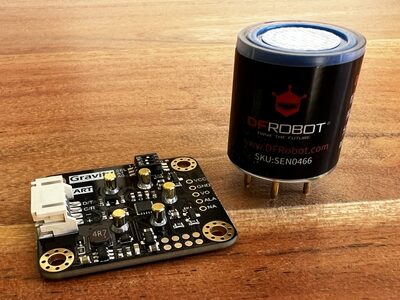
The sensor reports the gas concentration and the temperature of its on-board temperature sensor.
| Model | Gas | Unit | Model | Gas | Unit |
|---|---|---|---|---|---|
| SEN0465 | Oxygen (O2) | % | SEN0471 | Nitrogen dioxide (NO2) | ppm |
| SEN0466 | Carbon monoxide (CO) | ppm | SEN0472 | Ozone (O3) | ppm |
| SEN0467 | Hydrogen sulfide (H2S) | ppm | SEN0473 | Hydrogen (H2) | ppm |
| SEN0468 | Chlorine (Cl2) | ppm | SEN0474 | Hydrogen chloride (HCl) | ppm |
| SEN0469 | Ammonia (NH3) | ppm | SEN0475 | Hydrogen fluoride (HF) | ppm |
| SEN0470 | Sulfur dioxide (SO2) | ppm | SEN0476 | Phosphine (PH3) | ppm |
The sensor can be connected over I²C or UART. The SEL DIP switch on
the board selects the bus: 0 for I²C and 1 for UART.
# Example configuration entry for I²Csensor: - platform: dfrobot_sen0465_i2c model: SEN0466 concentration: name: "CO Concentration" temperature: name: "CO Sensor Temperature"# Example configuration entry for UARTuart: tx_pin: GPIOXX rx_pin: GPIOXX baud_rate: 9600
sensor: - platform: dfrobot_sen0465_uart model: SEN0466 concentration: name: "CO Concentration" temperature: name: "CO Sensor Temperature"Configuration Variables
Section titled “Configuration Variables”-
model (Required, string): The model of the sensor board, from
SEN0465toSEN0476. See the table above. The model sets the unit, the number of decimal places and the device class of the concentration sensor. -
concentration (Optional): The gas concentration. The unit is
%for oxygen (SEN0465) andppmfor all other gases.- All options from Sensor.
-
temperature (Optional): The temperature measured on the sensor board, in °C.
- All options from Sensor.
-
temperature_compensation (Optional, boolean): Correct the concentration for the board temperature. See Temperature Compensation. Not available for SEN0465 (O2) and SEN0473 (H2). Defaults to
false. -
alarm (Optional): Set up the alarm output (ALA pin) of the board. See Alarm Output.
- threshold (Required, float): The concentration at which the alarm is triggered, in the unit of the concentration sensor.
- type (Optional, string):
hightriggers the alarm when the concentration rises above the threshold,lowtriggers it when the concentration falls below the threshold. Defaults tohigh.
-
update_interval (Optional, Time): The interval to read the sensor. Defaults to
60s. -
address (Optional, int): I²C only. The I²C address of the sensor. Defaults to
0x77. See the I²C address table below. -
i2c_id (Optional, ID): I²C only. The ID of the I²C bus to use.
-
uart_id (Optional, ID): UART only. The ID of the UART bus to use.
UART Settings
Section titled “UART Settings”The baud rate of the sensor is fixed. The UART bus must use 9600 baud, 8 data bits, no parity and 1 stop bit,
and needs both a tx_pin and an rx_pin. ESPHome checks this when it validates the configuration.
I²C Address
Section titled “I²C Address”The A0 and A1 DIP switches on the board select the I²C address:
| A0 | A1 | Address |
|---|---|---|
| 0 | 0 | 0x74 |
| 0 | 1 | 0x75 |
| 1 | 0 | 0x76 |
| 1 | 1 | 0x77 (default) |
The sensor also supports other address groups between 0x60 and 0x7F. ESPHome cannot change the address group.
It can only be changed with the DFRobot Arduino library.
Startup
Section titled “Startup”At startup, ESPHome switches the sensor to passive mode, in which the sensor only answers requests. It then waits 1 second, sets or switches off the alarm and takes the first reading.
Setting the passive mode and setting the alarm are each tried up to 3 times, when the sensor does not answer or
sends a wrong answer. If a step still fails, ESPHome continues with the next step but keeps a warning set until the
device restarts, because the sensor may be running with the wrong mode or alarm. A reading that gets no answer, a
wrong answer or a bad checksum publishes unknown on the sensors and sets a warning that the next good reading clears.
A failed reading is not repeated; the sensor is asked again at the next update_interval.
If the very first request cannot be sent at all, for example because no device answers at the I²C address, the component is marked as failed and does not try again.
Temperature Compensation
Section titled “Temperature Compensation”The readings of electrochemical gas probes change with temperature. When temperature_compensation is true,
ESPHome corrects the concentration with the formulas from the DFRobot library and the board temperature.
The formulas only cover a limited temperature range, which depends on the gas. Outside this range the
concentration is published as NaN and the component shows a warning.
NOTE
The DFRobot library has no correct compensation formula for hydrogen (SEN0473), and none at all for oxygen (SEN0465). The option is therefore not available for these models.
Alarm Output
Section titled “Alarm Output”The board has an alarm output pin (ALA). The sensor sets this pin when the concentration crosses the
threshold. If alarm is not set, ESPHome switches the alarm off at startup.
The state of the alarm cannot be read over I²C or UART. To use it in ESPHome, connect the ALA pin to a GPIO and add a GPIO Binary Sensor:
sensor:  - platform: dfrobot_sen0465_i2c    model: SEN0466    alarm:      threshold: 35    concentration:      name: "CO Concentration"
binary_sensor:  - platform: gpio    pin: GPIOXX    name: "CO Alarm"    device_class: carbon_monoxide
According to DFRobot, the pin goes high when the alarm is triggered. If your board behaves the other way round,
add inverted: true to the pin.
NOTE
The sensor compares the threshold with its own reading, without temperature compensation. The alarm can therefore trigger at a slightly different value than the one shown by the concentration sensor.