

AS7341 / AS7343 / TCS3448 Spectral Color Sensor
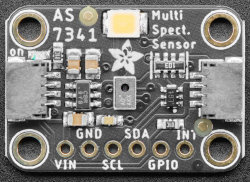
The as734x component allows you to use the AS7341
(datasheet,
Adafruit) and AS7343
(datasheet)
spectral color sensors with ESPHome. The TCS3448
(datasheet)
is supported as well: it replaces the AS7343 and shares its channels, register map and calibration, so
everything written below about the AS7343 applies to it too. The sensor is selected with the type option. The
I²C Bus is required to be set up in your configuration for this sensor to work.
NOTE
The AS7341 is also covered by the older as7341 platform, which keeps working.
See Moving From as7341 below for the differences.
# Example configuration entryas734x:  - id: spectral    type: AS7343
sensor:  - platform: as734x    as734x_id: spectral    counts:      f1:        name: "F1 405nm"      clear:        name: "Clear"
Component/Hub
Section titled “Component/Hub”The as734x component talks to the sensor and sets how it measures. Each as734x entry is one sensor, so add
more entries to the list to use several sensors.
Configuration variables
Section titled “Configuration variables”-
type (Required, string): The sensor model. Must be
AS7341,AS7343orTCS3448. -
id (Optional, ID): Manually specify the ID for this component. Set it when you have more than one
as734xsensor. -
normalize_basic_counts (Optional, string): Divide every basic count by a common reference, so the published values describe the shape of the spectrum rather than its strength. Defaults to
NONE. Must be one of:NONE(default): publish the basic counts as they are.ALL: divide by the largest basic count of any channel.BANDS: divide by the largest basic count among the visible bands, ignoringclearandnir.CLEAR: divide by the basic count of theclearchannel.
-
calibration (Optional): Corrections applied while converting raw counts to basic counts. See Calibration below.
- channel_correction (Optional, list of float): One factor per channel, in the order given under Channel Order. The list length must match the model: 10 values for the AS7341, 13 for the AS7343 and TCS3448. Defaults to the manufacturer’s factors for the AS7343 and TCS3448, and to all ones for the AS7341.
- dark_current (Optional, list of float): One dark current offset per channel, in basic counts,
subtracted before the corrections are applied. Same length rule as
channel_correction. Defaults to all zeroes. - glass_attenuation_factor (Optional, float): A single factor compensating for any cover glass in front
of the sensor. Defaults to
1.0, meaning no cover.
-
gain (Optional): The gain used by the device. A higher gain may be more suitable for lower-light environments. Defaults to
X8. Must be one of:X0.5X1X2X4X8(default)X16X32X64X128X256X512X1024(AS7343andTCS3448only)X2048(AS7343andTCS3448only)
-
atime (Optional, int): The number of integration steps. Defaults to
29. Must be between0and255. -
astep (Optional, int): The length of one integration step in increments of 2.78µs. Defaults to
599. Must be between0and65534. -
update_interval (Optional, Time): The interval to read the sensor. Defaults to
60s. -
address (Optional, int): The I²C address of the sensor. Defaults to
0x39, or to0x59whentypeisTCS3448, which answers on a different address than the AS7343. -
i2c_id (Optional, ID): Manually specify the ID of the I²C Component if you want to use multiple I²C buses.
NOTE
atime and astep must not both be 0, as that would leave the sensor with no integration time.
Sensor
Section titled “Sensor”The as734x sensor platform publishes the readings of an as734x component.
sensor: - platform: as734x as734x_id: spectral counts: f1: name: "F1 405nm" f8: name: "F8 745nm" nir: name: "NIR" clear: name: "Clear"Configuration variables
Section titled “Configuration variables”-
as734x_id (Optional, ID): The ID of the
as734xcomponent to read from. Only needed when you have more than oneas734xsensor. -
counts (Optional): The raw per-band readings to publish, see Raw Counts. Each band is optional; only the bands you list are published. Each band accepts all options from Sensor, or just a name as a shorthand.
- f1 (Optional): Band F1 (415nm on the AS7341, 405nm on the AS7343).
- f2 (Optional): Band F2 (445nm on the AS7341, 425nm on the AS7343).
- fz (Optional): Band FZ (450nm).
AS7343andTCS3448only. - f3 (Optional): Band F3 (480nm on the AS7341, 475nm on the AS7343).
- f4 (Optional): Band F4 (515nm).
- fy (Optional): Band FY (555nm).
AS7343andTCS3448only. - f5 (Optional): Band F5 (555nm on the AS7341, 550nm on the AS7343).
- fxl (Optional): Band FXL (600nm).
AS7343andTCS3448only. - f6 (Optional): Band F6 (590nm on the AS7341, 640nm on the AS7343).
- f7 (Optional): Band F7 (630nm on the AS7341, 690nm on the AS7343).
- f8 (Optional): Band F8 (680nm on the AS7341, 745nm on the AS7343).
- nir (Optional): Near-infrared (910nm on the AS7341, 855nm on the AS7343).
- clear (Optional): Clear, unfiltered wideband channel.
-
basic_counts (Optional): The same channels as
counts, but converted to basic counts, which are comparable across differentgainand integration time settings. See Basic Counts below. Each channel accepts all options from Sensor, or just a name as a shorthand. -
saturation_level (Optional): The highest channel reading as a percentage of the full-scale count. All options from Sensor, or just a name as a shorthand.
-
illuminance (Optional): Brightness as the human eye perceives it, in lux. All options from Sensor, or just a name as a shorthand.
-
irradiance_photopic (Optional): Radiant power weighted by the eye’s response curve, in W/m². All options from Sensor, or just a name as a shorthand.
-
irradiance_par (Optional): Radiant power over the 400nm to 700nm range plants use, in W/m². All options from Sensor, or just a name as a shorthand.
-
ppfd (Optional): Photosynthetic photon flux density, the same 400nm to 700nm range counted as photons rather than power, in µmol/m²/s. All options from Sensor, or just a name as a shorthand.
-
color_temperature (Optional): Correlated colour temperature of the light, in kelvin. All options from Sensor, or just a name as a shorthand.
Text Sensor
Section titled “Text Sensor”The as734x text sensor platform publishes the colour of the light as an sRGB hex string.
text_sensor: - platform: as734x as734x_id: spectral rgb_hex: name: "Colour"Configuration variables
Section titled “Configuration variables”- as734x_id (Optional, ID): The ID of the
as734xcomponent to read from. Only needed when you have more than oneas734xsensor. - rgb_hex (Optional): The colour of the light as an sRGB hex string. All options from Text Sensor, or just a name as a shorthand.
Each band is a photodiode with an optical filter in front of it, centered on the wavelength listed below. The
clear band has no filter and responds to the whole visible range, and nir responds to near-infrared light.
The AS7343 has three bands the AS7341 does not have (fz, fy and fxl), and the bands the two models share
are not centered on the same wavelengths. The same band key therefore does not mean the same thing on both
models. The TCS3448 has the same bands as the AS7343.
AS7341
Section titled “AS7341”| Band | f1 | f2 | f3 | f4 | f5 | f6 | f7 | f8 | nir | clear |
|---|---|---|---|---|---|---|---|---|---|---|
| Wavelength | 415nm | 445nm | 480nm | 515nm | 555nm | 590nm | 630nm | 680nm | 910nm | Wideband |
AS7343 and TCS3448
Section titled “AS7343 and TCS3448”| Band | f1 | f2 | fz | f3 | f4 | fy | f5 | fxl | f6 | f7 | f8 | nir | clear |
|---|---|---|---|---|---|---|---|---|---|---|---|---|---|
| Wavelength | 405nm | 425nm | 450nm | 475nm | 515nm | 555nm | 550nm | 600nm | 640nm | 690nm | 745nm | 855nm | Wideband |
Raw Counts
Section titled “Raw Counts”The counts sensors report the raw ADC counts read from the device. They are not calibrated and carry no
physical unit, so a value is only meaningful when compared with another value taken at the same gain, atime
and astep. Changing any of those three options changes the counts for the same light.
The largest count a band can reach is , or 65535 if that product
is larger. With the default atime and astep that limit is 18000. A band sitting at the limit is saturated
and its reading should be discarded; lower the gain or the integration time until it drops below the limit.
The saturation_level sensor reports how close the brightest channel is to that limit, as a percentage. It is a
convenient thing to watch while choosing gain, atime and astep: a reading near 100% means at least one
channel is clipping, and a reading of a few percent means most of the sensor’s range is going unused.
Basic Counts
Section titled “Basic Counts”A basic count is the raw count scaled to one unit of gain and one millisecond of integration time. Two basic
counts taken with different gain, atime or astep settings can be compared directly, which raw counts
cannot. The conversion is:
where is the integration time in milliseconds. The calibration corrections are then applied. Because basic counts are small fractional numbers, these sensors default to six decimal places.
Setting normalize_basic_counts divides every channel by a common reference, which turns the readings into a
spectral shape that does not move when the light gets brighter or dimmer. BANDS is the usual choice for
comparing the colour of a light source, since it ignores the wideband clear and the nir channels.
Charting the Spectrum
Section titled “Charting the Spectrum”The AS734x Spectrum Card is a Home Assistant Lovelace card
that plots these channels as a spectrum. It reads either the counts or the basic_counts sensors, and given a
full set of basic_counts it can also rebuild the spectrum between the channels using the manufacturer’s
per-channel weights.
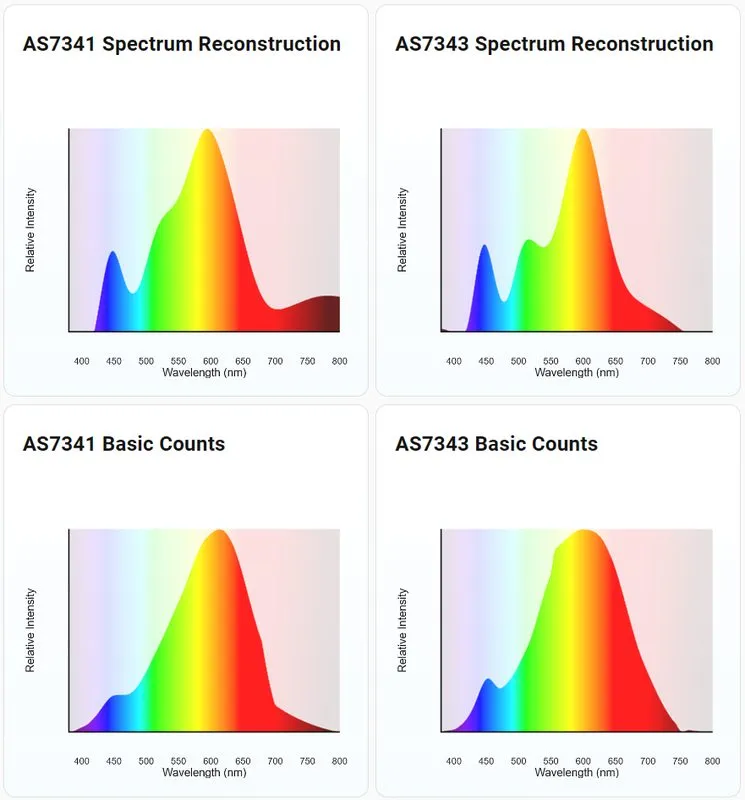
The lamp above is a blue emitter behind a phosphor, which is why the rebuilt curve shows a narrow spike near 450nm from the emitter and a broad hump near 600nm from the phosphor.
Calibration
Section titled “Calibration”The calibration block holds the corrections applied while a raw count becomes a basic count. They run in this
order:
- The channel’s
dark_currentis subtracted and the result is clamped at zero. - The device’s own gain correction is applied.
- The channel’s
channel_correctionis applied. glass_attenuation_factoris applied.
These corrections move the basic_counts sensors and everything computed from them. They do not touch the
counts sensors, which always report what the device returned.
Set glass_attenuation_factor when the sensor sits behind a window or enclosure that dims everything it sees by
a known amount. To measure your own dark_current, cover the sensor completely and record the basic counts each
channel reports; those values are the offsets to subtract.
Channel Order
Section titled “Channel Order”channel_correction and dark_current both take one value per channel, and the list length has to match the
model exactly: 10 values for the AS7341, 13 for the AS7343 and TCS3448. There is no syntax for setting a single
channel, so changing one value means supplying the whole list.
The values are read in the order ESPHome lists the channels, which is not wavelength order. On the AS7343, fy
(555nm) comes before f5 (550nm):
- AS7341:
f1,f2,f3,f4,f5,f6,f7,f8,nir,clear - AS7343:
f1,f2,fz,f3,f4,fy,f5,fxl,f6,f7,f8,nir,clear
Default Channel Correction
Section titled “Default Channel Correction”The AS7341 has no published per-device calibration, so all ten of its factors default to 1.0 and the channels
are left as the device reports them.
The AS7343 and TCS3448 default to the manufacturer’s factors for a golden reference device:
| Position | Channel | Wavelength | Default factor |
|---|---|---|---|
| 1 | f1 | 405nm | 1.055464349 |
| 2 | f2 | 425nm | 1.043509797 |
| 3 | fz | 450nm | 1.029576268 |
| 4 | f3 | 475nm | 1.017505200 |
| 5 | f4 | 515nm | 1.004418990 |
| 6 | fy | 555nm | 0.987356499 |
| 7 | f5 | 550nm | 0.957597044 |
| 8 | fxl | 600nm | 0.995863485 |
| 9 | f6 | 640nm | 1.014628964 |
| 10 | f7 | 690nm | 0.996500814 |
| 11 | f8 | 745nm | 0.933072749 |
| 12 | nir | 855nm | 1.052236338 |
| 13 | clear | 0.999570232 |
dark_current defaults to 0.0 for every channel on both models.
WARNING
Supplying channel_correction replaces the entire list, defaults included. To adjust one channel on an
AS7343, copy the other twelve values from the table above into your own list, or you will silently drop the
manufacturer’s calibration for them.
Adjusting One Channel
Section titled “Adjusting One Channel”Compare the channel against a reference, then scale its existing factor by how far off it reads:
For example, if f5 on an AS7343 reads half of what it should, its factor becomes
0.957597044 * 2 = 1.915194088, and the whole list is given with that one value changed:
as734x: - id: spectral type: AS7343 calibration: channel_correction: - 1.055464349 # f1 - 1.043509797 # f2 - 1.029576268 # fz - 1.017505200 # f3 - 1.004418990 # f4 - 0.987356499 # fy - 1.915194088 # f5, adjusted - 0.995863485 # fxl - 1.014628964 # f6 - 0.996500814 # f7 - 0.933072749 # f8 - 1.052236338 # nir - 0.999570232 # clearNOTE
Channels differ in bandwidth as well as centre wavelength, so two neighbouring channels do not read the same
under the same light even when both are working correctly. On the AS7343 in particular, fy is a wideband
channel and f5 is narrow, so f5 reading lower than fy is expected rather than a fault. Compare a channel
against a reference instrument or a known source before correcting it, and use a smooth broadband source: a
narrow LED peak that falls between two filters looks exactly like a broken channel.
Derived Light Metrics
Section titled “Derived Light Metrics”Beyond the per-channel readings, the component can publish several whole-light measurements. Each one is a
weighted sum over the channels, using per-channel factors from the manufacturer, and each is calculated from the
basic counts. You do not have to configure the basic_counts sensors to use them, but they do
share the same calibration, so anything you change there moves these values too.
normalize_basic_counts does not affect them: they are always calculated from the absolute basic counts.
color_temperature and rgb_hex describe the colour rather than the strength of the light. Both come from CIE
1931 tristimulus values summed over the channels, with the colour temperature using McCamy’s approximation. The
brightness measurements are explained below.
NOTE
These factors, and the AS7343 defaults in Calibration, come from ams OSRAM measurements of a
golden device: one reference part characterised under known light. Your sensor is not that part. Filter
response and sensitivity vary a little between individual chips, so two sensors under the same light can
report somewhat different absolute values. Readings taken from one sensor stay comparable with each other,
which is what most automations need. For absolute accuracy, compare the sensor against a reference
instrument and fold the difference into channel_correction.
What the Brightness Measurements Mean
Section titled “What the Brightness Measurements Mean”They all answer the question “how much light is there”, but each counts a different thing, so their values are not interchangeable and generally do not track each other between light sources.
Photopic irradiance is the radiant power arriving on a surface, in watts per square metre, weighted by the standard curve for human vision, which describes how sensitive the light-adapted eye is at each wavelength. That curve peaks at 555nm in the green and falls to nothing below about 400nm and above about 700nm, so a watt of green light contributes almost all of itself, a watt of deep red very little, and a watt of infrared nothing at all. Illuminance is this same quantity multiplied by 683 lm/W, the luminous efficacy of light at 555nm, which converts it to lux. Photopic irradiance and illuminance are therefore one measurement in two units; use lux when you care about how bright a space looks to people.
PAR irradiance covers photosynthetically active radiation: the power falling in the 400nm to 700nm band that plants use. Inside that band nothing is weighted, so a watt of blue counts exactly as much as a watt of red; outside it, nothing counts at all. It is radiant power with a 400nm to 700nm window applied and no curve.
PPFD, photosynthetic photon flux density, covers the same 400nm to 700nm window but counts photons per second instead of watts, in micromoles per square metre per second. Photosynthesis responds to the number of photons absorbed rather than the energy they carry: one photon drives one reaction whether it is a high-energy blue photon or a low-energy red one. Since blue photons carry more energy than red ones, a watt of blue light is fewer photons than a watt of red, which is why PPFD and PAR irradiance disagree between lights of different colour. PPFD is what horticultural lighting is rated in and the figure to compare grow lights on.
In short: use illuminance for spaces people occupy and ppfd for growing plants.
NOTE
These are estimates from a 10 or 13 channel sensor, not laboratory measurements. Treat them as good for
tracking change over time and for comparing one light against another, rather than as absolute values. In very
dim light there is not enough signal to place a colour, and color_temperature reports 0.
# Example configuration entry with derived metricssensor:  - platform: as734x    illuminance:      name: "Illuminance"    ppfd:      name: "PPFD"    color_temperature:      name: "Color Temperature"
text_sensor:  - platform: as734x    rgb_hex:      name: "Colour"
Optical Setup
Section titled “Optical Setup”The sensor only measures the light that actually reaches its photodiodes, so what sits in front of it matters as much as the settings. The optical design guide for these parts asks for a diffuser above the sensor, chosen so that:
- The top of the diffuser is lit evenly, whatever the size and position of the light source.
- The field of view is wide, so a source is still detected when the device is turned away from it.
- Nothing in front of the diffuser casts a hot spot or a shadow. Both move as the angle of the incoming light changes, and because the photodiodes sit side by side, a hot spot covers some of them more than others. The same light is then measured as a different spectrum.
- The diffuser scatters the incoming rays completely, leaving no directional information for the sensor to pick up.
Without one, a bare sensor still produces readings, but they shift as the light moves around the room, and the
colour values are the first to suffer. Any cover you do add absorbs some light, which is what
glass_attenuation_factor compensates for.
Integration Time
Section titled “Integration Time”The integration time determines how long a single channel measurement takes and depends on atime and astep.
The formula for the total integration time is:
The defaults of atime: 29 and astep: 599 give an integration time of 50ms.
One update does not take exactly this long. The AS7341 has more channels than it has ADCs, so it measures them
in two passes and takes two integration times per update. The AS7343 cycles internally and takes three. The
sensor is read without blocking the rest of the device, so a long integration time does not stall other
components, but keep the total below your update_interval.
Moving From as7341
Section titled “Moving From as7341”The as7341 platform keeps working. To move to as734x, add an as734x entry with type: AS7341 and the
gain, atime, astep, address and update_interval options, then change the sensor platform to as734x
and move the bands under counts. The options keep their names and their defaults.
# Old configurationsensor: - platform: as7341 gain: X8 f1: name: "415nm" clear: name: "Clear"# New configurationas734x: - id: spectral type: AS7341 gain: X8
sensor: - platform: as734x as734x_id: spectral counts: f1: name: "415nm" clear: name: "Clear"WARNING
The reported values change when you move over. The AS7341 returns its data registers low byte first, and the
as7341 platform never accounted for this, so its counts come out byte-swapped. The as734x component reads
them correctly. In practice a true count below 256 was reported by the old platform as 256 times too large, and
a larger count had its two bytes the wrong way round. Any automation, filter or long-term statistic built on
the old values will need to be revisited.
See Also
Section titled “See Also”- Sensor Filters
- AS734x Spectrum Card, a Home Assistant card that charts these channels
- AS7341 Spectral Color Sensor
- Adafruit_AS7341
- SparkFun_AS7341X_Arduino_Library
- API Reference: as734x.h