

MT6701 14-Bit Magnetic Angle Sensor
The mt6701 sensor platform lets you use your MT6701
(datasheet) 14-bit absolute magnetic angle
sensor / rotary encoder with ESPHome. The chip reports the shaft angle of a
diametrically magnetized magnet placed over it and can be read over either the
I²C or the SSI (SPI-compatible) interface.
This is a minimal driver: it reports the absolute angle and, over I²C, lets you configure the chip’s ABZ / UVW / analog outputs. Higher-level quantities such as multi-turn position or rotational speed are left to you to compute in YAML from the angle it exposes (see Deriving Position and Speed).
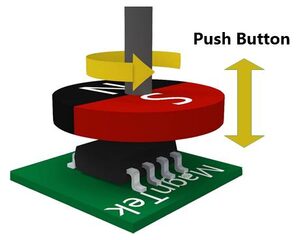
Pick one interface and add the matching hub, then add individual sensors with the MT6701 Sensor Platform.
| Capability | mt6701_i2c | mt6701_spi (SSI) |
|---|---|---|
| Absolute angle / raw count | yes | yes |
| CRC-validated frames | no | yes |
| Field status / push button / track loss | no | yes |
| Write chip configuration | yes | no |
| Save configuration to EEPROM | yes | no |
If five reads in a row fail (a bus error, or over SSI a CRC mismatch), the hub raises a warning status. It clears on the next good read.
I2C Hub
Section titled “I2C Hub”To use the encoder over I²C, first set up the I²C Bus and connect the sensor to the pins specified there.
mt6701_i2c: id: my_encoderConfiguration Variables
Section titled “Configuration Variables”-
address (Optional, int): The I²C address of the sensor. Defaults to
0x06. The chip can be programmed to the alternate address0x46.NOTE
0x06is in the I²C reserved address range, which a bus scan skips, so the MT6701 will not appear in thescan:output even though it responds to direct reads. -
direction (Optional, string): The rotation direction in which the angle increases. Follows the datasheet’s
DIRbit (clockwisewritesDIR = 1). If your encoder counts the wrong way, flip this. Not written unless specified.clockwisecounterclockwise
-
zero_offset (Optional): The angle reported as
0. Accepts a raw 12-bit count (0-4095), an angle (45deg,90°) or a percentage of a full turn (12.5%). -
hysteresis (Optional, float): Output hysteresis window in LSBs of the 12-bit output. One of
0(off),0.25,0.5,1,2,4,8. -
output_mode (Optional, string): Selects the incremental output format on the shared output pins.
abzuvw
-
abz (Optional): ABZ incremental output settings.
- pulses_per_revolution (Optional, int): AB pulses per turn,
1-1024. - z_pulse_width (Optional, string): Width of the Z index pulse. One of
1lsb,2lsb,4lsb,8lsb,12lsb,16lsb,180deg.
- pulses_per_revolution (Optional, int): AB pulses per turn,
-
uvw (Optional): UVW output settings.
- pole_pairs (Required, int): Emulated motor pole pairs,
1-16.
- pole_pairs (Required, int): Emulated motor pole pairs,
-
out_pin (Optional): Analog / PWM output pin settings.
- mode (Required, string): Output-pin mode,
analogorpwm. - pwm_frequency (Optional, string):
994.4hzor497.2hz. - pwm_polarity (Optional, string):
highorlow. - analog_start / analog_stop (Optional): Start/stop angles of the analog or PWM output range (12-bit, same units as zero_offset).
- mode (Required, string): Output-pin mode,
-
id (Optional, ID): Manually specify the ID for this MT6701 hub.
-
All other options from I²C Bus.
The hub does not poll on its own: the sensors below read the encoder at their
own update_interval.
NOTE
Configuration options are applied on every boot and take effect immediately in
RAM. They are not written to EEPROM unless you explicitly call the
mt6701_i2c.save_eeprom action.
NOTE
The I²C pins double as the ABZ outputs, and on the SOP-8 package also as the
UVW outputs; the chip’s MODE pin selects which of the two they carry. To use
ABZ or UVW output that you configure here, save it to EEPROM first and then
switch the MODE pin. The analog / PWM output has a pin of its own.
SSI/SPI Hub
Section titled “SSI/SPI Hub”The SSI interface is SPI-compatible and read-only, but it also reports the magnetic-field status, push button and track-loss flags that are not available over I²C. Each 24-bit frame is CRC-checked. First set up the SPI Bus.
mt6701_spi: id: my_encoder cs_pin: GPIOXXConfiguration Variables
Section titled “Configuration Variables”-
cs_pin (Required, Pin): The chip-select (CSN) pin.
-
id (Optional, ID): Manually specify the ID for this MT6701 hub.
-
All other options from SPI Bus. The bus needs a
miso_pin; the component defaults to SPI mode 1 at 1 MHz, so you normally do not need to changedata_rateorspi_mode.
The hub does not poll on its own: the sensors below read the encoder at their
own update_interval, and every read refreshes the status flags.
NOTE
A disconnected or stuck-low data line reads as all-zero frames, which pass the
CRC. When every frame at boot reads zero the hub logs a warning, but keeps
working, since an encoder resting at exactly 0 looks the same.
Sensor
Section titled “Sensor”The mt6701 sensor publishes the absolute angle (and, optionally, the raw
count) from your MT6701. Set up an I²C or
SSI/SPI hub first, then add this platform.
sensor: - platform: mt6701 mt6701_id: my_encoder name: Encoder AngleConfiguration Variables
Section titled “Configuration Variables”-
name (Required, string): The name of the angle sensor, in degrees (
0-360). -
mt6701_id (Optional, ID): The ID of the hub to read from.
-
raw_count (Optional): The raw 14-bit count,
0-16383.- All other options from Sensor.
-
update_interval (Optional, Time): The publish interval. Each poll also triggers a fresh read of the encoder. Defaults to
60s. -
All other options from Sensor.
Binary Sensor
Section titled “Binary Sensor”The mt6701_spi binary sensors expose the status flags carried in the SSI
frame. They are only available on the SSI/SPI hub.
binary_sensor: - platform: mt6701_spi mt6701_spi_id: my_encoder push_button: name: Encoder Button track_loss: name: Encoder Track LossConfiguration Variables
Section titled “Configuration Variables”-
push_button (Optional): On when the magnetic push-button gesture is detected.
- All other options from Binary Sensor.
-
track_loss (Optional): On when the encoder reports a tracking loss / overspeed condition.
- All other options from Binary Sensor.
-
mt6701_spi_id (Optional, ID): The ID of the SSI/SPI hub.
-
update_interval (Optional, Time): How often the flags are read. A push has to be seen between two reads, so this is short. Defaults to
50ms.
Text Sensor
Section titled “Text Sensor”The mt6701_spi text sensor exposes the magnetic-field status. It is only
available on the SSI/SPI hub.
text_sensor: - platform: mt6701_spi mt6701_spi_id: my_encoder name: Encoder Field StatusThe reported value is one of:
OK: the magnet distance is fine.TOO_STRONG: the magnet is too close / the field is too strong.TOO_WEAK: the magnet is too far / the field is too weak.UNKNOWN: the reserved status code.
Configuration Variables
Section titled “Configuration Variables”- mt6701_spi_id (Optional, ID): The ID of the SSI/SPI hub.
- update_interval (Optional, Time): How
often the field status is read. Defaults to
60s. - All other options from Text Sensor.
mt6701_i2c.save_eeprom Action
Section titled “mt6701_i2c.save_eeprom Action”Writes the current configuration registers into the chip’s EEPROM so they
survive a power cycle. Only available on the mt6701_i2c hub. The hub stops
reading the encoder while the chip programs its EEPROM.
The chip loads its EEPROM at power-up, so the datasheet verifies the programming by power-cycling the chip and reading the registers back. To check it, remove the options from your configuration (so they are not written again at boot), power-cycle the device and confirm the outputs behave as programmed.
button: - platform: template name: Save Encoder Config on_press: - mt6701_i2c.save_eeprom: my_encoder- id (Required, ID): The
mt6701_i2chub to program.
CAUTION
The MT6701 EEPROM has a limited number of write cycles. Never call this action from a periodic automation; trigger it only manually. The datasheet also requires the supply voltage to be 4.5-5.5 V during the programming window of more than 600 ms, so a 3.3 V-powered sensor should not be programmed.
Deriving Position and Speed
Section titled “Deriving Position and Speed”The MT6701 is an absolute angle sensor: it reports where the shaft points right
now (0-360°), not how many turns it has made or how fast it spins. Those are
easy to derive in YAML with a couple of globals and template sensors, which
keeps them under your control (initial value, reset, units, filtering).
globals:  - id: enc_position # accumulated multi-turn angle, in degrees    type: double    restore_value: false    initial_value: "0"  - id: enc_prev_angle    type: float    restore_value: false    initial_value: "-1"  - id: enc_prev_us    type: uint32_t    restore_value: false  - id: enc_rpm    type: float    restore_value: false
sensor:  - platform: mt6701    mt6701_id: my_encoder    id: encoder_angle    name: Encoder Angle    update_interval: 100ms    on_value:      then:        - lambda: |-            const float angle = x;            const uint32_t now = micros();            if (id(enc_prev_angle) >= 0.0f) {              float diff = angle - id(enc_prev_angle);              if (diff > 180.0f) diff -= 360.0f;              else if (diff < -180.0f) diff += 360.0f;              id(enc_position) += diff;              const uint32_t dt = now - id(enc_prev_us);              if (dt > 0)                id(enc_rpm) = (diff / 360.0f) / (dt / 60000000.0f);            }            id(enc_prev_angle) = angle;            id(enc_prev_us) = now;
  - platform: template    name: Encoder Position    unit_of_measurement: °    accuracy_decimals: 1    update_interval: 100ms    lambda: "return id(enc_position);"
  - platform: template    name: Encoder Velocity    unit_of_measurement: RPM    accuracy_decimals: 1    update_interval: 100ms    lambda: "return id(enc_rpm);"    filters:      - sliding_window_moving_average:          window_size: 5
NOTE
Both values are inferred from the change between two angle samples, so their
accuracy depends on how often the angle sensor updates: the shaft must move
less than half a turn between samples, or the wrap detection guesses the wrong
direction. At update_interval: 100ms that ceiling is ~300 RPM; lower the
interval for faster shafts.