

LD6002B 3D Presence Radar
Component
Section titled “Component”The ld6002b component allows you to use the Hi-Link HLK-LD6002B 60 GHz 3D presence radar module with
ESPHome. It can track up to 3 people and reports per-target position (X/Y/Z), cluster ID, and Doppler
index.
The UART component is required. baud_rate, data_bits, parity and
stop_bits must be 115200, 8, NONE and 1.
WARNING
Avoid the ESP’s UART0 pins (GPIO1/GPIO3 on the classic ESP32; other variants differ). The
bootloader prints its boot log on UART0 TX at 115200 baud on every reset, and this stray data
can corrupt the radar’s internal state until it is power cycled. The module has no reset pin or
reset command, so use a UART that stays quiet during boot.
# Example configuration entryld6002b: id: ld6002b_radarConfiguration Variables
Section titled “Configuration Variables”- id (Optional, ID): Manually specify the ID for this component.
- uart_id (Optional, ID): Manually specify the ID of the UART Component to use. Required if you have multiple UARTs configured.
- wakeup_pin (Optional, Pin Schema): Pin used to wake the
radar from low power mode. Required if you want
auto_wakeor thewakebutton to function. Withlow_powerenabled and nowakeup_pinwired, the first command after an idle period is consumed as a wake-up and is retried automatically; wiringwakeup_pinavoids that retry. - wakeup_pulse (Optional, Time, default:
50ms): Pulse length for the wakeup pin. Requireswakeup_pin. - auto_wake (Optional, boolean, default:
true): Pulsewakeup_pinbefore sending a command. Requireswakeup_pin.
Power and Hardware Requirements
Section titled “Power and Hardware Requirements”WARNING
The module is sensitive to power quality. Supply 3.1–3.5 V with ripple ≤ 50 mV and current capacity ≥ 1 A. For DC-DC supplies, use a switching frequency of at least 2 MHz.
- GPIO IO voltage is 3.3 V.
- The TX2 pin can output a simple presence signal (high when presence is detected).
- Boot requires BOOT1 held low before startup (BOOT pins are pulled up internally).
Specifications
Section titled “Specifications”- Operating frequency: 58–64 GHz.
- Emission power: 12 dBm; antenna gain: 4 dBi.
- Beam width: ±60° horizontal and vertical (-3 dB).
- Operating temperature: -20 to 85 °C.
- Maximum tracked targets: 3.
- Distance accuracy: ~0.4 m; identification accuracy: 95% (module spec).
Installation and Coordinate System
Section titled “Installation and Coordinate System”The module supports top and side mounting. The horizontal and vertical beam angles are ±60° and the maximum detection distance is 6 m. A typical ceiling installation at 2.7 m height yields a detection area of roughly 5 m by 3 m.
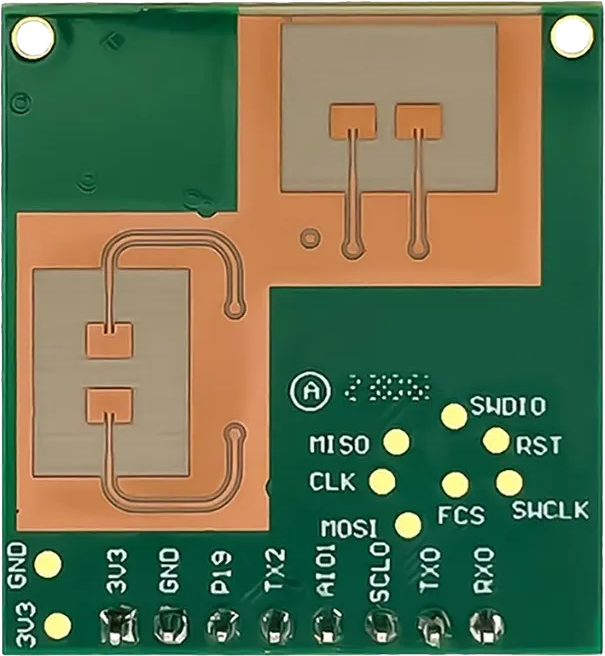
Mount the module in the orientation shown at the top of this page, with the antenna side facing the detection area and the pin header along the bottom edge; the reported X/Y/Z axes assume this orientation.
Target and area coordinates are reported in meters. The origin is the module projection onto the reference plane (floor for ceiling installs, wall for side installs). X is left/right, Y is forward/away, and Z is height. Detection and interference areas are configured relative to this origin.
NOTE
Detection distance varies with target size and environment. Some variation is expected.
Area Configuration Notes
Section titled “Area Configuration Notes”Detection areas define where presence is considered valid for the TX2 output and the
detection_area_N binary sensors. Interference areas mask known noise sources (fans, air
conditioners, curtains) so they do not trigger presence. Areas are stored in the module and persist
across power cycles.
Use area_id to select the area, set area_config, then press Apply Area. Use Get Areas to
read back stored values. A value you set on one of the area_config numbers is kept until you apply
it or switch to another area_id, so an area read does not overwrite an edit in progress.
NOTE
Apply Area writes all six coordinates of the selected area, combining the values you set with the ones cached from the last area read, which happens on boot and after Auto Interference, Clear Interference and Reset Detection Area. If a bound is still unknown, the component requests the current areas first and applies the update once a fresh report arrives; if that report is still incomplete, the update is dropped with a warning.
Binary Sensor
Section titled “Binary Sensor”The ld6002b binary sensor provides presence detection for targets and detection areas.
binary_sensor: - platform: ld6002b ld6002b_id: ld6002b_radar target: name: Presence target_1: name: Target-1 Presence detection_area_0: name: Area-0 PresenceConfiguration Variables
Section titled “Configuration Variables”- ld6002b_id (Optional, ID): Manually specify the ID of the LD6002B component.
- target (Optional): True if any target is detected or any detection area reports presence. All options from Binary Sensor.
- target_N (Optional): True if target slot N (N = 1 to 3) is occupied:
target_1,target_2,target_3. A person keeps the same slot for as long as they are tracked continuously, and a new person takes the lowest free slot. All options from Binary Sensor. - detection_area_N (Optional): True if presence is detected in detection area N (0 to 3):
detection_area_0,detection_area_1,detection_area_2,detection_area_3. All options from Binary Sensor.
NOTE
The detection_area_N sensors are cleared when the module reports that it entered unattended
low-power mode. If a target is still being tracked at that moment the clear is skipped, because a
tracked target is the more recent statement about the room.
Sensor
Section titled “Sensor”The ld6002b sensor provides target coordinates, point-cloud count, and configured area coordinates.
sensor: - platform: ld6002b ld6002b_id: ld6002b_radar target_count: name: Target Count point_count: name: Point Count target_1: x: name: Target-1 X y: name: Target-1 Y z: name: Target-1 Z doppler_index: name: Target-1 Doppler Index cluster_id: name: Target-1 ClusterConfiguration Variables
Section titled “Configuration Variables”-
ld6002b_id (Optional, ID): Manually specify the ID of the LD6002B component.
-
target_count (Optional, int): Total number of targets currently detected (0 to 3). All options from Sensor.
-
point_count (Optional, int): Total number of point-cloud points reported by the radar. All options from Sensor.
-
target_N (Optional): Details about each target (N = 1 to 3). Up to 3 targets can be tracked simultaneously:
target_1,target_2,target_3. A tracked person keeps the sametarget_Nslot for as long as they remain tracked, and a new person takes the lowest free slot.- x (Optional, float): X coordinate of the target in meters.
- y (Optional, float): Y coordinate of the target in meters.
- z (Optional, float): Z coordinate of the target in meters.
- doppler_index (Optional, int): Doppler index for the target (speed indicator, not a direct speed).
- cluster_id (Optional, int): Cluster ID for the target.
All options above inherit from Sensor.
Slot identity comes from the module’s own spatial clustering, so it is stable rather than perfect: two people standing very close together can merge into a single target, a track’s cluster ID can occasionally change while the person is still in the room, and a slot left by someone who leaves is reused by the next new person. Watch
cluster_idto see when a slot changes hands; it is published only when the value changes, not on every frame. -
interference_area_N (Optional): Interference (mask) area coordinates (N = 0 to 3). Each area provides
x_min,x_max,y_min,y_max,z_min,z_maxsensors. All options from Sensor. -
detection_area_N (Optional): Detection area coordinates (N = 0 to 3). Each area provides
x_min,x_max,y_min,y_max,z_min,z_maxsensors. All options from Sensor.
NOTE
The per-target x, y, z and doppler_index sensors come with these
filters by default. They hold the last reading for a second, so a
dropped frame does not read as a gap, and then limit how often updates reach the frontend:
- timeout: timeout: 1s value: last- throttle_with_priority: 1sGiving a sensor its own filters: replaces the defaults; use filters: [] to drop them. For
example, to get faster updates on a single axis:
target_1: x: name: Target-1 X filters: - throttle_with_priority: 300msIf a Target Display switch is configured, its restore_mode decides whether target reporting
starts on boot; the default is RESTORE_DEFAULT_ON. Without that switch, the component enables
target reporting automatically when any target sensors or the work_mode text sensor are
configured. While target reporting is disabled, target sensors remain unknown.
If you configure any area sensors or area configuration numbers, the component requests stored area data on boot. You can also use Get Areas to refresh the values.
NOTE
If a point_cloud switch is configured, it owns the point cloud stream and its restore_mode decides
the boot state, and turning it off returns point_count to unknown. Without that switch,
configuring point_count starts the stream on boot on its own.
The stream sends large frames over the 115200 baud link, so leave it on only while you need the
count. Configuring the switch or the sensor also reserves a larger 4 KB frame buffer at boot.
Text Sensor
Section titled “Text Sensor”The ld6002b text sensor exposes radar operating mode and firmware version.
text_sensor: - platform: ld6002b ld6002b_id: ld6002b_radar work_mode: name: Work Mode ota_version: name: OTA VersionConfiguration Variables
Section titled “Configuration Variables”- ld6002b_id (Optional, ID): Manually specify the ID of the LD6002B component.
- work_mode (Optional):
normalorlow_powerbased on the radar work mode. All options from Text Sensor. - ota_version (Optional): Firmware version string, if supported by your module firmware. All options from Text Sensor.
NOTE
work_mode reflects the current operating state and can differ from the low_power switch setting.
If the module firmware does not emit work mode reports, ESPHome falls back to the configured low-power
setting after a Get Low Power Mode request. In this fallback, ESPHome treats any detected presence
as normal.
NOTE
Firmware updates use the vendor OTA upgrade tool; see the HLK OTA documentation provided with the module.
Number
Section titled “Number”The ld6002b number platform lets you configure timing and detection areas.
number: - platform: ld6002b ld6002b_id: ld6002b_radar hold_delay: name: Hold Delay (s) z_min: name: Z Min (m) z_max: name: Z Max (m) low_power_sleep_time: name: Low Power Sleep (ms) area_config: x_min: name: Area X Min x_max: name: Area X Max y_min: name: Area Y Min y_max: name: Area Y Max z_min: name: Area Z Min z_max: name: Area Z MaxConfiguration Variables
Section titled “Configuration Variables”- ld6002b_id (Optional, ID): Manually specify the ID of the LD6002B component.
- hold_delay (Optional, range
0–65535s, step1): Presence hold time, in seconds (default 30 s in the 2025 protocol spec). All options from Number. - z_min / z_max (Optional, range
-10–10m, step0.1): Global Z-axis detection range, in meters. All options from Number. - low_power_sleep_time (Optional, range
0–60000ms, step100): Low power sleep time in milliseconds (default 500 ms). When low-power mode is enabled and the area is unattended, the module sleeps for this interval between scans; higher values reduce idle power but increase detection latency. All options from Number. - area_config (Optional): Coordinate values (
x_min/x_max/y_min/y_max/z_min/z_max, each range-10–10m, step0.1) for the selected area ID. Requires both aselect.area_idand abutton.apply_areaon the sameld6002b(enforced at compile time); set the values, then press Apply Area to send them. A minimum above its matching maximum is rejected with a warning instead of being written.
Select
Section titled “Select”The ld6002b select platform configures sensitivity, trigger speed, installation mode, and the
active area ID.
select: - platform: ld6002b ld6002b_id: ld6002b_radar sensitivity: name: Sensitivity trigger_speed: name: Trigger Speed installation_mode: name: Installation Mode area_id: name: Area IDConfiguration Variables
Section titled “Configuration Variables”- ld6002b_id (Optional, ID): Manually specify the ID of the LD6002B component.
- sensitivity (Optional):
low,medium, orhigh.lowonly detects motion. All options from Select. - trigger_speed (Optional):
fast(~0.5 s),medium(~1 s), orslow(~5 s), the time from detecting a person to triggering. All options from Select. - installation_mode (Optional):
toporside. All options from Select. - area_id (Optional): Area to edit with
area_config. Options areinterference_area_0throughinterference_area_3anddetection_area_0throughdetection_area_3(mapped internally to IDs 0–7). All options from Select.
NOTE
If no area ID is selected, Apply Area is ignored to prevent writing to the wrong region.
Switch
Section titled “Switch”The ld6002b switch platform enables low power mode, point-cloud output, and target reporting.
switch: - platform: ld6002b ld6002b_id: ld6002b_radar low_power: name: Low Power point_cloud: name: Point Cloud target_display: name: Target DisplayConfiguration Variables
Section titled “Configuration Variables”- ld6002b_id (Optional, ID): Manually specify the ID of the LD6002B component.
- low_power (Optional): Enable or disable low power mode. In low power mode, the module uses a lower duty cycle when the area is empty and returns to full tracking on motion. The module documentation reports ~2.5 mA average current in low power idle and ~135 mA in normal tracking. All options from Switch.
- point_cloud (Optional): Enable or disable point-cloud reporting, which is what
point_countreads. All options from Switch. - target_display (Optional): Enable or disable target reporting (
0x0A04). If disabled, target sensors will showunknownand target presence binary sensors turn off until re-enabled. All options from Switch.
NOTE
Each switch applies its own restore_mode on boot. point_cloud
and low_power keep the standard ALWAYS_OFF default, so enable Point Cloud when you want the
stream. target_display defaults to RESTORE_DEFAULT_ON, so target reporting starts on unless a
stored state or your own restore_mode says otherwise. inverted is not available on these
switches: they report what the module is doing, not how something is wired to it. The full point
cloud is not exposed as a text sensor; use point_count to monitor how many points are returned.
The low_power switch enables or disables low-power mode. The work_mode text sensor reflects the
current operating state, which may stay in normal while movement is detected.
Button
Section titled “Button”The ld6002b button platform exposes configuration and diagnostic commands.
button: - platform: ld6002b ld6002b_id: ld6002b_radar apply_area: name: Apply Area auto_interference: name: Auto Interference get_areas: name: Get Areas get_installation: name: Get Installation wake: name: WakeConfiguration Variables
Section titled “Configuration Variables”- ld6002b_id (Optional, ID): Manually specify the ID of the LD6002B component.
- apply_area (Optional): Send the configured
area_configto the selectedarea_id. Requires aselect.area_idon the sameld6002b. All options from Button. - auto_interference (Optional): Generate interference areas from the current environment. Run this with no people present and with known interference sources active. To reset the generated interference areas, use Clear Interference. All options from Button.
- get_areas (Optional): Request stored interference/detection areas from the radar. All options from Button.
- clear_interference (Optional): Clear interference areas. All options from Button.
- reset_detection_area (Optional): Reset detection areas to defaults (4 m by 4 m). All options from Button.
- get_delay (Optional): Request hold delay. All options from Button.
- get_sensitivity (Optional): Request sensitivity state. All options from Button.
- get_trigger_speed (Optional): Request trigger speed state. All options from Button.
- get_z_range (Optional): Request Z-axis range. All options from Button.
- get_installation (Optional): Request installation mode from the radar and update the
installation_modeselect withtoporside. All options from Button. - get_low_power_mode (Optional): Request low power mode state. All options from Button.
- get_low_power_sleep_time (Optional): Request low power sleep time. All options from Button.
- reset_unattended (Optional): Reset the module’s unattended (no-person) state used by its low-power logic. Helpful if the device gets stuck in an unattended state. All options from Button.
- wake (Optional): Pulse the
wakeup_pinto wake the radar. Requireswakeup_pinon the parentld6002b. All options from Button.
Examples
Section titled “Examples”Targets Only (X/Y/Z For 3 Targets)
Section titled “Targets Only (X/Y/Z For 3 Targets)”uart: tx_pin: GPIOXX rx_pin: GPIOXX baud_rate: 115200
ld6002b: id: ld6002b_radar
sensor: - platform: ld6002b ld6002b_id: ld6002b_radar target_count: name: Target Count target_1: x: name: Target-1 X y: name: Target-1 Y z: name: Target-1 Z doppler_index: name: Target-1 Doppler Index target_2: x: name: Target-2 X y: name: Target-2 Y z: name: Target-2 Z doppler_index: name: Target-2 Doppler Index target_3: x: name: Target-3 X y: name: Target-3 Y z: name: Target-3 Z doppler_index: name: Target-3 Doppler Index
binary_sensor: - platform: ld6002b ld6002b_id: ld6002b_radar target_1: name: Target-1 Presence target_2: name: Target-2 Presence target_3: name: Target-3 PresenceFull Configuration
Section titled “Full Configuration”uart: id: uart_bus tx_pin: GPIOXX rx_pin: GPIOXX baud_rate: 115200
ld6002b: id: ld6002b_radar uart_id: uart_bus wakeup_pin: GPIOXX wakeup_pulse: 50ms auto_wake: true
binary_sensor: - platform: ld6002b ld6002b_id: ld6002b_radar target: name: Presence target_1: name: Target-1 Presence target_2: name: Target-2 Presence target_3: name: Target-3 Presence detection_area_0: name: Area-0 Presence detection_area_1: name: Area-1 Presence detection_area_2: name: Area-2 Presence detection_area_3: name: Area-3 Presence
sensor: - platform: ld6002b ld6002b_id: ld6002b_radar target_count: name: Target Count point_count: name: Point Count target_1: x: name: Target-1 X y: name: Target-1 Y z: name: Target-1 Z doppler_index: name: Target-1 Doppler Index cluster_id: name: Target-1 Cluster target_2: x: name: Target-2 X y: name: Target-2 Y z: name: Target-2 Z doppler_index: name: Target-2 Doppler Index cluster_id: name: Target-2 Cluster target_3: x: name: Target-3 X y: name: Target-3 Y z: name: Target-3 Z doppler_index: name: Target-3 Doppler Index cluster_id: name: Target-3 Cluster interference_area_0: x_min: name: Interference-0 X Min x_max: name: Interference-0 X Max y_min: name: Interference-0 Y Min y_max: name: Interference-0 Y Max z_min: name: Interference-0 Z Min z_max: name: Interference-0 Z Max detection_area_0: x_min: name: Detection-0 X Min x_max: name: Detection-0 X Max y_min: name: Detection-0 Y Min y_max: name: Detection-0 Y Max z_min: name: Detection-0 Z Min z_max: name: Detection-0 Z Max # interference_area_1..3 and detection_area_1..3 follow the same shape
text_sensor: - platform: ld6002b ld6002b_id: ld6002b_radar work_mode: name: Work Mode ota_version: name: OTA Version
number: - platform: ld6002b ld6002b_id: ld6002b_radar hold_delay: name: Hold Delay (s) z_min: name: Z Min (m) z_max: name: Z Max (m) low_power_sleep_time: name: Low Power Sleep (ms) area_config: x_min: name: Area X Min x_max: name: Area X Max y_min: name: Area Y Min y_max: name: Area Y Max z_min: name: Area Z Min z_max: name: Area Z Max
select: - platform: ld6002b ld6002b_id: ld6002b_radar sensitivity: name: Sensitivity trigger_speed: name: Trigger Speed installation_mode: name: Installation Mode area_id: name: Area ID
switch: - platform: ld6002b ld6002b_id: ld6002b_radar low_power: name: Low Power point_cloud: name: Point Cloud target_display: name: Target Display
button: - platform: ld6002b ld6002b_id: ld6002b_radar apply_area: name: Apply Area auto_interference: name: Auto Interference get_areas: name: Get Areas clear_interference: name: Clear Interference reset_detection_area: name: Reset Detection Area get_delay: name: Get Hold Delay get_sensitivity: name: Get Sensitivity get_trigger_speed: name: Get Trigger Speed get_z_range: name: Get Z Range get_installation: name: Get Installation get_low_power_mode: name: Get Low Power Mode get_low_power_sleep_time: name: Get Low Power Sleep Time reset_unattended: name: Reset Unattended wake: name: Wake