

Seeed Studio Multi-Channel Relay Switch
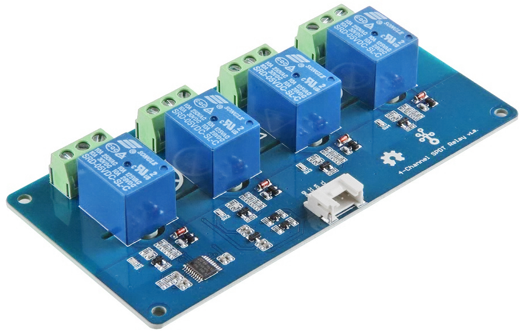
The seeed_multi_channel_relay component controls the relays of the Seeed Studio Grove multi-channel relay
boards over I²C: the
Grove 4-Channel SPDT Relay and the
Grove 8-Channel Solid State Relay.
# Example configuration entryseeed_multi_channel_relay:  id: relay_hub
switch:  - platform: seeed_multi_channel_relay    name: "Relay 1"    channel: 1
Configuration Variables
Section titled “Configuration Variables”- id (Optional, ID): Manually specify the ID used for code generation.
- address (Optional, int): The I²C address of the board. Defaults to
0x11. - i2c_id (Optional, ID): The I²C bus to use. Required with more than one bus.
Switch
Section titled “Switch”Each relay is a switch of the seeed_multi_channel_relay platform.
- channel (Required, int): The relay to control:
1to4on the 4-channel board,1to8on the 8-channel board. The component cannot tell the boards apart, so a channel the board does not have is accepted and does nothing. Each channel can be used once per board. - seeed_multi_channel_relay_id (Optional, ID): The board the relay belongs to. Required with more than one board.
- restore_mode (Optional): The board powers up with every relay off, so the default
RESTORE_DEFAULT_OFFmatches the hardware.DISABLEDbehaves likeALWAYS_OFFhere, because the component cannot leave a relay alone: it has to write all eight channels at once. See Switch. - All other options from Switch.
The board cannot report its relays, so the component keeps their state itself. After a restart of the ESP alone the board still drives the relays as they were.
WARNING
The first write after boot sets every channel from what the component knows, so a relay on a channel that has
no switch configured is turned off.
seeed_multi_channel_relay.change_address Action
Section titled “seeed_multi_channel_relay.change_address Action”Stores a new I²C address, from 0x08 to 0x77, in the board’s memory. The board answers at the new address
from then on, including after a power cycle, so run the action once and then set address to the new value.
button: - platform: template name: "Move relay board to 0x12" on_press: - seeed_multi_channel_relay.change_address: 0x12- address (Required, int, templatable): The new address.
- id (Optional, ID): The board to change. Required with more than one board.