

HDMI-CEC Bus
The hdmi_cec component connects an ESPHome device to the HDMI-CEC bus, so it can receive the messages
that travel between a TV and the devices attached to it, and send messages of its own: power a device on or
off, press a button on the TV’s remote, select an input, change the volume.
HDMI-CEC (Consumer Electronics Control) is a single wire in every HDMI cable, present as pin 13 of the connector. The wire is shared by all devices on an HDMI link, including those behind an A/V receiver or an HDMI switch, so one ESPHome device plugged into a spare HDMI port of the TV reaches every one of them. The bus is bidirectional, multi-master, and uses 3.3V signalling at a low bit rate, so a single GPIO pin is enough.
Wiring
Section titled “Wiring”- A GPIO pin that can be both input and output, to HDMI pin 13 (CEC)
- GND to HDMI pin 17 (DDC/CEC ground)
- Optional but recommended: the board’s 5V supply to HDMI pin 18, which tells the TV or receiver that something is connected and alive
An HDMI breakout board makes the connector easy to reach. The component configures the pin as an open-drain output with a weak pull-up, so no extra parts are needed for a first try; see Extended installation for a more robust connection.
Configuration
Section titled “Configuration”# Example configuration entryhdmi_cec: id: cec pin: GPIOXX address: 0x5The examples below assume id: cec.
Configuration Variables
Section titled “Configuration Variables”- pin (Required, Pin Schema): The GPIO pin wired to the CEC line.
- address (Required, int): The logical address the device answers to,
0x0to0xF.0x5is an audio system,0x4a playback device,0xFthe unregistered address; a device that only listens uses it together withmonitor_mode: true, as0xFalone still acknowledges broadcasts. - promiscuous_mode (Optional, boolean): Also hand messages addressed to other devices to
on_message. Defaults tofalse: only broadcasts and messages for this device’s address are seen. - monitor_mode (Optional, boolean): Listen without taking part in the bus: no acknowledge is sent for
messages addressed to this device, and
hdmi_cec.senddoes nothing. Defaults tofalse. - on_message (Optional, Automation): Automations to run for received messages, each
with optional filters:
- source (Optional, int): Only messages from this logical address.
- destination (Optional, int): Only messages to this logical address.
- opcode (Optional, int): Only messages with this opcode.
- data (Optional, list of int): Only messages whose payload starts with these bytes, the opcode first.
Inside the automation, source and destination are the logical addresses of the message as uint8_t,
and data is the payload starting with the opcode as a std::span<const uint8_t>. The payload is only
valid while the automation runs; copy it if a later action needs it.
NOTE
This component does not answer the TV’s questions on its own. A TV asks a new device for its physical
address, OSD name, vendor id and power status, and marks it absent when nothing comes back. Answer the
ones your TV needs with on_message automations; see Example: Answer the TV.
hdmi_cec.send Action
Section titled “hdmi_cec.send Action”Queues a message for transmission. Up to four messages wait in the queue while the bus is busy. A message is sent bit by bit from the main loop, which takes about 25 ms per byte, so the loop pauses for up to 400 ms while a message goes out; a warning about a slow operation during a send is expected.
button: - platform: template name: "Turn everything off" on_press: - hdmi_cec.send: destination: 0xF # broadcast data: [0x36] # Standby- destination (Required, int, templatable): The logical
address to send to,
0xFfor a broadcast. - data (Required, list of int, templatable): The
payload, the opcode first, up to 15 bytes. A lambda returns a
std::vector<uint8_t>.
The same is available in lambdas as id(cec).send(destination, {opcode, ...}). Both report the message in
the log once it is sent or when it was not acknowledged.
Example: Answer the TV
Section titled “Example: Answer the TV”hdmi_cec: id: cec pin: GPIOXX address: 0x5 on_message: - opcode: 0x8F # Give Device Power Status then: - hdmi_cec.send: destination: !lambda return source; data: [0x90, 0x00] # Report Power Status: onExample: TV Power and Volume
Section titled “Example: TV Power and Volume”button: - platform: template name: "TV Power On" on_press: - hdmi_cec.send: destination: 0x0 # the TV data: [0x44, 0x6D] # User Control Pressed: Power On - hdmi_cec.send: destination: 0x0 data: [0x45] # User Control Released, or the TV treats the key as held - platform: template name: "TV Volume Up" on_press: - hdmi_cec.send: destination: 0x0 data: [0x44, 0x41] # User Control Pressed: Volume Up - hdmi_cec.send: destination: 0x0 data: [0x45] # User Control Released - platform: template name: "TV Volume Down" on_press: - lambda: |- # User Control Pressed: Volume Down, then Released id(cec).send(0x0, {0x44, 0x42}); id(cec).send(0x0, {0x45});Not every TV honours every command; the log shows what was sent and received:
[D][hdmi_cec:089]: Sending: 50:44:41[D][hdmi_cec:123]: Send frame success in 1 attempt[D][hdmi_cec:056]: Received: 05:8F[D][hdmi_cec:089]: Sending: 50:90:00Example: Send from Home Assistant
Section titled “Example: Send from Home Assistant”api: actions: - action: hdmi_cec_send variables: cec_destination: int cec_data: int[] then: - hdmi_cec.send: destination: !lambda return cec_destination; data: !lambda return std::vector<uint8_t>(cec_data.begin(), cec_data.end());Extended Installation
Section titled “Extended Installation”Two additions make the connection more robust.
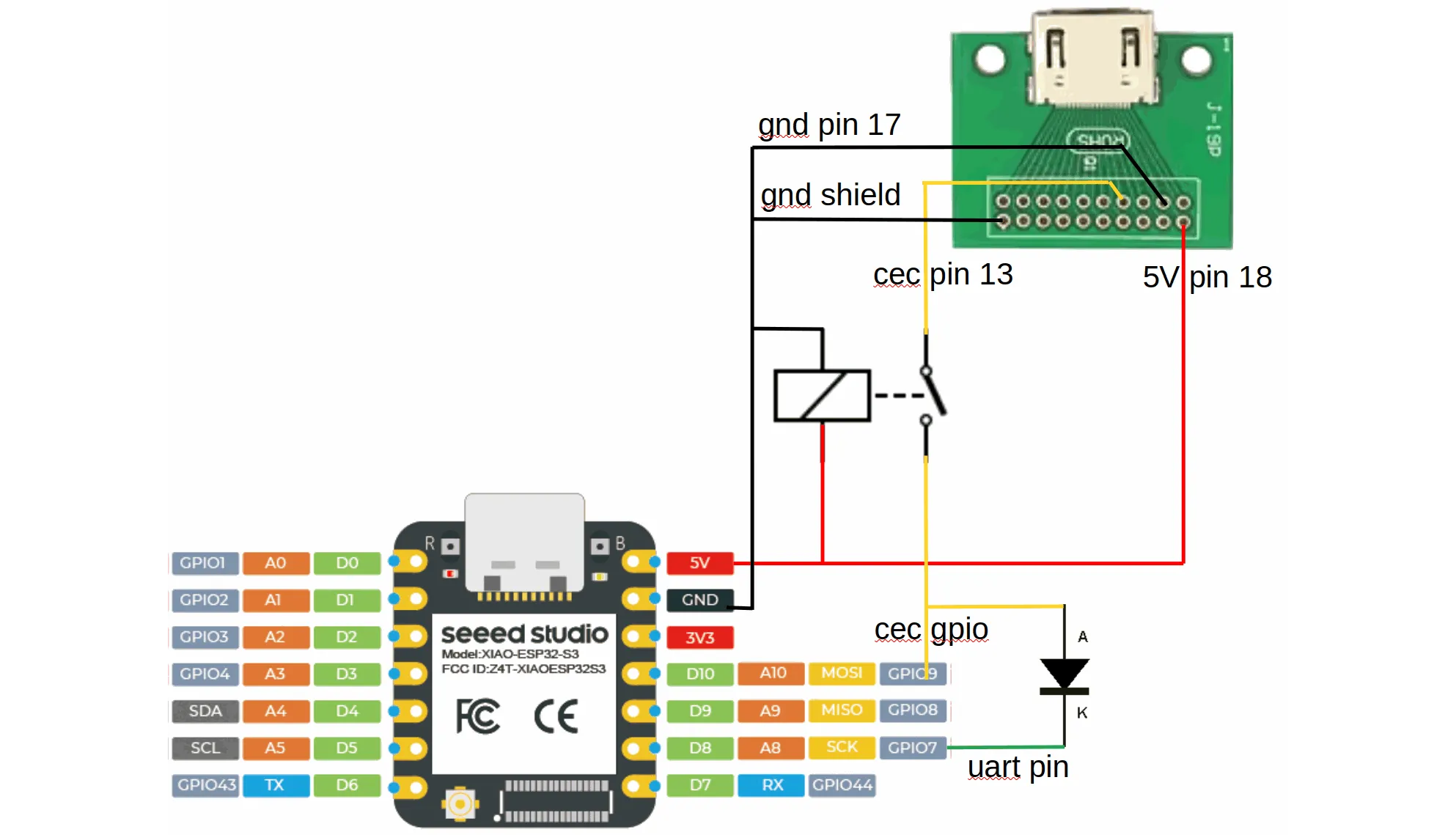
Disconnect from the CEC Line on Power-Down
Section titled “Disconnect from the CEC Line on Power-Down”The CEC line stays at 3.3V while the TV is on. A GPIO pin must not see a voltage above the device’s own supply, so with the ESPHome device powered off the line is outside the pin’s operating conditions. This is often ignored, at the risk of damaging the microcontroller or disturbing the other devices on the bus.
The schematic shows a small signal relay (a TQ2-5V or G6K-2P-5V, for instance) that disconnects the GPIO from the CEC line when the power is off. An I²C level shifter such as the TXS0102 or TCA9517 does the same job: it tolerates a bus voltage without local power, and its open-drain behaviour matches the CEC bus.
The diode and the second pin in the schematic are for driving the line from a UART, an option that is not part of this component yet; they can be left out.
Connect the HDMI Hot Plug Detect Pin
Section titled “Connect the HDMI Hot Plug Detect Pin”HDMI pin 19, Hot Plug Detect, is not part of CEC but tells when the cable is plugged into a TV. The TV drives it to 5V through a 1K resistor, so it has to be limited to 3.3V before it reaches a GPIO: a resistor divider (for example 10K to the pin and 20K from the pin to ground) or a 3.3V zener diode with a series resistor. The LED in the schematic below only shows the connection; its forward voltage is not a specification, so do not rely on it alone to protect the input.
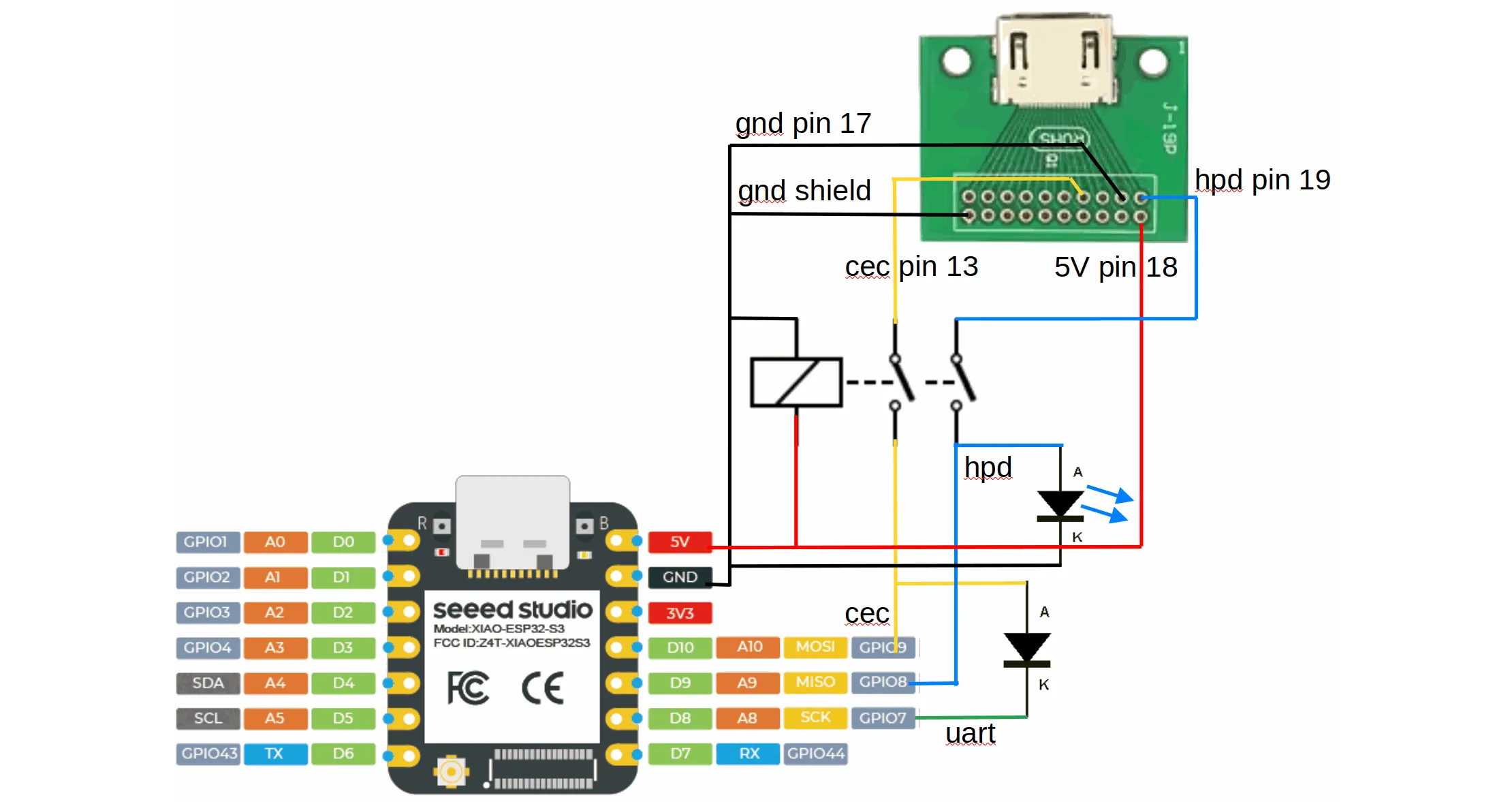
Configure the pin with a weak pull-down for a defined level when nothing is connected, and add delayed
filters: the signal bounces while plugging, and the TV pulls it low for a moment during address discovery.
binary_sensor: - platform: gpio pin: number: GPIOXX mode: input: true pulldown: true name: "HDMI Connected" filters: - delayed_on: 300ms - delayed_off: 300msNote on the HDMI Standard
Section titled “Note on the HDMI Standard”The HDMI 1.3a specification, available from hdmi.org, describes the CEC messages in Supplement 1, Consumer Electronics Control. Later versions are not public.
Marketing a product as HDMI needs a licence from the HDMI organisation; the component itself is available under the ESPHome licence.
Platform Compatibility
Section titled “Platform Compatibility”- ESP32-S3 and ESP32-C3: tested with the
arduinoandesp-idfframeworks - ESP8266: tested. The acknowledge bit is timed with hardware timer 1, which
esp8266_pwm,ac_dimmer,lightwaverfandopenthermuse as well, along with the Arduino core’stoneand servo outputs, so do not combine them with this component. - RP2040 and LibreTiny boards: compiled, not tested
Acknowledgements
Section titled “Acknowledgements”- johnboiles’ esphome-hdmi-cec was the starting point.
- Palakis’ Native HDMI-CEC component made it self-contained and added the interrupt driven receiver.
This component continues Palakis’ code with a transmit queue, retries spread over loop passes, and the collision detection the standard asks for.