

LD2450 Sensor
Component
Section titled “Component”The ld2450 component allows you to use the HLK-LD2450 human
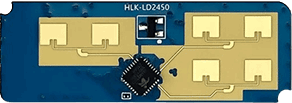
presence, motion detection and tracking radar module with ESPHome.
Target tracking involves real-time tracking of the position of a (moving) target within a specific area, enabling measurement of the target’s distance, angle and speed (relative to the sensor).
The LD2450 is a sensor module for motion target tracking within the Hi-link 24G millimeter-wave radar series. This module features simplified 24 GHz radar sensor hardware and intelligent algorithm firmware. It’s primarily intended for use indoors to enable the location tracking of moving human targets.
HLK-LD2450 official data sheet and user manuals
NOTE
Ensure that the LD2450 firmware version is V2.02.23090617 or later for proper integration functionality. You
can use the HLKRadarTool mobile app to update the firmware.
The UART is required to be set up in your configuration for this sensor to work, parity and
stop_bits must be respectively NONE and 1. Use of hardware a UART is highly recommended in order to
properly support the default 256000 baud rate of the LD2450 module.
# ld2450 configurationld2450: id: ld2450_radarConfiguration variables
Section titled “Configuration variables”-
id (Optional, ID): Manually specify the ID for this Ld2450 component.
-
uart_id (Optional, ID): Manually specify the ID of the UART Component to use. Required if you have multiple UARTs configured.
-
link_timeout (Optional, Time): How long the radar can send no valid data frame before the component reports that the link to the radar is lost. Range is
1sto1h. Defaults to5s. See When the Radar Stops Sending.A long value only delays the detection. It does not turn it off: after
1hwithout a frame the link is still reported lost. -
on_data (Optional, Automation): An automation to perform after each report is received. All target values are guaranteed to be up-to-date and consistent.
Binary Sensor
Section titled “Binary Sensor”The ld2450 binary sensor offers presence states for the targets.
binary_sensor: - platform: ld2450 ld2450_id: ld2450_radar has_target: name: Presence has_moving_target: name: Moving Target has_still_target: name: Still Target connected: name: Radar LinkConfiguration variables
Section titled “Configuration variables”-
ld2450_id (Optional, ID): Manually specify the ID for the Ld2450 component.
-
has_target (Optional): True if either target is still or in movement. All options from Binary Sensor.
-
has_moving_target (Optional): True if a moving target is detected. All options from Binary Sensor.
-
has_still_target (Optional): True if a still target is detected. All options from Binary Sensor.
-
connected (Optional): On while the radar sends valid data frames, off when the link to the radar is lost (see When the Radar Stops Sending). It reads off from boot until the first valid frame arrives. The device class is
connectivityand the entity category isdiagnostic. It has no default filter. All options from Binary Sensor. -
polygon_zones (Optional, list): Presence binary sensors for polygon zones. Each polygon zone must have exactly one presence binary sensor, under the same
ld2450_idas the zone.- polygon_zone_id (Required, ID): The ID of the polygon zone defined in the text platform.
- All options from Binary Sensor, except
filters. To keep presence on after targets leave, use presence_timeout.
NOTE
By default, the has_target, has_moving_target and has_still_target binary sensors include the following
filter to prevent flooding Home Assistant with state updates:
- settle: 1000msIf you have defined other filters, this default will be overridden; you may of course add it back to your custom filter(s) as above if you wish.
To remove the default filter for any given binary sensor instance, add filters: [] to its configuration.
Polygon zone binary sensors can’t have filters: they publish changes as soon as each radar frame is processed.
Sensor
Section titled “Sensor”The ld2450 sensor provides you with information about the states and attributes of detected targets.
sensor: - platform: ld2450 ld2450_id: ld2450_radar target_count: name: Presence Target Count still_target_count: name: Still Target Count moving_target_count: name: Moving Target Count target_1: x: name: Target-1 X y: name: Target-1 Y speed: name: Target-1 Speed angle: name: Target-1 Angle distance: name: Target-1 Distance resolution: name: Target-1 Resolution target_2: x: name: Target-2 X y: name: Target-2 Y speed: name: Target-2 Speed angle: name: Target-2 Angle distance: name: Target-2 Distance resolution: name: Target-2 Resolution target_3: x: name: Target-3 X y: name: Target-3 Y speed: name: Target-3 Speed angle: name: Target-3 Angle distance: name: Target-3 Distance resolution: name: Target-3 Resolution zone_1: target_count: name: Zone-1 All Target Count still_target_count: name: Zone-1 Still Target Count moving_target_count: name: Zone-1 Moving Target Count zone_2: target_count: name: Zone-2 All Target Count still_target_count: name: Zone-2 Still Target Count moving_target_count: name: Zone-2 Moving Target Count zone_3: target_count: name: Zone-3 All Target Count still_target_count: name: Zone-3 Still Target Count moving_target_count: name: Zone-3 Moving Target CountConfiguration variables
Section titled “Configuration variables”-
ld2450_id (Optional, ID): Manually specify the ID for the Ld2450 component.
-
target_count (Optional, int): Total targets detected, whether they are stationary or in motion. All options from Sensor.
-
still_target_count (Optional, int): Count of stationary targets. All options from Sensor.
-
moving_target_count (Optional, int): Count of moving targets. All options from Sensor.
-
target_N (Optional): Details about the targets (N = 1 to 3). A maximum of 3 targets can be detected:
target_1,target_2,target_3.-
x (Optional, int): Distance in
millimeter (mm)of the target from theld2450sensor along theX-axis (negative for left side of the sensor, positive for right side of the sensor). The value is reported as the radar sends it. Zones and polygon zones accept
Xfrom -4860 to 4860 mm. All options from Sensor. -
y (Optional, int): Distance in
millimeter (mm)of the target from theld2450sensor in the Ydirection (near/far). The value is reported as the radar sends it. Zones and polygon zones accept
Yfrom 0 to 7560 mm. All options from Sensor. -
speed (Optional, int): Speed of the moving target in
mm/s.All options from Sensor.
-
angle (Optional, float): Angle of the target in
degrees (°), with one decimal place.The angle is measured from the Y-axis, which points straight out from the
ld2450sensor. It is positive for targets on the left side of the sensor and negative for targets on the right side. All options from Sensor. -
distance (Optional, int): Straight-line distance in
millimeter (mm)from theld2450sensor to thetarget, calculated from its X and Y coordinates. All options from Sensor.
-
resolution (Optional, int): The
ld2450target detection range resolution inmillimeter (mm).All options from Sensor.
-
-
zone_N (Optional): Target count details in the defined zones (N = 1 to 3). A maximum of three zones:
zone_1,zone_2,zone_3.-
target_count (Optional, int): Total targets detected in the zone, whether they are stationary or in motion.
All options from Sensor.
-
still_target_count (Optional, int): Count of stationary targets in the zone. All options from
-
moving_target_count (Optional, int): Count of moving targets in the zone. All options from
-
NOTE
By default, each of the Sensor components above includes the following filters by default to prevent flooding Home Assistant with state updates:
- timeout: timeout: 1s value: last- throttle_with_priority: 1000msIf you have defined other filters, this default will be overridden; you may of course add it back to your custom filter(s) as above if you wish.
To remove the default filters for any given sensor instance, add filters: [] to its configuration.
TIP
Each target’s x and y are separate entities, filtered and sent to Home Assistant independently, so Home Assistant
can briefly hold the x of one radar frame with the y of another. To always get both from the same frame, use the
xy text sensor.
Switch
Section titled “Switch”The ld2450 switch allows you to control your Ld2450 Bluetooth and Multi/Single Target Tracking.
switch: - platform: ld2450 ld2450_id: ld2450_radar bluetooth: name: "Bluetooth" multi_target: name: "Multi Target Tracking"Configuration variables
Section titled “Configuration variables”-
ld2450_id (Optional, ID): Manually specify the ID for the Ld2450 component if you are using multiple components.
-
bluetooth (Optional): Turn on/off the bluetooth adapter. The switch has no default: it shows the state the radar reports at boot and after each change. When Bluetooth is turned on or off, the radar restarts. All options from Switch.
-
multi_target (Optional): Turn on/off the Multi Target Tracking option. The initial state set based on the corresponding setting as read from LD2450 module at boot. All options from Switch.
Number
Section titled “Number”The ld2450 number platform allows you to control the presence timeout and zone area configuration of your
Ld2450.
number: - platform: ld2450 ld2450_id: ld2450_radar presence_timeout: name: "Timeout" zone_1: x1: name: Zone-1 X1 y1: name: Zone-1 Y1 x2: name: Zone-1 X2 y2: name: Zone-1 Y2 zone_2: x1: name: Zone-2 X1 y1: name: Zone-2 Y1 x2: name: Zone-2 X2 y2: name: Zone-2 Y2 zone_3: x1: name: Zone-3 X1 y1: name: Zone-3 Y1 x2: name: Zone-3 X2 y2: name: Zone-3 Y2Configuration variables
Section titled “Configuration variables”-
ld2450_id (Optional, ID): Manually specify the ID for the Ld2450 component.
-
presence_timeout (Required, int): The duration, in seconds, for which the presence states will persist even after the detection is cleared. Range is 0 to 3600 seconds. The value is saved and restored after a reboot; if nothing is saved yet, it is
5seconds. Without theld2450number platform, the duration is also5seconds. All options from Number.With
0, there is no hold: a presence state clears on the first radar frame without a target. Thehas_target,has_moving_targetandhas_still_targetbinary sensors have asettledefault filter: it passes that change at once when the state was steady for its settle time, and delays it only when the state changed within that time. Polygon zone binary sensors have no filters, so they turn off on that frame.
NOTE
The presence_timeout value applies only to the presence binary sensor states,
including those of polygon zones. It does not apply to any other sensor data, such as
target count or target details.
-
zone_N (Optional): Configuration for the zone (N = 1 to 3), defined as a rectangular area in front of and relative to the sensor. A maximum of three zones can be configured:
zone_1,zone_2,zone_3. The zone coordinates consist ofx1,y1(near-left) tox2,y2(far-right) and are specified in millimeters (mm).-
x1 (Required, int): Start X coordinate of the zone along the X-axis. Range is from -4860 (far left) to 4860
(far right). All options from Number.
-
y1 (Required, int): Start Y coordinate of the zone along the Y-axis. Range is 0 (closest) to 7560
(furthest). All options from Number.
-
x2 (Required, int): End X coordinate of the zone along the X-axis. Range is from -4860 (far left) to 4860
(far right). All options from Number.
-
y2 (Required, int): End Y coordinate of the zone along the Y-axis. Range is 0 (closest) to 7560
(furthest). All options from Number.
-
Button
Section titled “Button”The ld2450 button allows you to perform restart and factory reset actions on your
Ld2450, and to temporarily publish every position of the xy
text sensors.
button: - platform: ld2450 ld2450_id: ld2450_radar factory_reset: name: "LD2450 Factory Reset" restart: name: "LD2450 Restart" xy_unfiltered: name: "LD2450 XY Unfiltered"Configuration variables
Section titled “Configuration variables”-
ld2450_id (Optional, ID): Manually specify the ID for the Ld2450 component.
-
factory_reset (Optional): Resets the
ld2450to its factory default configuration/values. All options from Button. -
restart (Optional): Restart the
ld2450device. All options from Button. -
xy_unfiltered (Optional): For the next
10s, thexytext sensors of all targets publish every position the radar reports, up to 10 times per second, as if they had no filters. That includes filters that change the value: with amapofNAtoAway, the sensor showsNAduring that time. Pressing the button again during that time starts the10sover. After that, the filters of eachxytext sensor, the default ones or those you set, apply again, as they do after boot. All options from Button.Needs at least one
xytext sensor on the sameld2450; the configuration is not valid without it.The filters are fixed when the firmware is built, so the only other way to get every position is
filters: [], which publishes 10 updates per second all the time. The button keeps the default of one update per second, and gives the full rate only when you ask for it, for example to draw the path of a target.A filter that keeps state of its own, such as a lambda filter that uses a global variable, is not reset by the button.
The ld2450 text platform defines polygon zones: one text entity per zone that holds its polygon,
paired with a presence binary sensor under the binary sensor platform.
text:  - platform: ld2450    ld2450_id: ld2450_radar    polygon_zones:      - id: couch_zone        name: Couch Zone Polygon
binary_sensor:  - platform: ld2450    ld2450_id: ld2450_radar    polygon_zones:      - polygon_zone_id: couch_zone        name: Couch Occupied
Configuration variables
Section titled “Configuration variables”-
ld2450_id (Optional, ID): Manually specify the ID for the Ld2450 component.
-
polygon_zones (Required, list): The polygon zones.
Polygon Zones
Section titled “Polygon Zones”The hardware zones of the number platform are three rectangles. A polygon zone can have any shape, and presence in it is evaluated on the device at the radar’s full rate of 10 Hz, instead of in Home Assistant from the target X/Y sensors, which are throttled to 1 Hz by default.
The polygon is set at runtime through the zone’s text entity, as x,y points in millimeters separated by ;:
-1000,500;1000,500;1500,3000;-1500,3000- 3 to 23 points, in the radar’s coordinates, the same as the target X/Y sensors. X is from -4860 to 4860 and Y is
from 0 to 7560. Spaces around numbers and a trailing
;are allowed. - An empty value disables the zone, and its presence binary sensor becomes unknown.
- An invalid value, or one that can’t be saved, is rejected and the previous polygon is kept.
The polygon is saved and restored on boot. On platforms that save to flash, an accepted polygon is written right
away, without waiting for the next flash_write_interval. Presence is on while any target is inside the polygon,
and stays on for presence_timeout after the last target leaves it.
NOTE
Polygons are checked against the raw coordinates reported by the radar, before any sensor filter, so a filter
that changes the target X/Y sensor values (such as multiply, offset or lambda) puts them in a different
coordinate frame. Targets the radar itself drops never reach a polygon zone: those outside the hardware zones
when zone_type is Detection or inside them when it is Filter, and all but one target when multi_target
is off.
NOTE
On ESP8266, polygons are kept in RTC memory by default, which survives a reboot but not a power loss; set
restore_from_flash to keep them across a power loss. Each zone
takes about 100 bytes of the small space for saved settings, which is shared with other components: at most 4
zones fit in RTC memory, or 5 with restore_from_flash, and the build fails when everything saved does not fit.
TIP
The LD2450 Zone Card is a Home Assistant dashboard card that lets you draw polygon zones over a live view of the targets. It finds polygon zone entities automatically.
Text Sensor
Section titled “Text Sensor”The ld2450 text sensor allows you to get information about your Ld2450.
text_sensor: - platform: ld2450 ld2450_id: ld2450_radar version: name: "LD2450 Firmware" mac_address: name: "LD2450 BT MAC" target_1: direction: name: "Target-1 Direction" xy: name: "Target-1 XY" target_2: direction: name: "Target-2 Direction" xy: name: "Target-2 XY" target_3: direction: name: "Target-3 Direction" xy: name: "Target-3 XY"Configuration variables
Section titled “Configuration variables”-
ld2450_id (Optional, ID): Manually specify the ID for the Ld2450 component.
-
version (Optional): The
ld2450firmware version. All options from Text Sensor. -
mac_address (Optional): The
ld2450Bluetooth MAC address, as the radar reports it. It readsunknownwhen Bluetooth is off, also after you turn it off with the bluetooth switch, or when the radar reports an all-zero or all-FFaddress. All options from Text Sensor. -
target_N (Optional): Targets (N = 1 to 3). A maximum of 3 targets can be detected:
target_1,target_2,target_3.-
direction (Optional): Direction of the target relative to the
ld2450sensor. Possible values are:Stationary,Moving away,Approaching,NA. All options from Sensor. -
xy (Optional): Position of the target as
x,yinmillimeter (mm), for example-782,1713, orNAwhen the target is not tracked.xandyare the radar’s own values, always from the same radar frame. Filters on the target’sxandysensors, such asoffsetormultiply, do not apply to them.-
filters (Optional): Like the target’s sensors, defaults to a
1stimeoutthat resends the last position and a1sthrottle_with_prioritythat letsNAthrough at once, so the last position of a target that stops is never lost. Usefilters: []to publish every change. Settingfiltersreplaces the defaults, so add them back to keep the rate limit:xy:name: "Target-1 XY"filters:- timeout: 1s- throttle_with_priority:timeout: 1svalue: "NA"See Text Sensor Filters. To publish every position only for a short time, keep the filters and use the xy_unfiltered button.
-
All options from Text Sensor.
-
-
Select
Section titled “Select”The ld2450 select allows you to control baud rate and zone type of your Ld2450.
select: - platform: ld2450 ld2450_id: ld2450_radar baud_rate: name: "Baud rate" zone_type: name: "Zone Type"Configuration variables
Section titled “Configuration variables”-
ld2450_id (Optional, ID): Manually specify the ID for the Ld2450 component.
-
baud_rate (Optional): Set the baud rate of the radar. Options are
9600,19200,38400,57600,115200,230400,256000and460800. The select shows thebaud_rateset in the UART Component configuration.Picking an option sends the new rate to the radar and restarts it. It does not change the UART of the ESP, so the sensors stop working until you set the same
baud_ratein the UART configuration and install it.Radar firmware
2.14.25112412resets the radar to 9600 baud. If the sensors are silent on that firmware, setbaud_rate: 9600in the UART configuration and install it.All options from Select.
-
zone_type (Optional): Control the zone detection modes. It can be set to
Disabled,DetectionorFilter. Selecting theDisabledoption will disable zone area detection.Detectionmode is used to detect only targets in the specified area, whileFiltermode can be used to exclude an area from detection. All options from Select.
When the Radar Stops Sending
Section titled “When the Radar Stops Sending”The radar sends data frames about 10 times per second, also when nobody is in the room. Without frames, the component has nothing to publish, so its sensors would keep their last value. To avoid that, the component treats the link as lost when no valid frame has arrived for link_timeout. A radar without power, a broken wire, or a radar that sends at a baud rate the ESP does not read causes this.
On link loss the component logs one warning. The warning tells whether any bytes arrived and how many frames were invalid since the last valid frame. Bytes without valid frames point to a wrong baud rate. No bytes at all point to power or wiring. These entities then change:
- These read
unknown:- The
has_target,has_moving_targetandhas_still_targetbinary sensors, and the polygon zone binary sensors. - All target count sensors, including the zone counts.
- All sensors of
target_N:x,y,speed,angle,distanceandresolution. - The
directionandxytext sensors. They publish the textunknown, which Home Assistant shows as an unknown state.NAstill means that the radar sees no target.
- The
- The connected binary sensor reads off.
- These keep their last value, because they hold settings and not radar data: the switches, selects, numbers and
polygon text entities, and the
versionandmac_addresstext sensors.
When the radar has sent no frame since boot, only the warning and the connected sensor change: the other entities
have no value yet, so they already read unknown.
On the first valid frame the link is back. The component logs one message, the connected sensor turns on and every
entity publishes from that frame. An empty room reads off on that frame, without waiting for the
presence_timeout.
Filters on the presence binary sensors are reset on link loss:
output they still hold back, such as a pending delayed_off, is dropped, so the sensor stays unknown. The values
after the link returns go through the filters again, so a filter such as delayed_on still delays them.
The silence that the component causes itself does not count as a loss, for a few seconds:
- at boot
- after a restart with the restart button
- after a factory reset
- when Bluetooth is turned on or off
- when the baud rate is changed
- while the settings of the radar are read
Commands that change the zones or the target mode do not silence the radar for long, so they get no such time.
After a baud rate change the radar sends at a rate the ESP does not read, so the link is reported lost when this
time has passed. It comes back after you set the same baud_rate in the UART Component
configuration and install it.
When the radar is silent from boot, the link is reported lost later than link_timeout after boot, because the
restart at boot and the reading of the settings get this time first.
NOTE
The link is lost when frames stop. A radar that still sends valid frames but detects nothing is not a lost link.
In an empty room the presence sensors read off, and the connected sensor stays on.
Example configuration
Section titled “Example configuration”Here is the complete example configuration for Ld2450.
esphome:  name: ld2450-radar  friendly_name: ld2450-radar
esp32:  board: wemos_d1_mini32
logger:
api:
ota:  - platform: esphome
wifi:  ap:
uart:  id: uart_ld2450  tx_pin: GPIOXX  rx_pin: GPIOXX  baud_rate: 256000  parity: NONE  stop_bits: 1
ld2450:  id: ld2450_radar  uart_id: uart_ld2450  link_timeout: 5s
binary_sensor:  - platform: ld2450    ld2450_id: ld2450_radar    has_target:      name: Presence    has_moving_target:      name: Moving Target    has_still_target:      name: Still Target    connected:      name: Radar Link    polygon_zones:      - polygon_zone_id: couch_zone        name: Couch Occupied
text:  - platform: ld2450    ld2450_id: ld2450_radar    polygon_zones:      - id: couch_zone        name: Couch Zone Polygon
number:  - platform: ld2450    ld2450_id: ld2450_radar    presence_timeout:      name: "Timeout"    zone_1:      x1:        name: Zone-1 X1      y1:        name: Zone-1 Y1      x2:        name: Zone-1 X2      y2:        name: Zone-1 Y2    zone_2:      x1:        name: Zone-2 X1      y1:        name: Zone-2 Y1      x2:        name: Zone-2 X2      y2:        name: Zone-2 Y2    zone_3:      x1:        name: Zone-3 X1      y1:        name: Zone-3 Y1      x2:        name: Zone-3 X2      y2:        name: Zone-3 Y2
switch:  - platform: ld2450    ld2450_id: ld2450_radar    bluetooth:      name: "Bluetooth"    multi_target:      name: "Multi Target Tracking"
select:  - platform: ld2450    ld2450_id: ld2450_radar    baud_rate:      name: "Baud rate"    zone_type:      name: "Zone Type"
button:  - platform: ld2450    ld2450_id: ld2450_radar    factory_reset:      name: "LD2450 Factory Reset"      entity_category: "config"    restart:      name: "LD2450 Restart"      entity_category: "config"    xy_unfiltered:      name: "LD2450 XY Unfiltered"
text_sensor:  - platform: ld2450    ld2450_id: ld2450_radar    version:      name: "LD2450 Firmware"    mac_address:      name: "LD2450 BT MAC"    target_1:      direction:        name: "Target-1 Direction"      xy:        name: "Target-1 XY"    target_2:      direction:        name: "Target-2 Direction"    target_3:      direction:        name: "Target-3 Direction"
sensor:  - platform: ld2450    ld2450_id: ld2450_radar    target_count:      name: Presence Target Count  - platform: ld2450    ld2450_id: ld2450_radar    still_target_count:      name: Still Target Count  - platform: ld2450    ld2450_id: ld2450_radar    moving_target_count:      name: Moving Target Count  - platform: ld2450    ld2450_id: ld2450_radar    target_1:      x:        name: Target-1 X      y:        name: Target-1 Y      speed:        name: Target-1 Speed      angle:        name: Target-1 Angle      distance:        name: Target-1 Distance      resolution:        name: Target-1 Resolution    target_2:      x:        name: Target-2 X      y:        name: Target-2 Y      speed:        name: Target-2 Speed      angle:        name: Target-2 Angle      distance:        name: Target-2 Distance      resolution:        name: Target-2 Resolution    target_3:      x:        name: Target-3 X      y:        name: Target-3 Y      speed:        name: Target-3 Speed      angle:        name: Target-3 Angle      distance:        name: Target-3 Distance      resolution:        name: Target-3 Resolution    zone_1:      target_count:        name: Zone-1 All Target Count      still_target_count:        name: Zone-1 Still Target Count      moving_target_count:        name: Zone-1 Moving Target Count    zone_2:      target_count:        name: Zone-2 All Target Count      still_target_count:        name: Zone-2 Still Target Count      moving_target_count:        name: Zone-2 Moving Target Count    zone_3:      target_count:        name: Zone-3 All Target Count      still_target_count:        name: Zone-3 Still Target Count      moving_target_count:        name: Zone-3 Moving Target Count