

RS485 Frame
The rs485_frame hub is a generic DLE-framing engine: it lets an ESPHome
device participate in RS485 buses that wrap their payloads in
DLE-STX/ETX-delimited, byte-stuffed frames. It receives and validates frames
locally, allowing it to decode them and expose the state of devices on the bus
as Home Assistant entities (e.g., pool water temperature). It also queues
outbound commands so they transmit precisely during the narrow timing window of
the controller’s keep-alive cycle (e.g., a Home Assistant button entity to turn
on the pool lights). Compared to performing these operations with a USB/TCP
serial-based app or an ESPHome Serial Proxy, these capabilities provide reliable
command delivery, low-latency feedback to observe the side effects of issued
commands, and significant event reduction by exposing Home Assistant to
low-frequency states instead of high-frequency frames.
The component is not tied to any single product. You configure everything
explicitly: the framing bytes (framing:), the CRC algorithm and variants
(crc:, required), an optional command encoder (command_format:), the TX gate
behaviour (tx:), and user-supplied frame decoders (on_frame:). The
Configuration variables section documents each
block; an illustrative explicit configuration for a Hayward AquaLogic wireless
bus appears under Basic usage.
It helps to think of the setup as a three-stage pipeline:
- UART moves raw bytes on and off the wire.
rs485_frameturns that byte stream into validated frames: delimiting, escape de-stuffing, and CRC checking, and queues outbound frames onto the bus.- Your
on_frame:lambdas andvalue:buttons decode frame payloads into Home Assistant entities and produce outbound commands.
TIP
Have a Hayward AquaLogic? Start with the ready-to-flash configurations in
the rs485_frame-examples repository — copy the
Hayward example-device.yaml, fill in your pins, uncomment the equipment you have, and flash.
Direction Control by Platform
Section titled “Direction Control by Platform”On ESP32, with either the ESP-IDF or the Arduino framework, set flow_control_pin on the
uart: component to the transceiver’s DE/RE pin. The UART then runs in hardware RS485
half-duplex mode (UART_MODE_RS485_HALF_DUPLEX): the hardware asserts DE/RE when it starts
sending, releases it only after the last bit has left the shift register, and suppresses the
echo of transmitted bytes on RX.
flow_control_pin is only available on ESP32. On other platforms use an auto-direction
transceiver (e.g. MAX13487, MAX22025), where DE follows the TX line. On ESP8266 and RP2040
the hub waits for the UART to finish sending each frame.
idle_gap TX gate mode is sensitive to echo on the RX line: each transmitted frame comes
back as bus activity and restarts the min_silence wait, which delays the next frame.
Without the ESP32 hardware mode, prefer frame_trigger or use a transceiver that suppresses
local echo. fixed_delay does not check for bus activity at all, so use it only on buses
where sending at a fixed interval is safe.
Basic Usage
Section titled “Basic Usage”The following illustrates a Hayward AquaLogic wireless bus. The same structure applies to
any DLE-framed bus — substitute the uart: settings, framing.escape scheme, crc.type,
and tx.gate.frame_type for your controller. User payload decoding is done via on_frame:
on the hub — one lambda per frame type, pushing values to platform: template sensors.
uart:  id: pool_uart  tx_pin: GPIOXX  rx_pin: GPIOXX  baud_rate: 19200  data_bits: 8  parity: NONE  stop_bits: 2  flow_control_pin: GPIOXX  # DE/RE pin; omit if your adapter auto-manages direction
rs485_frame:  id: pool  uart_id: pool_uart  framing:    escape:      mode: escape_byte   # Hayward stuffs a literal DLE as DLE + this byte      byte: 0x00  crc:    type: sum16_big_endian  command_format:                    # required for the value: button shorthand below    preamble: [0x00, 0x83, 0x01]  # Hayward AquaLogic wireless remote frame    value_element_bytes: 4    postamble: [0x00]  tx:    gate:      frame_type: [0x01, 0x01]
  on_frame:    # LED status frame: decode the 32-bit mask once, push to all LED sensors.    - frame_type: [0x01, 0x02]      then:        - lambda: |-            if (payload.size() < 6) return;            uint32_t mask = uint32_t(payload[2]) | (uint32_t(payload[3]) << 8) |                            (uint32_t(payload[4]) << 16) | (uint32_t(payload[5]) << 24);            id(led_filter).publish_state(bool(mask & (1UL << 5)));            id(led_lights).publish_state(bool(mask & (1UL << 6)));
    # Display frame: decode the Hayward text into a static buffer. Text sensors forward    # every publish_state() call, so publish only when the text changes.    - frame_type: [0x01, 0x03]      then:        - lambda: |-            // Sized for Hayward Pro Logic's widest displays (~40 chars) plus the            // 2-byte UTF-8 degree symbol.            const size_t BUF_LEN = 128;            static char out[BUF_LEN];            size_t olen = 0;            for (size_t i = 2; i < payload.size() && olen < BUF_LEN - 2; i++) {              uint8_t b = payload[i] & 0x7F;  // bit 7 marks blinking text              if (b == 0) continue;              if (b == '_') {                out[olen++] = '\xC2';                out[olen++] = '\xB0';              } else {                out[olen++] = char(b);              }            }            while (olen > 0 && out[olen - 1] == ' ') olen--;            const auto &state = id(display_text).state;            if (state.size() != olen || memcmp(state.data(), out, olen) != 0)              id(display_text).publish_state(out, olen);
binary_sensor:  - platform: template    id: led_filter    name: "Filter"    device_class: running
  - platform: template    id: led_lights    name: "Lights"    device_class: light
text_sensor:  - platform: template    id: display_text    name: "Display"
button:  - platform: rs485_frame    rs485_frame_id: pool    name: "Filter"    # The first word is the press, the second the release.    value: [0x80000000, 0x80000000]
Writing on_frame: Lambdas — Best Practices
Section titled “Writing on_frame: Lambdas — Best Practices”on_frame: fires at bus frequency (~10 Hz for Hayward, faster on polled buses).
To keep long-uptime devices stable, follow these patterns:
-
No heap allocation in the lambda. Decode into fixed-size buffers (
char[BUF_LEN],uint8_t[N], structs). Avoidstd::string text;followed bytext.push_back()— even withreserve(), the underlying string is freshly allocated each call. Build into a fixed buffer and pass it with its length:publish_state(buf, len). -
Prefer
staticbuffers for anything larger than a few bytes. Astaticbuffer inside a lambda is BSS-allocated once at program start (the same discipline the hub uses for its setup-time scratch buffers): no per-call stack pressure and no heap. Example:const size_t BUF_LEN = 128; // sized to cover the widest payload you expectstatic char text[BUF_LEN]; // allocated once in .bss; reused across callsuint8_t tlen = 0; // local, resets each call// ... build into text[0..tlen) ...id(display_text).publish_state(text, tlen);Use a named constant (
BUF_LEN) instead of bare magic numbers so the bound is obvious and easy to bump if your display turns out wider than expected. ESPHome lambdas run on the single-threaded main loop, so static reuse is race-free. -
Guard payload lengths. Always
if (payload.size() < N) return;before indexing past the frame type. A short or malformed frame would otherwise read past the end of the payload. -
Avoid
std::to_string,String::format, and other allocating helpers inside the lambda. Usesnprintfinto astatic char[]buffer if you need formatted text. -
Publish only changes. Text sensors forward every
publish_state()call, so compare with.statefirst when a frame repeats unchanged. -
Don’t block. A long loop or
delay()inside the lambda stalls every other ESPHome component for the duration. Keep decode logic tight. -
No waiting actions.
on_frame:actions must be synchronous:delay:,wait_until:and other actions that wait are rejected at config time. For slow work, copy the bytes you need into globals and start a script. -
Decoding multi-byte fields? The
bytebufferhelper provides endian-awareget_*accessors over a byte span, which is cleaner (and allocation-free) than hand-assembling integers frompayload[i]shifts.
For broader background, see ESPHome Lambda Magic.
Raw Frame Transmission
Section titled “Raw Frame Transmission”When the hub has a command_format: block, it can turn value: entries into the on-wire
payload via a fixed preamble + value bytes + postamble. For anything that doesn’t map
cleanly to that shape — hubs with no command_format:, probe frames,
vendor-specific commands, multi-frame setup sequences — the component exposes a raw
transmission path that hands the hub a frame type and the payload bytes directly. The hub
still does DLE-STX/ETX wrapping, byte-stuffing, and CRC according to the configured
crc.type and crc.tx_variant; only the payload-encoding step is the caller’s
responsibility.
There are two surfaces:
rs485_frame.send_frame Action
Section titled “rs485_frame.send_frame Action”A general-purpose Action you can invoke from anywhere — scripts, on_frame: triggers, template buttons, schedule entries. Both fields are templatable.
# Hayward AquaLogic wireless example: press AUX 1 from a script (channel byte, the# press and release words, then the trailing pad).script:  - id: pulse_aux1    then:      - rs485_frame.send_frame:          id: pool          frame_type: [0x00, 0x83]          payload: [0x01, 0x00, 0x02, 0x00, 0x00, 0x00, 0x02, 0x00, 0x00, 0x00]
# Computed payload via lambda — useful when the bytes depend on entity state, a# trigger argument, or any other runtime value. Payload layout is protocol-specific.button:  - platform: template    name: "Set Pool Setpoint"   # pool controller example    on_press:      - rs485_frame.send_frame:          id: pool          frame_type: [0x00, 0x42]          payload: !lambda |-            return std::vector<uint8_t>{              0x42, 0x00, static_cast<uint8_t>(id(setpoint).state),              0x00, 0x00, 0x00,            };
Action Configuration Variables
Section titled “Action Configuration Variables”- id (Required, ID): The ID of the
rs485_framehub. - frame_type (Required, list of hex bytes or Templatable): The frame type prefix, up to 8 bytes (usually 2). Frame type and payload together must be at least 2 bytes.
- payload (Required, list of hex bytes or Templatable): The payload bytes that follow the frame type. Caller-composed, not double-encoded.
Raw Form on the Button Platform
Section titled “Raw Form on the Button Platform”For static frames a template button + action is overkill; the
rs485_frame button platform also accepts a raw form
that drops the value: field in favour of frame_type: + payload:. Use this when
you have a fixed mapping between a button entity and a frame literal — typical for
custom devices, or any hub configured without a command_format:.
button: - platform: rs485_frame rs485_frame_id: pool name: "Custom Probe Frame" frame_type: [0x00, 0x83] payload: [0x00, 0x01, 0x02, 0x00, 0x42, 0x00, 0x00, 0x00, 0x42, 0x00, 0x00, 0x00]value: and (frame_type: + payload:) are mutually exclusive on the same button.
The value: form encodes via a command_format: set on the button or on the hub; add one
to use it, or use the raw form above.
When to Use Which
Section titled “When to Use Which”| You want to… | Use |
|---|---|
| Send a command via the hub’s encoder | button: value: (requires a command_format: on the button or hub) |
| Send a fixed custom frame to a generic device | button: frame_type: + payload: |
| Send a frame computed from entity state or a trigger argument | rs485_frame.send_frame: with a lambda payload |
| Send a multi-frame setup sequence | several rs485_frame.send_frame: actions in a script, with tx.queue_policy: fifo |
With the default tx.queue_policy: replace_latest, each queued frame replaces the one still
waiting for the TX gate, so a sequence sends only its last frame. Use fifo with a
tx.max_queue_size that holds the whole sequence.
Hardware Setup
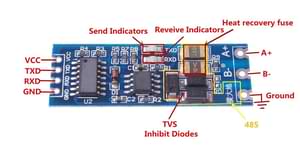
Section titled “Hardware Setup”Use an RS485-to-TTL adapter connected to a UART on your ESPHome device, or an integrated device like WaveShare’s ESP32-S3-RS485-CAN which has both the RS485-to-TTL and an ESP32-S3. See the UART component for wiring details.
GPIOXX (TX) → DI (adapter data-in)GPIOXX (RX) → RO (adapter data-out)GPIOXX → DE + RE tied (half-duplex direction control)DC Supply → VCC (match adapter supply voltage)GND → GNDA / B → RS485 bus terminalsFor half-duplex adapters with a DE/RE pin, set flow_control_pin on the
uart: component (not on rs485_frame:). On ESP32 this activates the
UART peripheral’s built-in RS485 half-duplex mode; see
Direction control by platform.
uart: flow_control_pin: GPIOXX # DE/RE direction pinIf you receive no data, try swapping tx_pin/rx_pin or the A/B bus wires.
Some adapters label DI/RO from the adapter’s perspective, which is the reverse
of the device’s.
Configuring for a Specific Device
Section titled “Configuring for a Specific Device”Configure the bus explicitly: set the uart: parameters your device uses, declare the
framing.escape scheme, choose the crc: algorithm, set tx.gate.frame_type to the bus
keep-alive / poll frame, and (only if you want the value: button shorthand) add a
command_format:. To find those values:
- Ready-to-flash configs for Hayward AquaLogic (and a starting point for contributing new ones) live in the rs485_frame-examples repository.
- Passive sniffing — enable
sniffer_only: true(see Getting started with an unknown bus) to capture frame types before committing to TX. - Product and installer manuals often list baud rate and frame format.
- Open-source reverse-engineering projects for your controller family may have already cataloged frame types, escape schemes, and CRC variants — a search turns up community work for many pool, HVAC, and lighting controllers.
Configuration Variables
Section titled “Configuration Variables”-
id (Optional, ID): Manually specify the ID of the hub.
-
sniffer_only (Optional, boolean): Disable all TX including buttons. Defaults to
false. -
dump_frames (Optional, boolean): Log every validated RX frame and every TX frame, as the full wire bytes (framing and CRC included), at DEBUG level. Defaults to
false. -
max_frame_length (Optional, integer, 2–1024): Discard frames longer than this many bytes, counting the frame type and payload before byte-stuffing, without the CRC. Defaults to
128. -
frame_timeout (Optional, Time): Reset receive state if a partial frame sits on the bus longer than this. Prevents a noise burst or mid-frame cable pull from permanently stalling reception. At most
10s. Defaults to50ms. -
framing (Required): DLE-framing configuration. The
escape:sub-block must be set explicitly; the delimiter bytes default to the de-facto standard but can be overridden.dle/stx/etxmust be three distinct byte values, and inescape_bytemode the escapebytemust differ fromstxandetx; an ambiguous set is rejected at config time.-
dle (Optional, hex byte): Frame delimiter byte. Defaults to
0x10. -
stx (Optional, hex byte): Start-of-frame byte. Defaults to
0x02. -
etx (Optional, hex byte): End-of-frame byte. Defaults to
0x03. -
escape (Required): How a literal DLE inside the payload (and CRC) is byte-stuffed on the wire. There is no default: the wrong scheme silently corrupts any frame that contains a DLE, and which one a bus uses cannot be inferred, so you must declare it.
- mode (Required, string):
escape_byte— a literal DLE is sent as DLE followed by a marker byte (the scheme Hayward uses); ordouble— a literal DLE is sent as two DLE bytes (the more common DLE-doubling convention). - byte (Required with
mode: escape_byte, hex byte): The marker byte emitted after a DLE to mark it as literal data, e.g.0x00. Must be omitted whenmode: double.
- mode (Required, string):
-
-
crc (Required): CRC algorithm configuration. There is no cross-bus default, so this block (and its
type) must be set explicitly.- type (Required, string):
none,sum8,sum16_big_endian,sum16_little_endian,xor8, orcrc16_modbus. Usenoneto accept any structurally valid frame (e.g. while sniffing an unknown bus). - rx_accept (Optional, list): CRC variants accepted on RX —
header_inclusive,payload_only, or both. Defaults to both. - tx_variant (Optional, string): CRC variant used when building outbound frames. Defaults to
header_inclusive.
header_inclusiveincludes DLE+STX in the CRC sum (e.g. Hayward wireless).payload_onlycomputes the CRC over the unescaped payload only (e.g. Hayward wired remotes). - type (Required, string):
-
command_format (Optional): How
value:button entries are serialised into the frame payload. Used by thevalue:form of rs485_frame buttons. Left unset by default. Withoutcommand_format:, thevalue:button form is rejected at config time — use raw frame transmission (frame_type:+payload:on the button, or thers485_frame.send_frameaction) instead, or addcommand_format:to opt into the encoder.- value_element_bytes (Required, integer): Number of bytes written per value element:
1,2,3, or4. Each value must fit in that many bytes, or the config is rejected; elements are written back-to-back between the preamble and postamble. - preamble (Optional, list of hex bytes): Bytes written to the payload before the
value field(s). Up to 8 bytes. Defaults to
[](none). - endian (Optional, string): Byte order of each value element:
big(most-significant byte first) orlittle. Defaults tobig. - postamble (Optional, list of hex bytes): Bytes written after the value field(s).
Up to 8 bytes. Defaults to
[](none).
A representative format. Per-device sets are in the rs485_frame-examples repository.
# Hayward AquaLogic wireless remote — preamble + postamblecommand_format:preamble: [0x00, 0x83, 0x01] # frame sub-type + channel bytevalue_element_bytes: 4postamble: [0x00] # trailing padHayward wired unit-address customisation: Hayward AquaLogic distinguishes wired keypads by the second byte of the frame type (
0x02= main panel,0x03= registered wired remote,0x04= unit 3, etc.). Choose which unit to impersonate via the secondcommand_format.preamblebyte:command_format:preamble: [0x00, 0x04] # impersonate unit 3value_element_bytes: 4NOTE
value:accepts a single value or a list of up to 8, each serialized back-to-back with the samecommand_format. This is shorthand for protocols whose frame carries more than one value in a single payload, without repeating the preamble/postamble per value. See the rs485_frame-examples repository for worked examples.What we have observed on a live Hayward AquaLogic / ProLogic bus:
0x02— full command set accepted. Impersonates the main panel; may collide with physical panel keypresses during simultaneous use.0x03— full command set accepted, no main-panel collision. Use this when your AquaLogic system has a wired remote registered.0x04— partial: only menu / navigation buttons accepted. AUX toggles, Lights, and Filter are silently ignored.
- value_element_bytes (Required, integer): Number of bytes written per value element:
-
on_frame (Optional, Automation): Automation(s) that fire when a matching frame is received. Multiple entries may be listed; each fires independently based on its
frame_typefilter. The automation receives the payload aspayload(std::span<const uint8_t>). It points into the receive buffer, which the next frame overwrites. The actions must be synchronous;delay:and other waiting actions are rejected at config time. Use[]to match every frame.-
frame_type (Required, list of hex bytes or list of byte-lists): Frame-type prefix(es) to match against the start of each received payload. Two forms are accepted:
# Single prefix — the most common case.frame_type: [0x01, 0x03]# List of prefixes — one lambda fires for any of the listed frame types. Useful# when several frame types share the same decode (e.g. two display-screen frame# types with identical payload layouts). Up to 4 alternates per entry.frame_type:- [0x01, 0x03]- [0x01, 0x09]Use
[](the single-prefix form) to match every frame. An individual alternate inside the list-of-prefixes form may not itself be empty —[[0x01, 0x03], []]is rejected at config time rather than silently making the whole trigger match every frame. Each prefix is conventionally one or two bytes; up to eight bytes per prefix are accepted (enforced at config time). See the lambda best-practices section above.
-
-
tx (Optional): TX and command-queue configuration.
-
queue_policy (Optional, string):
replace_latest(new command overwrites pending) orfifo. Defaults toreplace_latest. -
max_queue_size (Optional, integer, 1–32): Maximum commands in queue. Must be
1forreplace_latest. Defaults to1. -
gate (Optional): TX gate — controls when queued commands are transmitted.
- mode (Optional, string):
frame_trigger(default),idle_gap, orfixed_delay. - frame_type (Optional, list of hex bytes): Gate frame for
frame_triggermode — the bus keep-alive / poll frame the hub transmits after. Has no default; it is required and must be non-empty whenmodeisframe_triggerandsniffer_onlyis false (a configuration that would never fire is rejected at config time). Not used byidle_gap/fixed_delay. - delay (Optional, Time): Additional delay
after the gate opens, in every mode. At most
10s. Defaults to0ms. - min_silence (Optional, Time): Bus silence
required for
idle_gapmode. At most10s. Defaults to4ms. - interval (Optional, Time): TX interval for
fixed_delaymode. At most10s. Defaults to100ms.
- mode (Optional, string):
-
Payload Layout
Section titled “Payload Layout”All on_frame: handlers receive the same payload bytes:
Bytes 0..N-1 frame_type prefix bytes (N = length of the configured frame_type)Bytes N+ frame data CRC bytes are stripped during validationFor most protocols N is 2, but the schema accepts up to 8. Always guard
against short payloads in lambdas before indexing past the prefix:
lambda: |- if (payload.size() < 5) return; // payload[2..] is frame data for a 2-byte frame_typeOffset Convention: Payload-Relative
Section titled “Offset Convention: Payload-Relative”rs485_frame uses payload-relative byte offsets: payload[0] is the
first byte of the frame_type prefix. For the typical 2-byte frame_type, the
first data byte is at payload[2]. This matches what the lambda actually
receives at the C++ level — the payload span has already had the DLE+STX
preamble stripped, escapes unwrapped, and CRC removed, but the frame_type
bytes are still at the start.
Community references often use a different convention. Some strip the
frame_type before counting, so what they call “byte 0” of the frame is our
payload[2]. When porting offsets from external research, add the
frame_type length (usually 2) to translate. Per-source translation notes and
examples for common open-source projects are in
rs485_frame-examples CONTRIBUTING.md.
Getting Started with an Unknown Bus
Section titled “Getting Started with an Unknown Bus”Use this workflow when you don’t yet have known-good settings for your controller.
Step 1: Gather Existing Research
Section titled “Step 1: Gather Existing Research”Search for prior work before touching hardware. The HA community forums and GitHub often have threads with baud rates, framing details, and frame-type catalogs for specific controllers.
Step 2: Flash a Passive Sniffer
Section titled “Step 2: Flash a Passive Sniffer”Create a YAML with sniffer_only: true and dump_frames: true. Set
crc: {type: none} so every framing-valid frame is logged regardless of CRC.
sniffer_only hubs need no tx.gate.frame_type.
framing.escape is still required: pick mode: double (DLE doubling, the more common
convention) or mode: escape_byte with the marker byte your bus uses. On a bus you have not
yet characterized, start with double. In double mode a DLE followed by any byte other than
DLE, STX or ETX drops the frame, so if expected frames go missing, the bus may use
escape_byte. Compare with a raw UART capture (the uart: debug: option) to see which byte
follows each 0x10.
rs485_frame: id: bus uart_id: bus_uart sniffer_only: true dump_frames: true framing: escape: mode: double crc: type: noneStep 3: Catalog Frame Types from Logs
Section titled “Step 3: Catalog Frame Types from Logs”With dump_frames: true and logger at DEBUG level, each validated frame is logged as the full
wire bytes — framing (DLE/STX/ETX) and CRC included, same as the TX log lines:
[D][rs485_frame:xxx]: RX 10020101ff1003[D][rs485_frame:xxx]: RX 10020102010000080000080000ff1003[D][rs485_frame:xxx]: RX 100201030103500050006f6f6c2054...ff1003With the default dle/stx bytes, each frame starts 1002; the two-byte frame type follows
right after. Frames longer than 32 wire bytes are split over several RX lines, and only the
first starts with 1002. Join the lines until the closing 1003, which can itself be split
across two lines, before reading the next frame type. Collect these over a few minutes and
note cadence. Press physical buttons and watch for new frame types.
Step 4: Confirm the CRC
Section titled “Step 4: Confirm the CRC”Once you have captured payloads, test CRC candidates. Set crc.type and temporarily set
rx_accept to only one variant, then check that frames still appear in the dump_frames
log; frames that fail the CRC check are not logged.
Step 5: Configure Decoders
Section titled “Step 5: Configure Decoders”Replace the sniffer config with on_frame: handlers that decode each frame type
of interest, plus template sensors that receive the decoded values via
id(...).publish_state(...). See the Basic usage example.
Why Buttons, Not Switches
Section titled “Why Buttons, Not Switches”Each rs485_frame button sends a single frame event onto the bus. What the bus device
does with it — and whether the device state changes — depends on the device. The ESP has
no way to know the outcome from the send alone; the ground truth is in whatever response
frame the bus emits afterward. Read that state with on_frame: handlers and expose it
through platform: template binary sensors; do not infer it from the fact that a command
was sent.
On Hayward AquaLogic this maps directly to pressing a physical panel key: the controller decides whether to change state, and the LED status frame that follows is the authoritative answer.
See Also
Section titled “See Also”- rs485_frame-examples — ready-to-use configurations for Hayward AquaLogic and other DLE-framed RS485 controllers.
- rs485_frame button
- UART