

Delta AC Wallbox
The delta_wallbox component connects to a Delta AC wallbox over Bluetooth Low Energy. It reports the charger’s
model, serial number, firmware versions, state, power, energy and charging time, and can start and stop a charging
session.
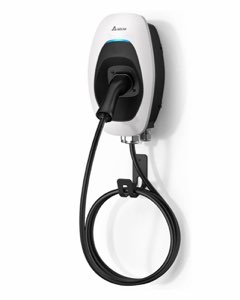
The Delta AC MAX (Basic) wallbox is supported. You need the password and the pairing pin, both shown in the Delta
app when the charger is first set up.
The component needs a BLE Client and runs on the ESP32 only.
Finding the Wallbox
Section titled “Finding the Wallbox”To find the charger’s MAC address, add the following to your configuration and look in the log for a device whose
name starts with JV:
logger:  level: DEBUG
esp32_ble_tracker:
Configuration
Section titled “Configuration”The charger pairs with a passkey, so the esp32_ble component needs keyboard input and bonding enabled, as in the
example.
# Example configuration entryesp32_ble:  io_capability: keyboard_only  auth_req_mode: sc_mitm_bond
ble_client:  - id: delta_ble_client    mac_address: "xx:xx:xx:xx:xx:xx"
delta_wallbox:  ble_client_id: delta_ble_client  password: !secret wallbox_password  pin: !secret wallbox_pin
Configuration Variables
Section titled “Configuration Variables”- password (Required, string): The password from the Delta app.
- pin (Optional, int): The six-digit pairing PIN from the Delta app, needed when the charger asks for a passkey while pairing.
- user (Optional, string): The user name to log in with. Defaults to
admin. - time_id (Optional, ID): A time source. When set, the charger’s clock is synchronized at every connection so that its own logs carry the right time.
- update_interval (Optional, Time): How often to read the charger.
Defaults to
15s. - ble_client_id (Required, ID): The BLE client the charger is reached through.
- id (Optional, ID): Manually specify the ID used for code generation.
Sensor
Section titled “Sensor”sensor: - platform: delta_wallbox charger_state: name: "Charger State" max_current: name: "Max Current" power: name: "Charging Power" energy: name: "Session Energy" charging_time: name: "Charging Time"- delta_wallbox_id (Optional, ID): The
delta_wallboxhub. Only needed with more than one. - charger_state (Optional, Sensor): The state byte the charger reports, as sent by the charger; the values are not decoded. All options from Sensor.
- max_current (Optional, Sensor): The configured charging current limit in amperes. All options from Sensor.
- power (Optional, Sensor): The charging power in kilowatts. All options from Sensor.
- energy (Optional, Sensor): The energy of the current session in kilowatt hours. All options from Sensor.
- charging_time (Optional, Sensor): The length of the current session in minutes. All options from Sensor.
Text Sensor
Section titled “Text Sensor”text_sensor: - platform: delta_wallbox model_name: name: "Charger Model" serial_number: name: "Charger Serial Number" fw_version: name: "Charger Firmware" bt_fw_version: name: "Charger Bluetooth Firmware" error_code: name: "Charger Error Code"- delta_wallbox_id (Optional, ID): The
delta_wallboxhub. Only needed with more than one. - model_name, serial_number, fw_version, bt_fw_version, error_code (Optional, Text Sensor): The charger’s model, serial number, firmware version, Bluetooth firmware version and current error code. All options from Text Sensor.
Button
Section titled “Button”button: - platform: delta_wallbox start_charging: name: "Start Charging" stop_charging: name: "Stop Charging"- delta_wallbox_id (Optional, ID): The
delta_wallboxhub. Only needed with more than one. - start_charging (Optional, Button): Starts a charging session. All options from Button.
- stop_charging (Optional, Button): Stops the charging session. All options from Button.