

ST7305 Reflective LCD Display
The st7305 display platform drives reflective monochrome LCD panels based on the Sitronix
ST7305 and ST7306 controllers over a 4-wire SPI bus. These panels are 1 bit
per pixel, have no backlight and retain their image. The built-in WAVESHARE-400X300 model
describes the 4.2” panel on the Waveshare ESP32-S3-RLCD-4.2 (400x300 in landscape). Other
panels can be described with the CUSTOM model.
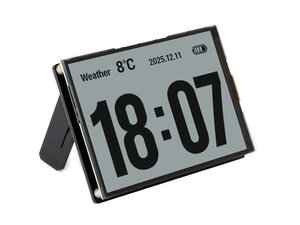
The controller RAM is addressed in 12-pixel by 2-pixel blocks. A landscape panel packs 2x4 pixels into each byte, while a portrait panel packs 4x2 pixels. The selected model’s orientation sets the packing and the address window alignment.
Waveshare ESP32-S3-RLCD-4.2
Section titled “Waveshare ESP32-S3-RLCD-4.2”The WAVESHARE-400X300 model also sets the board’s fixed pins: CS on GPIO40, DC on GPIO5 and
reset on GPIO41. Connect the SPI bus to the board’s display connector and use the model.
spi:  clk_pin: GPIO11  mosi_pin: GPIO12
display:  - platform: st7305    model: WAVESHARE-400X300    lambda: |-      it.fill(Color::WHITE);      it.print(10, 10, id(my_font), Color::BLACK, "Hello");
Custom Panels
Section titled “Custom Panels”Use the CUSTOM model and supply the panel dimensions, packing orientation (portrait), address
window and init sequence.
display: - platform: st7305 model: CUSTOM width: 168 height: 384 portrait: true column_start: 0x17 cs_pin: GPIOXX dc_pin: GPIOXX reset_pin: GPIOXX init_sequence: - [0x11] - delay 200ms - [0x29] lambda: |- it.print(0, 0, id(my_font), Color::BLACK, "Hello");Each init_sequence entry is a [command, data...] list. Use delay <time> between entries
where the controller needs time to settle. Supply every register write the panel requires; the
driver programs the address window for each refresh from the window options.
The panel’s inner dimension must be a multiple of 12 so that the framebuffer’s inner stride
matches whole 12-pixel controller addresses: the height for landscape panels, the width for
portrait panels. Landscape panels also require an even width, and portrait panels an even height.
The address window must be large enough for the framebuffer: the number of addressed columns,
rows and three bytes per address must cover width * height / 8 bytes.
Configuration Variables
Section titled “Configuration Variables”- model (Optional, string): The panel model. One of
WAVESHARE-400X300(default) orCUSTOM. - cs_pin (Optional, Pin Schema): The chip
select pin. Required for
CUSTOM; theWAVESHARE-400X300model supplies GPIO40. - dc_pin (Optional, Pin Schema): The data/command
pin. Required for
CUSTOM; theWAVESHARE-400X300model supplies GPIO5. - reset_pin (Optional, Pin Schema): The reset pin.
The
WAVESHARE-400X300model supplies GPIO41. If no pin is configured, the driver uses a software reset. - data_rate (Optional, frequency): The SPI clock rate. Defaults to
10MHz. - spi_id (Optional, ID): Manually specify the ID of the SPI Component if there are multiple SPI buses.
- width (Optional, int): The display width in pixels. Required for
CUSTOM. - height (Optional, int): The display height in pixels. Required for
CUSTOM. - portrait (Optional, boolean): Set to
truefor a panel that packs 4x2 pixels per byte (portrait native orientation). Set tofalsefor the 2x4 landscape layout. Required forCUSTOM; theWAVESHARE-400X300model sets it tofalse. - column_start (Optional, int): The CASET start address. Defaults to the model value, or
0forCUSTOM. - column_end (Optional, int): The CASET end address. Defaults to the model value, or to a
value derived from the display dimensions for
CUSTOM. - row_start (Optional, int): The RASET start address. Defaults to the model value, or
0forCUSTOM. - row_end (Optional, int): The RASET end address. Defaults to the model value, or to a value
derived from the display dimensions for
CUSTOM. - init_sequence (Optional, list): The controller initialisation sequence. Required for
CUSTOM; may override a model’s sequence. - id (Optional, ID): Manually specify the ID used for code generation.
- update_interval (Optional, Time): The interval to
re-draw the screen. Defaults to
1s. - lambda (Optional, lambda): The lambda to use for rendering the content on the display.
- pages (Optional, list): Show pages instead of a single lambda. See Display Pages.
- auto_clear_enabled (Optional, boolean): Whether the display should be cleared before each
update. Defaults to
trueif a lambda or pages are configured. - show_test_card (Optional, boolean): Show a test card. Defaults to
false. - rotation (Optional, integer): Rotate the rendered content. One of
0(default),90,180or270.
Partial Updates
Section titled “Partial Updates”The driver tracks the area that changed and writes only the matching address window. Drawing a
pixel with the value it already has produces no SPI traffic. To keep updates small, set
auto_clear_enabled: false and draw only the parts that change. With the default auto_clear
behaviour the screen is cleared and redrawn each update, but the write is still limited to the
area the content occupies.