

HT16K33 Character Display
The ht16k33_char display platform drives character displays built around the Holtek HT16K33 LED driver over
I²C. The chip can drive any array of LEDs, but this platform only knows displays whose segments
are wired as characters.
The platform is based on the ht16k33_alpha external component by ssieb, generalized so other boards can be added.
Supported Displays
Section titled “Supported Displays”| Display | device |
|---|---|
| Adafruit 0.56” 4-Digit 7-Segment | ADAFRUIT_7_SEG_.56IN |
The only thing that differs between boards is how the LEDs are wired to the driver, so another board wired like a
supported one works with that device setting.
# Example configuration entrydisplay: - platform: ht16k33_char device: ADAFRUIT_7_SEG_.56IN address: 0x70 lambda: |- it.print("12:34");Configuration Variables
Section titled “Configuration Variables”- device (Required, string): The display board, one of the values in Supported Displays.
- address (Optional, int): The I²C address of the display. With several displays, the address of the first
one. Defaults to
0x70. - secondary_displays (Optional, list): Further displays on the same bus that continue the message after the first one, in the order they are placed. Each entry takes an address (Required, int). Up to seven.
- intensity (Optional, int): The brightness of the displays, from 0 (dimmest) to 15 (brightest). Defaults
to
15. - max_buffer_length (Optional, int): The longest message, in bytes, that the lambda can print. Must hold every
character of the message, including the decimal points and colons, and a multi-byte character such as
°takes two bytes. From 4 to 64. Defaults to8. - add_characters (Optional, mapping): Characters to add to the font, or to redraw differently. See Adding or Changing Characters.
- lambda (Optional, lambda): The lambda to use for rendering the content on the display. See Rendering Lambda for more information.
- update_interval (Optional, Time): The interval to re-draw the screen.
Defaults to
10s. - id (Optional, ID): Manually specify the ID used for code generation.
- i2c_id (Optional, ID): The ID of the I²C Component, only needed with more than one bus.
Rendering Lambda
Section titled “Rendering Lambda”The lambda is passed a variable called it, the ht16k33_char display itself. It prints into a message buffer
that is drawn to the displays after the lambda returns. Text is placed by byte position, where 0 is the first
digit of the first display; a ., a : and each byte of a multi-byte character count as one position, so the
position is not the digit number. The buffer starts out empty on every update.
it.print(pos, str): Writesstrinto the buffer atpos, over whatever was there. Returns the number of bytes written, which is less than the length ofstrwhen the buffer is full.it.print(str): Writesstrat the start of the buffer.it.printf(pos, format, ...)andit.printf(format, ...): Format likeprintfand write the result.it.strftime(pos, format, time)andit.strftime(format, time): Format theESPTimewithstrftimeand write the result.it.clock_display(pos, show_leading_zero, use_ampm, time): Writes the time asHH:MM, orH:MMwith a blank first digit whenshow_leading_zeroisfalse, in 12-hour form whenuse_ampmistrue.it.clear(): Empties the buffer. The lambda never needs it, since the buffer is emptied before every update. It is for printing from automations withid(my_display).print(...)on a display without a lambda: what they print stays until the next update draws it, so clear first when the new message is shorter than the old one.
Other things the lambda can do:
it.set_intensity(value): Sets the brightness from 0 to 15.it.set_blink(rate): Makes the chip blink the displays on its own:0steady,1twice a second,2once a second,3once every two seconds.it.display_off(turn_off): Turns the displays off withtrueand back on withfalse. Turning them on again also stops blinking.it.display_standby(standby): Stops the chip’s oscillator withtrue, its lowest power state, and starts it again withfalse.it.blank(): Clears the display memory of every chip. The message buffer is untouched, so the next update draws it again.
A character that is not in the font shows as a blank digit. The decimal point and the colon do not take a digit of
their own: a . lights the decimal point of the digit before it, and a : lights the colon, which on this board
sits between the second and third digit. Where they cannot light, such as a . before the first digit, they are
skipped.
# A clock with a temperature on a second displaydisplay: - platform: ht16k33_char device: ADAFRUIT_7_SEG_.56IN secondary_displays: - address: 0x71 max_buffer_length: 16 add_characters: "°": 0x63 update_interval: 1s lambda: |- it.clock_display(0, false, false, id(my_time).now()); it.printf(5, "%4.1f°", id(outdoor).state);Please see Formatted Text for a quick introduction into the printf
formatting rules and Displaying Time for the strftime time formatting.
The 7-segment font has the digits 0 to 9, a space, -, _ and the letters that read well on seven segments:
A, b, C, c, d, E, F, G, H, h, I, J, L, N, O, o, P, r, S, t, U, u and
Y.
Adding or Changing Characters
Section titled “Adding or Changing Characters”add_characters maps a single character to the segments that draw it. A character already in the font is drawn the
new way, and mapping it to 0 blanks it; any other character, including multi-byte ones such as °, is added.
. and : always light the decimal point and colon and cannot be redefined. Each segment is one bit of the value,
with bit 0 the least significant:
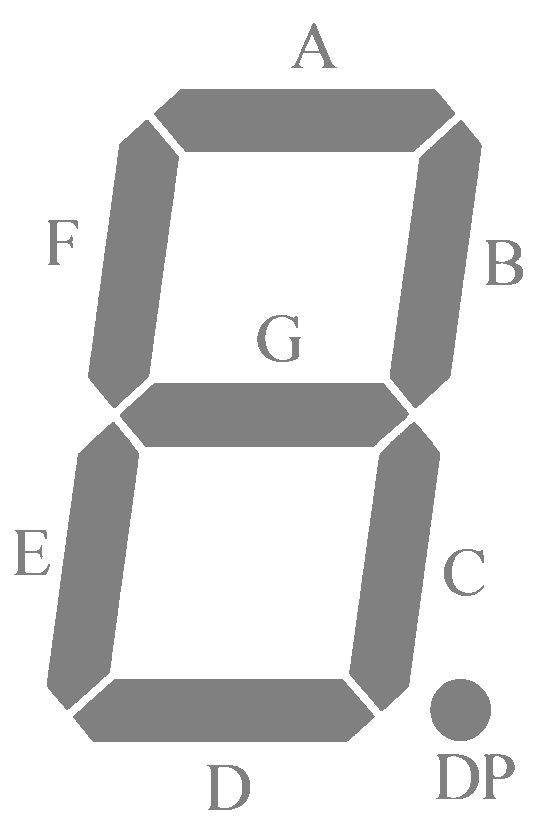
| Bit | 0 | 1 | 2 | 3 | 4 | 5 | 6 | 7 |
|---|---|---|---|---|---|---|---|---|
| Segment | A | B | C | D | E | F | G | decimal point |
add_characters: "°": 0x63 "E": 0b1010000 # draw E as r "Y": 0 # never draw Y