

Packet Interface Component
A packet interface sends and receives packets of bytes over a communication channel, such as a serial port or a UDP network connection. It does not know what the bytes mean. Other components use a packet interface to carry their own data, without needing to know how the channel works.
Each channel type is a platform of this component. The platforms currently available are:
- UART: packets are sent over a serial port, with a simple framing scheme that marks where each packet starts and ends.
- UDP: each packet is sent as one UDP datagram, using the settings of the UDP component.
- TCP: packets are sent over a TCP connection between two devices, which also provides reliable delivery and tells the layers above when the other device can be reached.
- ESP-NOW: each packet is sent as one ESP-NOW packet, to one device or to every device on the channel.
- SX126x and SX127x: each packet is sent as one LoRa or FSK radio packet, using an SX126x or SX127x radio.
The Entity Transport component uses a packet interface to send sensor and binary sensor states between devices. The Packet Transport component can also use any packet interface as its channel, through the packet_interface transport platform.
Example Configuration
Section titled “Example Configuration”# Example configuration entryuart: tx_pin: GPIOXX rx_pin: GPIOXX baud_rate: 115200
packet_interface: - platform: uart id: serial_linkConfiguration Variables
Section titled “Configuration Variables”These options are common to all platforms:
-
platform (Required, string): The type of channel to use, for example
uartorudp. -
id (Optional, ID): Manually specify the ID used for code generation. Use this to refer to the interface from another component.
-
max_packet_size (Optional, int): The largest packet, in bytes, that a user of this interface may send. The range and default depend on the platform.
-
addressing (Optional): Adds an addressing layer to the interface.
-
encryption (Optional): Adds an encryption layer to the interface.
-
reliability (Optional): Adds a reliability layer to the interface.
-
fragmentation (Optional): Adds a fragmentation layer to the interface.
-
compression (Optional): Adds a compression layer to the interface.
-
session (Optional): Adds a session layer to the interface.
When more than one of these is configured, they are always stacked in the same order, whatever order they are written in: addressing is next to the channel, then encryption, reliability, fragmentation, compression and session. Each layer works with the same layer on the other device, so both devices must configure the same layers. If a layer cannot make sense of 10 packets in a row, it logs a warning that the layers may not match.
Each layer adds its own bytes to every packet, so a small max_packet_size can leave a layer no room. Such a
configuration is rejected when it is validated.
Some platforms do the job of a layer themselves, and then that layer cannot be configured on them. For example, a TCP connection already joins two devices and resends lost data. The page for each platform says which layers it provides.
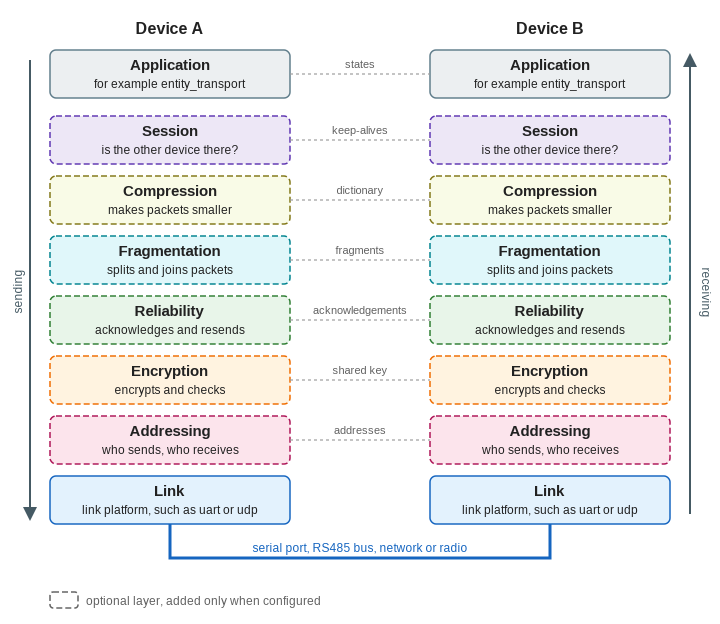
See the page for each platform for the options it adds.
Addressing
Section titled “Addressing”An addressing layer lets several devices share one channel, such as an RS485 bus with more than two devices. Each device has its own address, and each packet carries the address of the device it is for and of the device that sent it. A device drops packets that are not for it, before decrypting them, and also drops its own packets if the channel echoes them back.
packet_interface: - platform: uart id: bus addressing: address: 0x0001 destination: 0x0002-
type (Optional, string): The addressing method. Only
basicis available, which uses 16-bit addresses. Defaults tobasic. -
address (Required, int): The address of this device, from
0x0001to0xFFFE. Each device on the channel must have a different address. -
destination (Optional, int): The address of the device to send to, or
broadcastto send to every device on the channel. It must not be this device’s ownaddress. Defaults tobroadcast. Cannot be used withpeers. -
peers (Optional, list): Talk to several devices on the channel, each with its own layers. See Several Devices on One Channel. Each entry has:
- id (Required, ID): The ID that components such as entity transport use to send to and receive from this device.
- destination (Required, int): The address of the device, or
broadcast. Each entry must have a different destination, and none can be this device’s ownaddress. - encryption, reliability, fragmentation, compression, session (Optional): The layers for this device, with the same options as when they are configured on the interface.
With a destination other than broadcast, the interface becomes a link between this device and that one: it sends
only to that device, and accepts packets only from it. The reliability and session
layers, and the rolling code of the encryption layer, work between two devices only, so they need a
destination other than broadcast.
With broadcast, every device on the channel receives every packet, from any device. This suits
entity transport, which tells devices apart by their names.
The addressing layer adds 4 bytes to each packet.
Several Devices on One Channel
Section titled “Several Devices on One Channel”With peers, one channel carries a separate link to each of several devices, each with its own layers, and
optionally a broadcast entry for everything else. A packet sent to this device by a device that has its own entry
goes to that entry. Broadcasts, and packets from devices without an entry, go to the broadcast entry; without one,
a broadcast from a device with its own entry goes to that entry, and packets from other devices are dropped.
packet_interface:  - platform: uart    id: rs485    addressing:      address: 0x0001      peers:        - id: pump_link          destination: 0x0002          encryption: !secret pump_key          reliability:          session:            binary_sensor:              name: Pump connected        - id: valve_link          destination: 0x0003          reliability:        - id: bus_link          destination: broadcast
entity_transport: - packet_interface: pump_link sensors: - tank_level - packet_interface: valve_link binary_sensors: - valve_open- With
peers, theencryption,reliability,fragmentation,compressionandsessionoptions go in each entry, not on the interface, and other components must use an entry’sid, not the interface’s. - Entries that use the rolling code each need their own encryption key. With a shared key, a packet recorded from one device and sent again with another device’s address would be accepted as coming from that device.
- When two devices on a half-duplex bus such as RS485 send at the same moment, their packets collide and are lost. The reliability layer sends them again, after a timeout with a small random variation so that the two devices do not collide again.
- Each device with a reliability layer needs its own memory for packets waiting to be acknowledged: about 2 KB with
the default packet size. Reduce
max_packet_sizeon devices with little memory. - Every reliable device adds acknowledgements, and with a session layer keep-alive packets, to the channel. On a slow
channel, send states that every device needs once, through a
broadcastentry, rather than to each device.
Encryption
Section titled “Encryption”An encryption layer encrypts each packet with a key shared by both devices, so that other devices on the channel
cannot read it. It also checks each packet it receives, and drops a packet that was changed or sent with another
key. With the rolling code enabled, it also drops a packet that was sent before (a replay). Both devices must use the
same key, the same encryption type and the same rolling_code_enable setting.
packet_interface: - platform: uart id: serial_link encryption: key: !secret serial_link_key rolling_code_enable: true session:The key can also be given on its own:
encryption: !secret serial_link_key- type (Optional, string): The encryption method. Only
xxteais available, which uses the XXTEA cipher with a 256-bit key. Defaults toxxtea. - key (Required, string): The shared key. Any text can be used; a long random text is best.
- rolling_code_enable (Optional, boolean): Add a rolling code to each packet, so that a recorded packet sent
again is dropped. Each boot writes to flash once. Needs a session layer on the same packet interface.
Defaults to
false.
The encryption layer adds 4 to 8 bytes to each packet, or 16 to 19 with the rolling code. The largest packet that can
be sent through it is smaller than max_packet_size by 4 to 7 bytes, or 16 to 19 with the rolling code.
The check that drops changed packets uses 3 fixed bytes, so a device that sends millions of random packets could get one accepted. Without the rolling code, the same packet is always encrypted to the same bytes, so another device can tell when a packet is repeated, though not what it holds. Use the rolling code where this matters.
Without the rolling code, anyone who records a packet can send it again later, and it will be accepted.
With the rolling code, each device saves a boot number in flash and increases it at every boot, and counts the packets it sends. Each packet also repeats the highest boot number heard from the other device. A device accepts a packet only if it repeats the device’s current boot number, and is newer than the last packet accepted from the other device. So a packet recorded earlier is never accepted, even after a restart. A device that only receives would never send its boot number, so the session layer’s keep-alives are needed to send it. This has two effects:
- After either device restarts, its first packets are dropped until the two devices have heard from each other. With
a reliability layer, they are sent again. Without one, the session layer may report the other
device connected only after its next
keep_alive. - If the other device’s flash is erased, or the
idof its packet interface changes (the boot number is saved under it), its packets are dropped until this device restarts. A warning is logged when this happens.
Reliability
Section titled “Reliability”A reliability layer makes sure that packets arrive in order, with none lost or repeated. Each packet is
acknowledged by the other device, and resent if no acknowledgement arrives in time. Both devices must use the same
reliability type.
The reliability layer works between two devices only, so the link it is on must join this device to just one other
device. On a channel with more than two devices, such as an RS485 bus, use an addressing layer with a
destination other than broadcast, or a peers entry for each device. Do not use it on a link that sends to every
device, such as a UDP broadcast address or a broadcast destination.
packet_interface: - platform: uart id: serial_link reliability: timeout: 200ms max_queue_length: 4- type (Optional, string): The reliability method. Only
hdlcis available, which uses the acknowledgement and resend method of the HDLC protocol. Defaults tohdlc. - timeout (Optional, Time): How long to wait for an acknowledgement before
resending. At least
50ms. Defaults to200ms; on a radio link, to what the radio’s settings need for the other device’s largest packet and an acknowledgement. - ack_delay (Optional, Time): How long to wait before acknowledging a
packet, so that one acknowledgement can cover several packets, or a reply can carry it. Useful on radio links,
which cannot receive while they send; about the time one packet takes to send is a good value. Must be shorter than
timeout. Defaults to0ms, which acknowledges at once. - max_queue_length (Optional, int): How many packets can be waiting for an acknowledgement. When the queue is
full, a new packet is refused, and the component sending it is told, so that it can try again; entity transport
does. Range is 1 to 7. Defaults to
4. - max_retries (Optional, int): How many times to resend without an acknowledgement before the packets waiting
are discarded and the connection is started again. A warning is logged when this happens. With a
session layer above, the other device is reported lost, then connected again. Range is 1 to 255.
Defaults to
5.
The reliability layer adds 3 bytes to each packet, so the largest packet that can be sent through it is 3 bytes
smaller than max_packet_size. Each device holds max_queue_length packets of max_packet_size bytes in memory;
if there is not enough memory, the layer is marked failed and nothing is sent.
Fragmentation
Section titled “Fragmentation”A fragmentation layer lets other components send packets larger than the channel allows, for example more than the
255 bytes of a LoRa radio packet. Each packet is split into fragments that fit, and joined again on the other
device. Both devices must use the same fragmentation type.
packet_interface: - platform: sx126x id: lora_link reliability: # A 1024-byte packet needs 5 fragments of 250 bytes max_queue_length: 5 fragmentation: max_packet_size: 1024- type (Optional, string): The fragmentation method. Only
basicis available. Defaults tobasic. - max_packet_size (Optional, int): The largest packet, in bytes, that can be sent or received through the
layer. Each device holds one packet of this size while joining it. Range is 16 to 16384. Defaults to
1024.
The fragmentation layer adds 2 bytes to each fragment. A packet that fits in one fragment is sent as it is, apart from those 2 bytes.
If any fragment of a packet is lost, the whole packet is dropped. With a reliability layer, lost
fragments are sent again, so packets arrive whole. The reliability layer must have room in its queue for every
fragment of the largest packet: a packet is not sent until there is room for all of its fragments. A configuration
whose largest packet needs more fragments than the queue holds is rejected; increase the reliability layer’s
max_queue_length, up to 7, or reduce max_packet_size. Without a reliability layer, a packet can have at most 128
fragments.
On a channel shared by several devices, use an addressing layer, so that fragments from different
devices are not mixed. When two devices send packets of several fragments to a broadcast entry at the same moment,
only the packet started last arrives; a separate entry for each device, with its own fragmentation layer, avoids this.
A dropped packet or fragment is logged only at the VERBOSE level, so without a reliability layer these losses are
not seen in the default log.
Compression
Section titled “Compression”A compression layer makes packets smaller before they are sent, so they take less time on the channel. It suits text, such as JSON. A packet larger than the channel allows can also be sent, if it compresses enough to fit. Each packet is compressed on its own, so a lost packet does not affect the others.
Short packets repeat little within themselves, so most of the saving comes from a dictionary: text that both devices hold, from which a packet can copy pieces. The best dictionary is a typical packet of the application. Both devices must have the same dictionary. Each packet carries a short check of the dictionary, so a packet from a device with a different one is usually dropped; about 1 in 128 pairs of dictionaries share a check, and then packets expand to the wrong data.
packet_interface: - platform: sx126x id: lora_link reliability: compression: # A typical packet; the values need not match those sent dictionary: '{"node":"garden","temperature":21.4,"humidity":48.2,"battery":87,"state":"ON"}' # Larger than a LoRa packet, so a packet this large is sent only if it compresses enough max_packet_size: 600- type (Optional, string): The compression method. Only
lzssis available. Defaults tolzss. - dictionary (Optional, string): Text of up to 512 bytes that packets can copy from. Defaults to a short list of
pieces common in JSON, such as
{"name":","state":"ON"andnull. Set it to""for no dictionary. - max_packet_size (Optional, int): The largest packet, in bytes, before compression. Range is 16 to 16384. Defaults to the largest packet the layers below take, less 1 byte. A packet larger than the layers below take is sent only if it compresses enough to fit; otherwise it is refused, with a warning in the log. When it is set, the layers below must take packets of at least 17 bytes, so that a packet that does not compress can still be sent.
The compression layer adds 1 byte to each packet. A packet that does not get smaller, such as one that is already compressed or encrypted, is sent as it is, apart from that byte. The layer sits above encryption, as encrypted data does not compress, and above fragmentation, so a whole packet is compressed before it is split.
On a LoRa link with a dictionary made from a typical packet, JSON packets of 70 to 400 bytes were sent at 20 to 40% of their size. With the default dictionary, the JSON tried shrank by about 40% overall, and less for short packets that are mostly numbers.
Each layer holds two packets of max_packet_size bytes and one packet of the layers below, and the device holds
1.5 kB, shared by every compression layer, used to find repeated text; if there is not enough memory, the layer is
marked failed and nothing is sent.
Session
Section titled “Session”A session layer tells whether the other device can be reached. Each device sends a short keep-alive packet at a
regular interval, and the other device is considered lost when nothing has been received from it for the timeout. A
restart of the other device is also noticed, even if it is quicker than the timeout. Both devices must use the same
session type.
Like the reliability layer, the session layer works between two devices only. When both are configured, the session layer is placed above the reliability layer, so a single lost keep-alive does not mark the other device as lost.
packet_interface: - platform: uart id: serial_link reliability: session: keep_alive: 10s binary_sensor: name: Serial link connected- type (Optional, string): The session method. Only
basicis available. Defaults tobasic. - keep_alive (Optional, Time): How often to send a keep-alive packet. From
1sto1h. Defaults to10s. - timeout (Optional, Time): How long without receiving anything before the
other device is considered lost. Must be longer than
keep_alive, and at most3h. Defaults to three timeskeep_alive. - binary_sensor (Optional): A binary sensor that is ON while the other device can be reached. All options from Binary Sensor.
The other device is checked at each keep_alive interval, so it is reported lost between timeout and timeout
plus keep_alive after the last packet arrived. A restart is reported as lost, then connected again. So is a reset
of a reliability layer below, which can lose packets: the session is reported lost, and connected
again when the other device is next heard, so that an application such as entity transport sends everything again.
The session layer adds 1 byte to each packet, so the largest packet that can be sent through it is 1 byte smaller than the layer below allows.
Example: A Binary Sensor from Another Device over UDP
Section titled “Example: A Binary Sensor from Another Device over UDP”In this example, a device named kitchen-display shows the state of a door sensor on a device named front-porch.
The two devices are connected over UDP, with reliability and session layers, and the kitchen display has a binary
sensor that shows whether the porch device can be reached.
Configuration of the device that receives the door state:
esphome:  name: kitchen-display
udp:  id: udp_link  # Reliability and session work between two devices only, so send to the  # other device's address rather than broadcasting  addresses: ["192.168.1.50"]
packet_interface:  - platform: udp    id: porch_link    udp_id: udp_link    reliability:    session:      binary_sensor:        name: Porch link connected
entity_transport:  - packet_interface: porch_link
binary_sensor:  - platform: entity_transport    provider: front-porch    remote_id: front_door    name: Front door
Configuration of the device that has the door sensor. It must configure the same layers:
esphome:  name: front-porch
udp:  id: udp_link  addresses: ["192.168.1.40"]
packet_interface:  - platform: udp    id: display_link    udp_id: udp_link    reliability:    session:
entity_transport:  - packet_interface: display_link    binary_sensors:      - front_door
binary_sensor: - platform: gpio id: front_door pin: GPIOXX- Each device’s
addressesis the IP address of the other device. provideris thenameof the device that sends the state, andremote_idis the ID of its binary sensor.- The
Porch link connectedsensor turns off when nothing has been heard from the porch device for 30 to 40 seconds: the defaulttimeoutof three timeskeep_alive, checked at eachkeep_alive. If the porch device restarts, it turns off and on again, and both devices send all their states again. - To encrypt the link, add the same
encryptionkey to bothpacket_interfaceentries.